Search
-
Re: Texturing in Blender 2.48 Quick Start
 Nice one, Chris. Ran across this while trying to find some info about some of the nodes in blender. Been messing about a bit with the node editor, just playing around to see what sort of viewport jazz I could cook up. Managed to get a decent rimlight similar to TF2's. 1. Base lighting 2. Rimlight 3. Rimlight after taking…
 -
Re: What Are You Working On? (3D) 2025

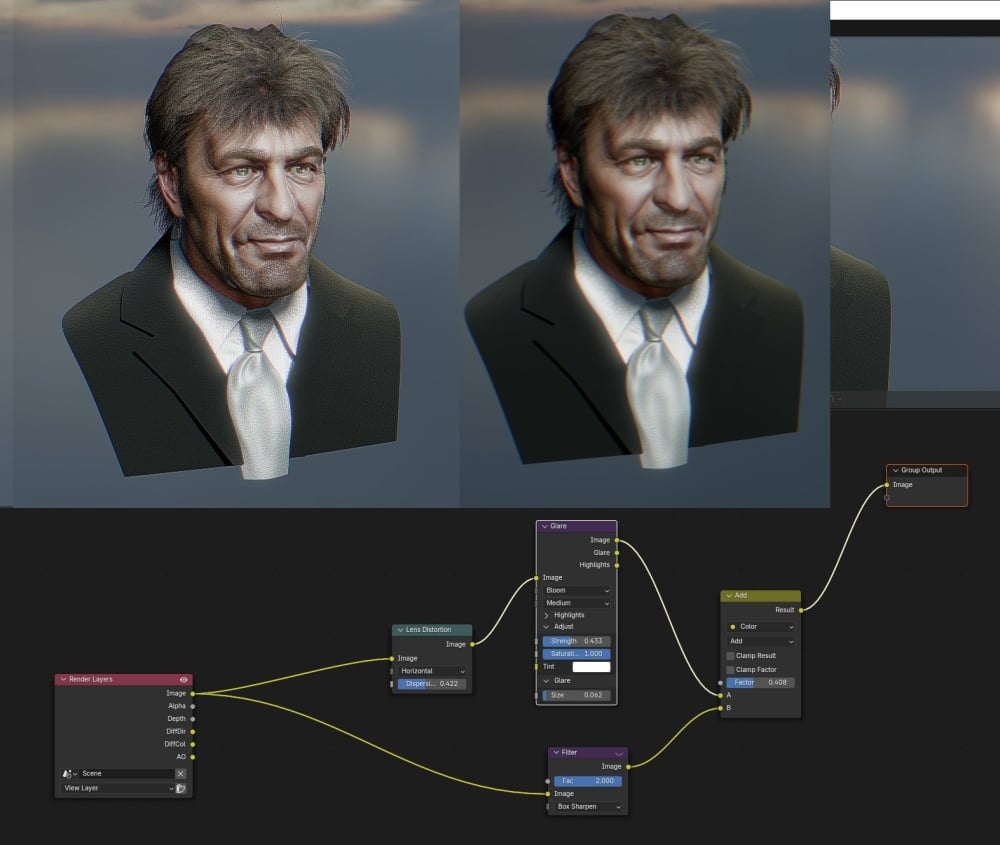 so i developed this setup for Blender real time compositor, makes a lot of difference to the viewport quality in both eevee and cycles. Its basically a sharpen setup, seems to bring out a lot more detail i tried it with mix, but add seems to work quite well, not quite as harsh. it's the filter node set to box sharpen…
 -
Re: omg! there is a cyborg in the vault!!
 heyho.. finished another model laying around and waiting for some attention. In the process of making the textures and final shots I also reworked my toon shader a lot. Switching from shaderFX-node-pushing to txt-editor scripting. Cleaning the code and tweaking the methods. Will release an update for the shader soon.…
 -
Re: Help making a MEL script
 Damn it, and I just wrote something out lol. Here it is anyway I guess proc exportToCryEngine() { string $prompt = `promptDialog -title "Cryengine Export" -message "Label your node:" -button "OK" -button "Cancel" -defaultButton "OK" -cancelButton "Cancel" -dismissString "Cancel"`; if ($prompt == "OK") { string $name =…
 -
Re: Houdini 16.5 Sneak Peak
 I think Houdini is good for modeling that doesn't require a very controlled topology. For that type of modeling, what hurts Houdini rather than help it is that every action creates a node. Just redirecting an edge or cleaning up topology ends up being a huge node tree..and while that technically isn't an issue, it feels…
 -
Re: Maya: Custom Time Warp using an extra animation curve
 So I found a improved solution. Still some manual tweaking but acceptable. This way the default time node is warped. So all your animations will be warped. What you do is create a new time node and use the "unwarpedTime" attribute from the"time1" node and connect that to the "outTime" attribute of the "time2" node. Then…
 -
Re: [Solved] Overlapping shapes in SD - Height details to normal issue
 Haha, I just saw Allegorithmic has tweeted this material. - Great work! how did you make the jelly beans not to get into each other? - Thanks Vinícius! Ive basically layered them up. Each layer is a tile sampler node and I tried to tile them in a way where none of the beans touch. I then blended each of the layers on top…
 -
Re: Uniformizing environment textures
 Not sure how much this applies to other engines, but when working in unreal i will adjust the brightness of my textures with a multiply node. Iv always thought that the biggest contributer to making textures sit together is just the brightness of them, as well as the saturation, Also looking at your level in unlit mode…
 -
Re: Animating a cloud mask for an emissive shader
 You probably need to write your own shader for this. If you're comfortable writing code, there are plenty of resources about the Unity shader syntax. However if you're like me and you prefer node-based visual editors, then take a look at Shader Forge. It's not free, but it's well worth the cost. I've been doing a ton of…
 -
Re: Dota 2 Art Guide - Baking a Gradient Mask
 Kodde, I tried it out and worked awesome. I got a few gradient mismatches but I think that might be to fucked up vertex normals though will confirm today. I havent taken a look at the code, but it didnt seem to prompt what texture size I wanted. Maybe something to implement later? Something I've been toying around with…
>37262 results