Search
-
Re: my artwork
 I don't want to hijack the thread, but is it always high to low poly? I've been trying to figure out the workflow myself, and I've heard both low to high and high to low. [edit] To be helpful, here's a link to the tutorial video I think Virtuosic is talking about:…
 -
Re: Ninrod sea lady

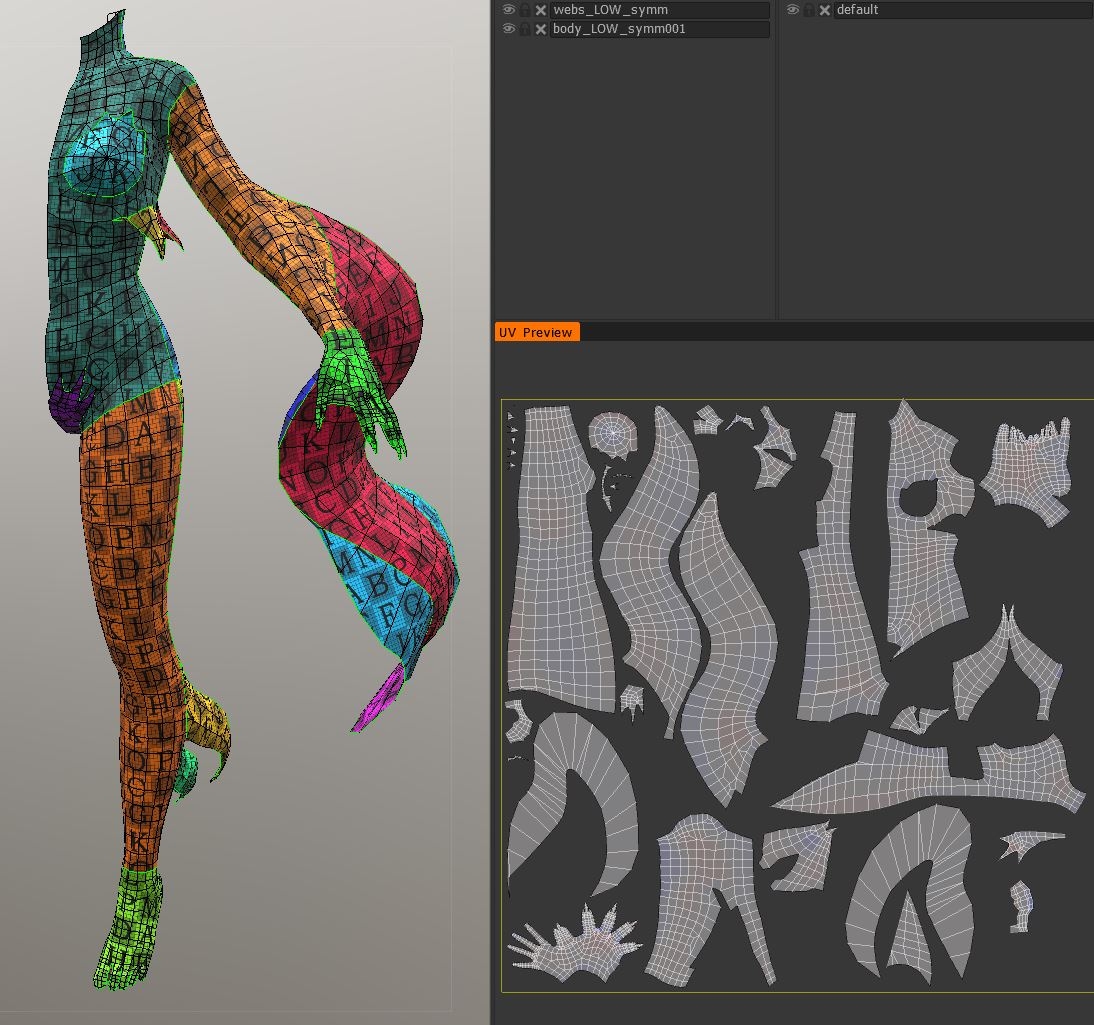 UPDATE UVs are done! A screenshot of the process in 3D-Coat: I finished them up in 3dsMax. Then I did a Normal Map bake with xNormal and fixes + detail defining in 3D-Coat again. This is the result so far in Marmoset Toolbag3: I am quite happy with how things are going; faster than I thought! Next step will be texturing.
 -
Re: 3ds Max Modifier - AdvArray
 @timbot - I dont know what i would pay, i dont use array`s that often, it`s just a feeling that is to much considering the free alternatives. Even the integrated 3dsmax one is doing the job for me. So yeah maybe someone with better marketing experience can give you a better answer. gl man :smile:
 -
Re: Blender for Game Art
 I've used Maya, 3DSmax, and Blender and find that for modeling I've gravitated heavily towards blender and its completely capable for 98% of game work. Vertex Normal editing has been in blender now for quite some time. So not sure what feature you're talking about that is still missing.…
 -
Re: 3ds max RTT ignores Edge-Padding.
 If you put more than one output (diffuse, normal, AO ect) it will mess up the edge padding. If you only put one in at a time it should calculate the padding correctly. This post goes into a little more detail and a few other "issues" you'll run into while baking in 3dsmax...…
 -
Re: Sketchbook: Sam Hatami

 At first I had planned a direct entrance to this part, form the corridor seen in the first post, but I felt that I want to restrict the project a bit more and force myself to keep things a bit less....to big. This resulted in blocking out a living area just behind the cockpit. With a kitchen and bed section. Everything…
 -
Re: xNormal: disaster strikes!
 Sure you don't use the max2obj exporter which is used in old versions of 3dsmax. It's SUPER bugged. Use the gw::Obj one or the xNormal's SBM native format instead. Also sure your UV's are well welded and, if possible, pixel-snapped. Also, collapse it to Edit Mesh, then apply a ResetXForm and re-collapse again before…
 -
Re: (3DS Max 2015) Weird bug with the enhanced menu
 Weird. What hardware are you running on? Maybe the graphics card can't handle it? Also maybe the defaults have been corrupted somehow. In Windows 8, 3ds Max stores the defaults in C:\Users\<yourusername>\AppData\Local\Autodesk\3dsMax\<maxversion>. After you uninstall, delete these folders, then re-install. Maybe this will…
 -
Re: Character modeling newbie question
 You could use Viewport Canvas in Max to mark out specific areas. I've not used it myself other than a brief look for later use. Might want to check that out. http://docs.autodesk.com/3DSMAX/15/ENU/3ds-Max-Help/index.html?url=files/GUID-F5518487-A253-44F0-A8D9-9CB537A8F392.htm,topicNumber=d30e412268
 -
Re: What is the equivalent to the multi-cut-tool in maya, but in 3ds max?
 They aren't nearly the same thing. 3dsmax's cut tool is very, very basic compared to maya's awesome multi-cut. Don't expect Max's cut tool to do anything other than cut a face or create edges between verts (erratically). Unless Max 2016+ changed the cut tool, max does not have an equivalent tool.
>7594 results