Search
-
Re: psd tga, etc. preview in vista 64-bit
 Running Vista64 and tried both versions of the Mystic Installer. x86 installed fine, but didn't do anything to my thumbs. Uninstalled, and did the x64, got the same error as everyone else. It's pretty ridiculous that Vista doesn't have this by default. ><
 -
Re: How can I tile with precision mappig?

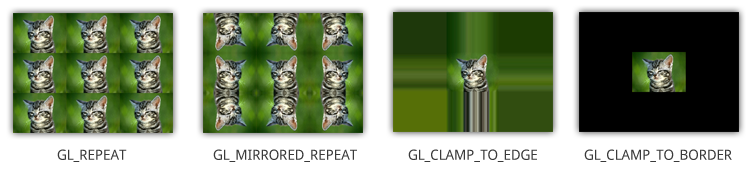 Clamp is different from Solidify. Clamp is what happens outside the UV square, not within the texture. Repeat is the default mode, which tiles the texture. What is the final output for your model? Realtime in a game engine or viewer, or rendered in an offline renderer?
 -
Re: Hair planes
 Ah, you want to turn off self-shadowing while retaining the ability to cast on to other objects and receive from other objects. I don't think that's possible in Maxs viewport by default, but there might be some custom shaders out there that support it.
 -
Re: Small game-art book.
 Its not about learning cryengine, because all shaders and ToD Is default. Its more from art side, and experience. Its hard anyway ;) and there are no tutorials on that matter, its just way of failure and mistakes. And a few people that you can talk with ;)
 -
Re: Maya scale components by a specific amount?
 relative transform should do what you're looking for (in the status line, by default set to absolute transform) e: scaling in world space that is if you're looking to scale in object space you could use the scale mel command to do that for you.
 -
Re: Mudbux UV Bleed
 Increase your bleed for this area by navigating to Windows -> Preferences -> Paint -> Edge Bleed. It should default to 4.0 - try increasing it to see if it helps. I'd set it back after you're done unless you need that extra bleed for a larger image.
 -
Re: UDK runs very slowly; advice on speed up of program?
 ok, so does UDK run slowly with only a blank/default level open? If it's running slow with the level, how many assets do you have placed and how heavy are they? (in other words, is it the application or your work that runs slow)
 -
Re: AWAITING CONFIRMATION: Displacement map input
Certainly. The unbiased displacement stores the displacement values in the positive range (0,1). This is xNornal's default setting. The biased map stores the displacement values in both negative and positive ranges (-1,1). I found no options to choose between these very important options. -
Re: 3dsMax perspective view when rotating from orthoraphic
 Yeah, in the viewer, just press "P." That should bring you to the perspective view. If you need to, set the viewcube to display in the top right of the viewer. It might be displayed by default. You can also use that to switch to different views, orthographic and perspective.
 -
Re: marmo y u so dumb
 right.. i havnt figured out how to add a gloss map to marmo since some genius decided to cram them in to the same texture slot, so im assuming its defaulting to 0.. how do i adjust gloss?
>10519 results