Search
-
Re: [Finished] The Once and Future King Unreal Environment
 For your next project i suggest using less fog. It makes everything hard to see and its unrealistic. Unless you are doing a sandstorm its to be avoided or used more subtle. But the biggest problem is the lighting. Because you've used dynamic lighting, it looks very flat in most places and a bit better where you placed fill…
 -
Re: Why do my models look flat in unreal?
 Dominant directional lights still bake shadows for static geometry. What other lights are in your scene? If you have a skylight it will flatten your geoemtry because it is unshadowed ambient light. If you have environment lighting enabled in world properties lightmass settings and don't bake lighting then it will be…
 -
Re: Subsurface Scattering Research and Experimentation
 Jeez , who would have thought it would be such a pain sending a message lol I have unticked the private message thing, so hopefully it should all work now :) @bombshell - Thanks for that link , I shall give it a read though :) The current problem with using custom lighting to override the Phong lighting in UDK is that it…
 -
Re: [UDK] Ancient Gateway
 If you want soft/hard shadows except for having 3 directional lights which increases light rendering time you can go into the properties of your 1 directional light source under tabs "Light" > "Light Component" > "Lightmass" > "Lightmass Settings" > "Light Source Angle" and "Shadow Exponent" Mess with these 2 settings it…
 -
Re: [PBR] Environment Challenge
 overall your saturation seems high on your door, the floor red tiles, and the wood. Your also doing yourself a disservice, by having all four of your lights at the same color/value range. I'd pick one area to make bright, and let the rest of the lights in the scene be more dim....pushed back to the background. I'd also…
 -
Re: viking character - unity 5
 yeah just to mirror/extend on what George is saying here: Substance Designer/Painter use image based lighting, so you only get a sense of how the asset will look under ambient light conditions. You would ideally want to find another way of previewing with direct lights to help see how things will look on the final asset.…
 -
Re: Hard Surface - Corner Scene
 JakeLeeCooper - Once you have the images uploaded to imgur, copy the direct link for them and then use the "Insert Image" button to have the images show up in your post. I went ahead and fixed your last post. As for the scene, it's a good start, but the lighting still has a long way to go. At the moment it's too dark…
 -
Re: 3dsmax favors local-space normal maps?
 It doesn't matter what your lighting is set to if you're just rendering a single normal-map. The lighting will only matter if you're rendering a complete map including diffuse and shadows and stuff... just the RGB normal map is not affected by any lighting. I'd use a Skylight with advanced lighting turned on to get good…
 -
7ate9 Entertainment seeks freelance game environment designer
Solo Game Environment Artist needed for innovative television production utilizing a hybrid production system. Live action and motion capture filming combined with real time compositing on CG backgrounds. We are looking for a talented game environment artist interested in working in a cutting edge video game / game show… -
Re: UE4 Spirited Away Gate

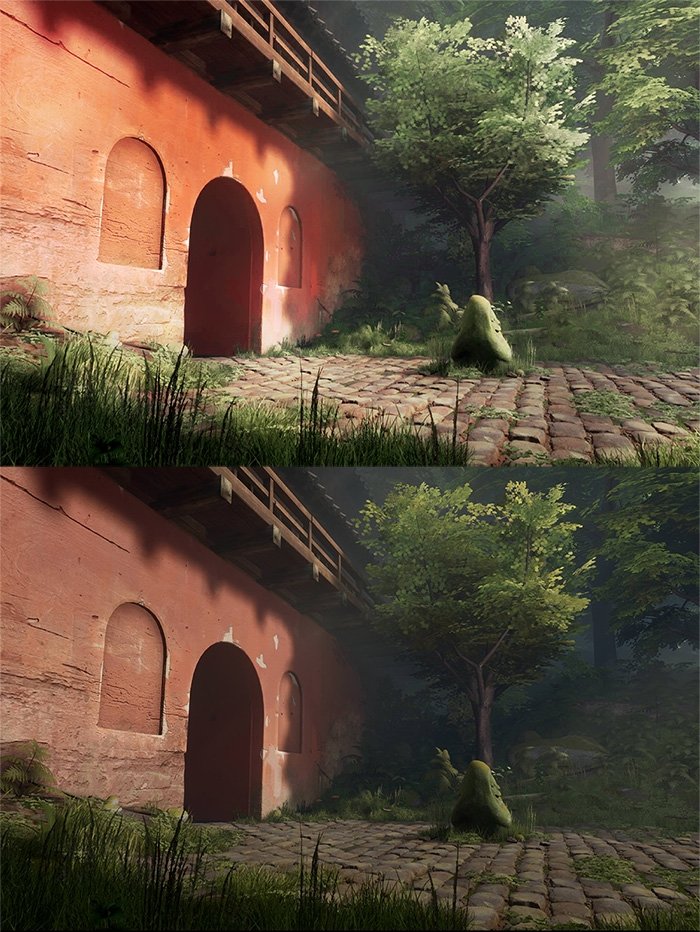 That's a great scene to choose! I've got a couple suggestions: The trees probably look great from further above but the current camera locations make the 'planes' look very obvious. I would take the canopy and angle the planes until they almost face the low camera. The one closest to the building is almost there. Lighting…
>36286 results