Search
-
Re: Dota 2 - Workshop Thread
 good idea kite. I'm using an nvidia 660ti. My normals are just set to the base colour, i double checked my mask1 and mask2 for issues, it all follows the valve guide very closely. I did 95% of the texturing in photoshop, with a little adjustment in mudbox. edit1:Installing the 332.21 driver now to see if that helps at all.…
 -
Re: [WIP] Mavica FD71 - Floppy Disk camera

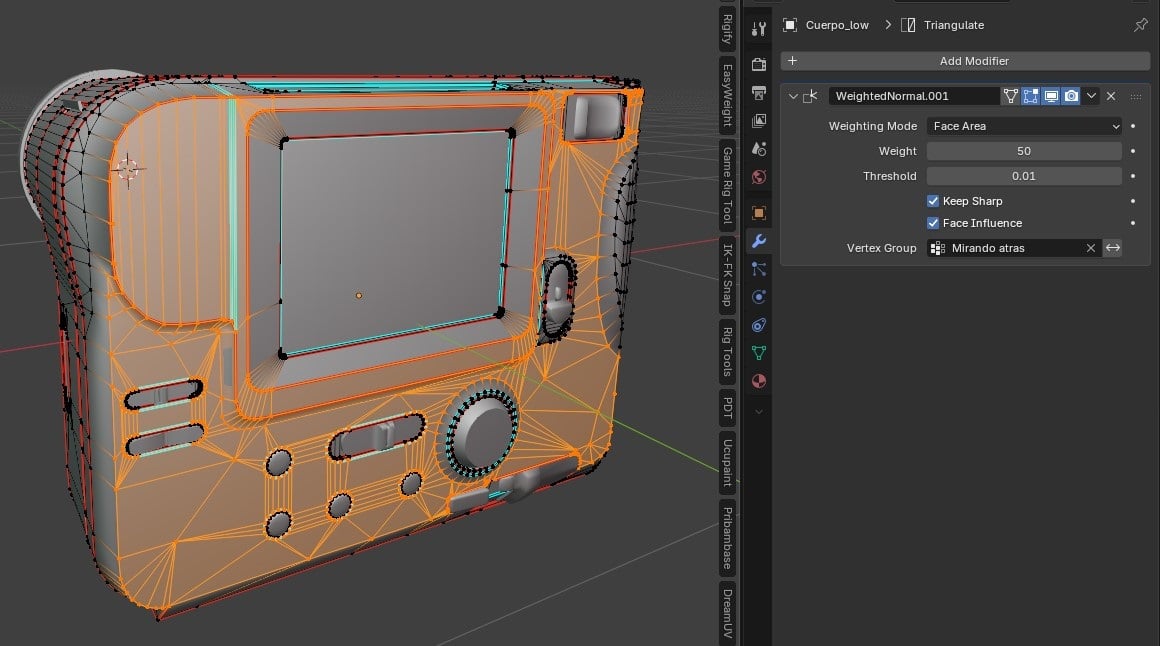 Thanks for the forums, I've learned a lot from them the first time I read them. I think we had the same chat the first time I've posted at this website xD. I've ended up creating a vertex group from the back faces, setting their Face Strenght to Strong and adding a Weighted Normals assigning the created vertex group.…
 -
Can't Edit? UVsheet?

 I can't edit this area... anyone know how i can? I don't know how edit uvsheet...
 -
video editing....
im looking for a free or nearly free video editing program so that i can further edit my first animation. if anyone could point me in a direction that would be sweet! -
Re: Converting to editable poly turns out strange after importing from roadkill (in max)
 The 'turn to poly' modifier gave the same result, with and without 'keep polygons convex' but the edit poly modifier did the trick. I just didn't think about that one. Thanks a lot for the quick reply. -Tom. EDIT: Even if you add the 'edit poly' modifier and then you convert to editable poly it doesn't give that error any…
 -
Re: Is there a way to convert a 3DS Mesh to an editable poly without it breaking?
 It's likely this model has non-manifold mesh, that's why it's breaking. Editable Poly requires specific topology rules. Editable Mesh does not, you can have edges extruded in the middle of a surface for example. Editable Poly does not support this. Where did you get the model from? Ask them for the source file. The .3ds…
 -
Re: Get Editable Mesh Normals?
 For edit poly objects use obj = $Box001.mesh. obj will be a trimesh of the Editable Poly. To get normals use the Edit Normals modifier. It will work on both the Editable Mesh and Editable Poly objects. Here is an example. ( eMod = Edit_Normals() modPanel.addModToSelection (eMod) ui:on for obj in selection do ( vCount =…
 -
Make Manual LODs With Edited Normals? (3ds Max)
 Hello. So I've taken to editing vertex normals a while ago and have incorporated into my workflow and so far it's something I can't live without. The only thing that's put my work to a halt at the moment is LODs, because this is only really something I use for high quality meshes primarily weapons I need at least the first…
 -
Re: xNormal - MASTER THREAD
 I'm having a big problem baking vertex colour from a lage .ply file. I've unchecked "Ignore per-vertex-color" on the high poly mesh and I'm baking using 'Bake highpoly's vertex colors. When I load the meshes in th 3d viewer I can see the vertex colour on the high poly mesh, but I can't get anything to bake. No vertex…
 -
Zbrush, why does it seem random if using edit will work or not?
 Almost pulling my hair out trying to follow videos on literal complete beginner starter steps on zbrush, I have made very simple models of head already, but I am trying to follow the videos, every other minute I am restarting because something has gone wrong and I literally have no idea why. The main issue is starting…
>35090 results