Search
-
Re: Dwarf Mines - dev thread

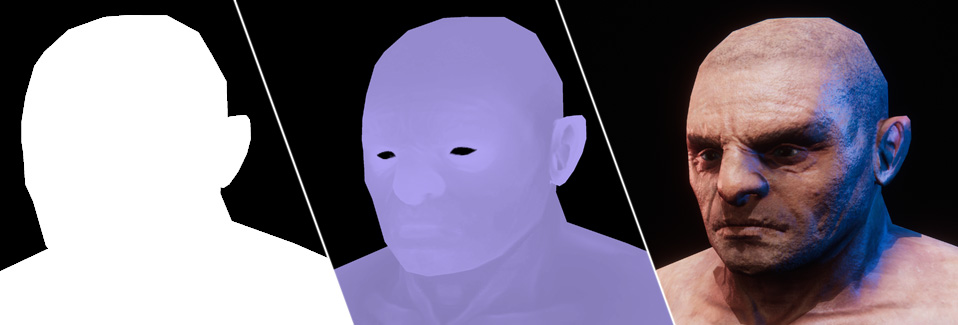 Hi everyone! This time it's bit more technical stuff. I write about using the stencil buffer and Unity's replacement shader rendering to get texel based masking for image effects (in my case: screen space sub surface scattering) : You can find the whole post…
 -
Re: PS CS6 records brushstrokes - but it's not bug free.
 To repeat the same cloning process on different textures, you could consider cloning using a different process. For example, duplicate on texture, offset it and perform the equivalent of the clone tool by masking the offset layer to reveal the layer below. Then you would do the same duplication process with your normals…
 -
Re: borders on rendered transparancy
 Commander, really? I cannot tell a single game doing that. All the ones I can think of go for masking. Donkey Kong country, Diablo, even highres stuff like Blazblue or KOF12 (okay thats handpainted but still, very high resolution sprite work) use hard pixel masking. Maybe Critter Crunch? even that one Im not sure. Honestly…
 -
Re: My Character Reel
 hey for the skin roughness try applying a mask in there so that you can break up the flat surface shine and through two different roughness maps you could even use an overall tiled sweat mask that will give the look of pours in the skin as well. As for the wire frames i think there great for showing your characters forms…
 -
Re: Space station (UE4)
 looking dope! especially low poly with a shader. as I understood you're using shader in unreal with cavity as a mask for the adding/removing scratches? like similar substance designer is working? i like scratches itself but don't like how they are placing everywhere, maybe if you can erase some parts from the mask where…
 -
Re: TRON - PLAYER - antonkoz
 Wow, I love the corruption on the mask. Looks sexy. I can't wait until you bring in some more images. The only thing I'm curious about is the flesh tones of the exposed mask. Everyone in the games and movies seems to have a less saturated skin tone. I was wondering if you're going to adjust the face for that? Then again I…
 -
Re: Zbrush 4R6: Sculpting hard to reach places.
 1. Use polygroups, then hide parts of a meshes by mouse clicks. Most likely the fastest method. 2. Related to previous. Keep mesh parts separate, then hide occluding. Works on mechanical stuff mostly. 3. Or use ZBrush specific selection methods, these can "creep" along topology with moderate success, so that you can mask a…
 -
Re: Winter styled Characters
 It's for a multiplayer team deathmatch type game, the masks the serial killer team are wearing is dear skull masks if that helps. I like the bottom picture that seems kind of fitting. The player's faces won't be visible at all, I'm just struggling on coming up with a suitable attire for them. I want something that would be…
 -
Re: SplatterHouse Rick
 So far I'm impressed. I'm really digging his anatomy. Might be personal preference but I'd like to see more separation between his mask and everything else. Maybe more blocky/ angular design? Maybe edge scratches or surface noise? I don't know much about the lore of the game but something that makes the mask look more…
 -
Re: Is my substance painter slower than intended?
 This happens regardless of the layer I'm painting on. As long as my "rust" layer is visible then the issue occurs. I don't have to delete the rust layer for a performance increase. I just have to disable it's visibility. The actual rust texture being masked is a PNG while the mask is a TGA. I tried unifying the formats to…
>40567 results