Search
-
Re: Any tips on making this more realistic? Struggling on this for a while. Thanks!
 I agree with @JohannesAg, this is looking good so far but a few things stand out to me. The blanket being the main thing. It feels too flat other than the wrinkles on the right hand side, almost like melted ice cream on a plate. The left side facing the camera seems too perfectly draped and the odd crease on the back end.…
 -
[WIP][UE4]Deadpools House / living room Environment

 Hi everyone, for my next personal project I will be re-creating this small scene, its a shot from the deadpool game by highmoon studios, will be great to get any feedback or critique along the way. I have started to block out and in the meantime created the highpoly for the beer bottles
 -
Re: Maya leaves help..
 http://wiki.polycount.com/CategoryEnvironmentFoliage http://wiki.polycount.com/CategoryEnvironmentTerrain Creating Foliage for UDK has a bunch of great workflow info. Applicable for bushes and trees. You can also use Paint FX in Maya to create the high-res branch and leaves for baking your maps.
 -
Re: [WIP] Raubahn Fanart (FFXIV - Stormblood)
 Nice!!! Great tip to add two different turbosmooth modifiers to create the high poly axis so clear and smooth. I will try the nex time I'd have to create any prop. ^__^ Would be awesome to share the way you make the baking and texture!!!
 -
3D Animator @ INDG
THIS IS A FULL TIME POSITION FOR OUR STUDIO IN BUCHAREST, ROMANIA Computer generated imagery is all around us. Consumers accept this as the new standard for visual communication and that fuels the desire for similar experiences elsewhere. INDG believes that at some point in the future all products will be virtual to… -
Re: What's the Best Way to to make Filigree and Ornamental 3D Objects?

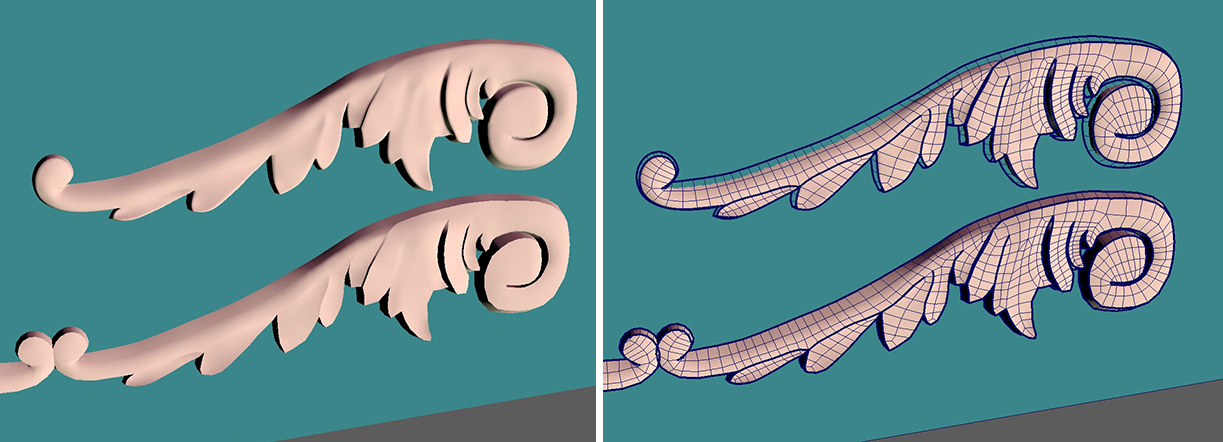 Small update. And a new issue. Here's the crazy workflow I did:* Created a silhouette vector line object in Maya and extruded it * Brought that into zbrush and gave it some better depth (and that's how it got doughy) * Brought that into maya and used the quad draw tool/make live button to make new topology * Then modified…
 -
What environment helps get you a job?
I'm not really sure what kind of environment to create for my portfolio. What types of environments are effective in portfolios that can help land a job? I was thinking about doing a horror game centered around catacombs, but I'm uncertain if that's a strong choice, or if I should focus on a city or a sci-fi environment… -
Re: Why does my model look like this?
 - The quickest way to make sure normals are pointing the right way is to turn "Face Orientation" on in the Geometry > Show Overlays menu of the viewport in Blender. It'll highlight anything flipped in red. I'm under the impression the original tires have flipped normals, so when you flip the mirrored tires to match them…
 -
Great idea...
![[MILES]](https://us.v-cdn.net/5021068/uploads/userpics/navatar16155_3.gif) Neat! I could see this being very useful! http://www.trustedreviews.com/article.aspx?art=3448
Neat! I could see this being very useful! http://www.trustedreviews.com/article.aspx?art=3448
>88648 results