Search
-
Re: bomb critique
 that's a good point. Usually when you're making your texture, keep middle grey in mind (128, 128, 128) Anything you want to be averagely light/dark should be around that tone. Then you have a good starting point to make the bright things lighter, and the dark darker.
 -
Rexel Workflow

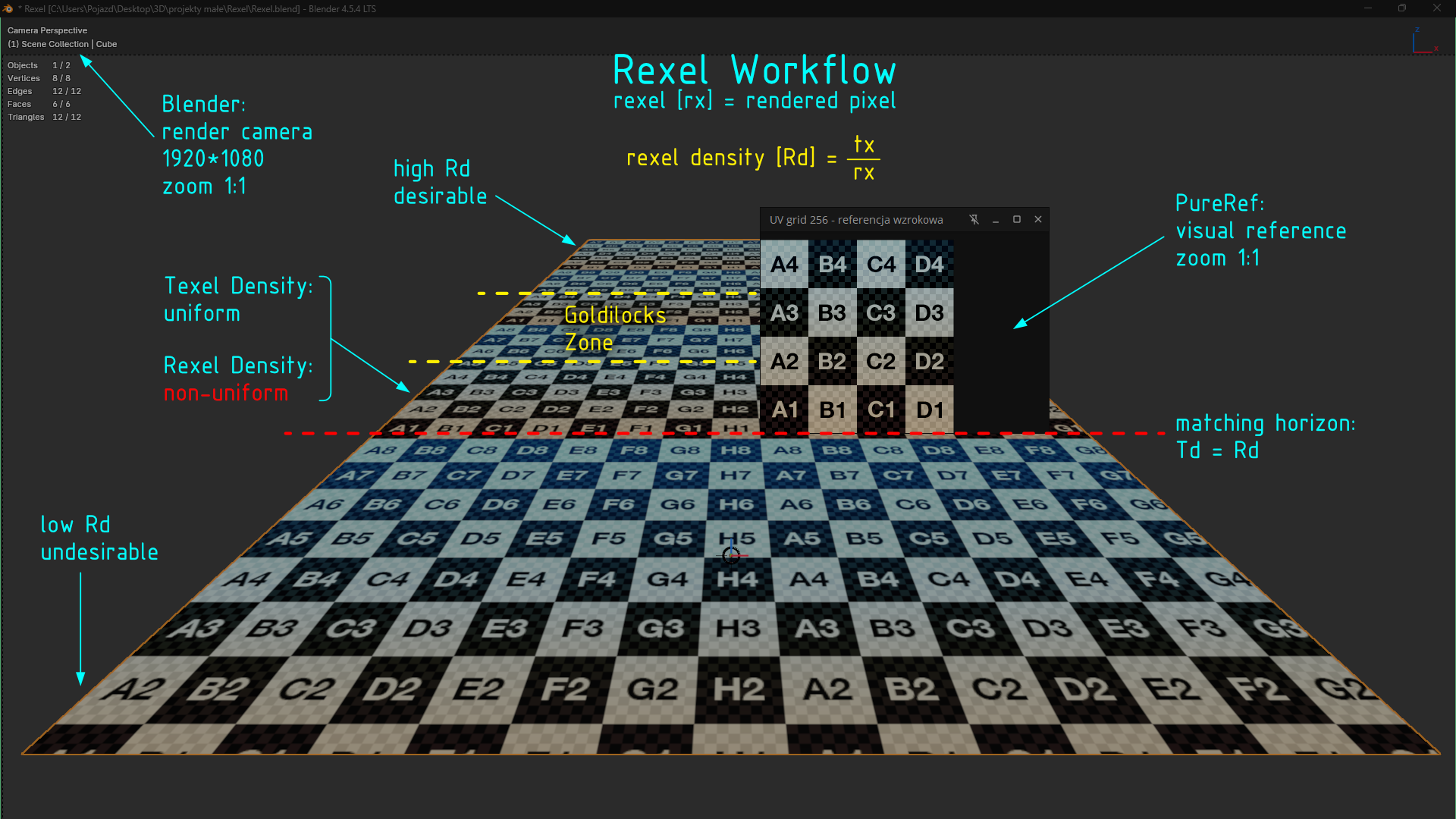 I propose Rexel Workflow when it comes to setting texel density while unwrapping. This workflow is for static images and is camera-dependent. Rexel is the final rendered pixel. Let’s say we have a scene with a vehicle model: an airplane with detailed objects and a few cameras, some distant for an overall view, but some for…
 -
Re: Harvest Model for XrucifiX (nextgen-punk)
 the seam is not a maya problem its a bug in the normal map ! and there for your responsibility to fix it ! you can fix it by going into the R chanel of your normal map take a 128 128 128 (grey) brush and paint along the seam fixed edit also why aren the belt the the shoulder pats the thign around his neck and the boots not…
 -
Re: Blender Mega Thread
 There are 2 versions. The 0.9 GPL edition and the 1.5 paid for version. The 0.9 is included in trunk and there are plans to have the 1.5 edition included after a while (between 5-9 months from July 2011) The 1.5 edition has faster algorithms and more editing options etc. :) http://www.bsurfaces.info/
 -
Re: Mercedes SLK WIP (First Post)
 I understand what you are saying, and it is good advice, but my point is you cant make a Gears of War character with 2k tris and have it look as good as the 12k. Just like you cant have a 12k car look as good as Gran Turismo 5 models. The interiors of the cars in that game are more than 12k.
 -
Re: Tablet PCs for Game Art creation
 I would advise against the slate 7 the graphics card, processor and screen are all worse than X230T.... Difference between HD3000 (slate 7) and HD4000 is substantial -benchmark comparison HD3000 to HD4000 http://compare-processors.com/rank/notebookgraphics.php?Intel+HD+Graphics+3000=on&Intel+HD+Graphics+4000=on&cp=Compare…
 -
Re: Max dual monitor problem
 run this script in your maxscript listener (F11 - > new script -> paste -> file -> evaluate script ) ---------------------------------------------------------------------------------- Fix MAX's window positions-- version 2.0-- max version 6, 7, 8, 2008, 2009-- written by Joshua Newman-- www.joshuanewman.net-- written…
 -
Re: Doom 3 center Seam
if its a vertical seam like over your chest/face you can takea 128 128 128 grey brush and paint along that seam on the red color chanel of the normal map in photoshop the seam will be gone afterwards if its a horizontal seam link on a belt or somethign / i guess it doesnt hurt anyone in that case) you can you the same… -
Re: Modular 3D environment kit where one important piece breaks the grid
 Ahh that makes sense. Good thing you're not worried about wall thickness, this time around. Just to be clear, I was suggesting (crappily) merge all of the windows together and add .125 of wall (or support beams) to the left and right making it a 4m tile. Rereading my post it might have sounded like I meant to do that to…
 -
Re: [Project Thread] Planitia's Art
 Huzzah! Made my first maya rig, skinned the little guy, and posed him a bit: Painting the weights was A LOT easier than I remember it being in Max. I'm not sure I like how the rig feels. I followed this tutorial…
>4063 results