Search
-
Re: toolbag contest + wish list
 Ah cool, there is an alpha in the targa. I guess the only thing it lacks is that the alpha doesn't include the bloom effect, which looks slightly odd since it is glowy but the edge is clean. I've also noticed that the lighting system for normal maps isn't optimal, perhaps due to the lightcubes? Smoothing errors will show…
 -
Re: Paint Skin Weights in Maya 2011 causing vertices to move?
 In 2011 the default normalization when binding a smooth skin is set to "post" (previous versions it was interactive) meaning that verts can have a total weight value less or more than one. That means, if you are removing weights from a vert, it will not automatically be assigned to a neighboring joint like it would before.…
 -
Re: My intro post! Summore stuff (Updated 06/14/06)
 Hey there, chief. I really love your use of smoothing groups. They remind me a lot of another artist from way back when (can't remember his nick now ) who would use those very anatomically correct edge loops mixed with the hard creases from the smoothing groups to create some pretty cool fold and muscle effects. There is…
 -
Re: Saving skin from a high poly to a low.
 Use Copy Skin Weights. Select all the joints that are weighted to your high-poly mesh, and bind them to the lower-poly one (regular Smooth Bind method). Then select your high-poly mesh, followed by your lower-poly mesh (the order is important!) and do Skin -> Edit Smooth Skin -> Copy Skin Weights. Default settings should…
 -
Re: Belldroid
 That's an interesting idea almighty_gir, I might try it. Here's the low and high poly. I'd really like to know if things look right and if anything needs changing before I proceed. I've yet to deal with the 90 degree edges though... after reading a lot about this, I was thinking of bevelling the ones that will be within UV…
 -
Re: Need help with hard edges
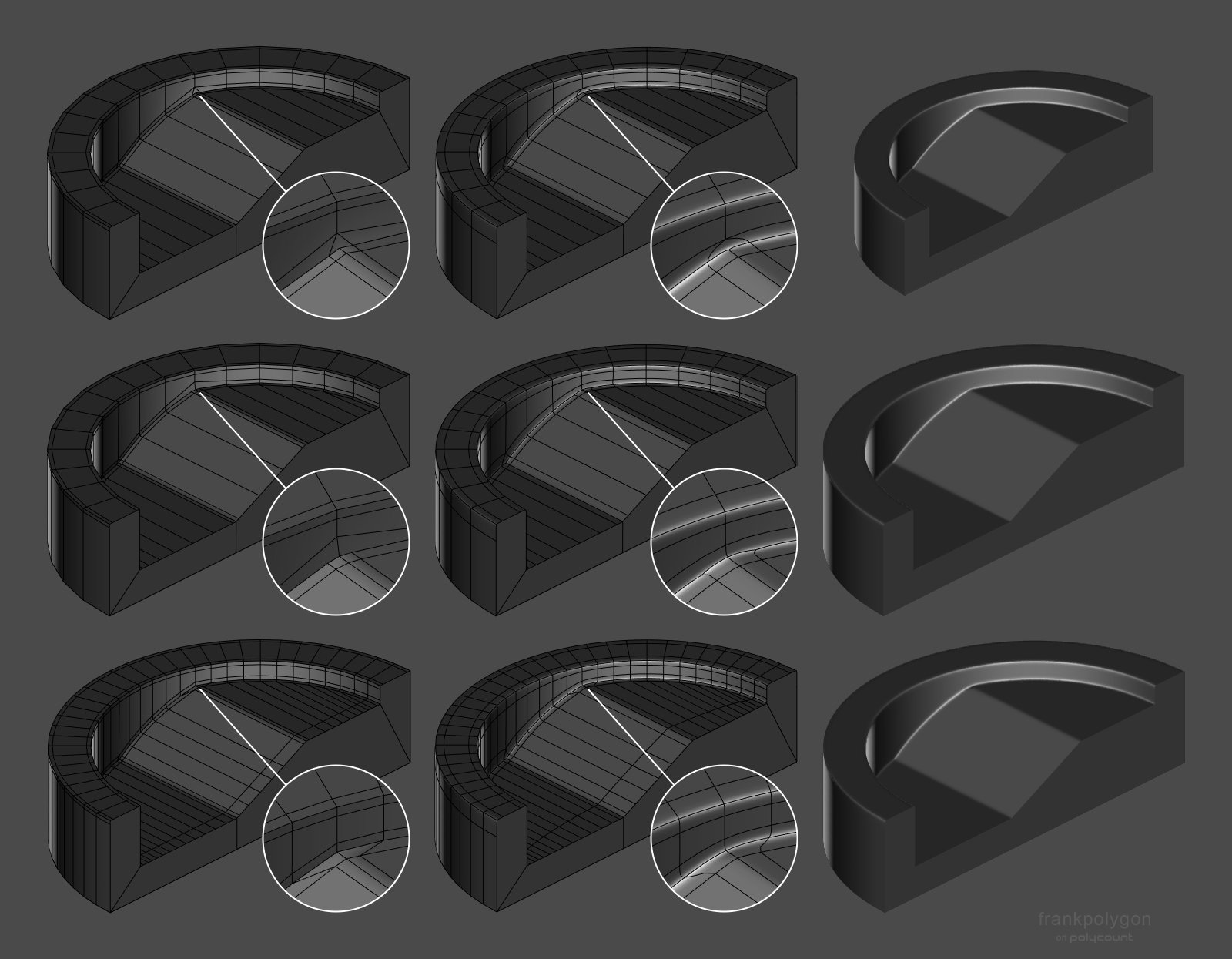 @mimodeste Welcome to Polycount. Consider checking out the forum information and introduction thread. There's a couple of different ways to resolve this type of smoothing artifact. The support loops for the transition between the two flat areas could be reduced using a triangular quad, terminated with an n-gon or carried…
 -
Re: Baking Normal Maps of an Angle?
 Seeing your actual lowpoly edges with a baked normal map applied is expected - as it's a limitation of baked normal maps, as the "illusion" can hold hold up for so much distance. This can be solved with chamfering your super hard 90 degree edges, or maybe even higher resolution bakes, but this all comes down to how…
 -
Re: Character almost finished - Please give me feedback
 I think the materials are looking a bit better, but could be pushed further still. The inside of the overcoat, is that silk? Or velvet? The reflective quality of it doesn't seem like fabric still. Concerning the skin, the roughness is too uniform I think migth be the biggest problem. The flat part of her chest is makes…
 -
Re: Viking Style Helmet
 Good start. You should make the top part of the help rounder. Look at your reference, it is very round, yours almost seems blocky. Smooth, but blocky. I've also noticed alot of edge loops in your lower-poly version around the eye holes. Are those simply there to keep the sharper edge when you apply the…
 -
Re: Making a Gears oF War Lancer, but in need of suggestions..
 Try modeling the whole top section of the gun, from front sight to rear sight, as one smooth piece with no layering. Then duplicate it, cut in the shape of the first layer and extrude (along normals) and delete the unwanted faces and tweak the edge flow so it mesh smooths nicely. You can then duplicate this layer to create…
>15014 results