Search
-
Re: Arcane Tower [Warcraft 3}

 First iteration of textures. The metal should probably be darker. Although, if I do, I often end up having 2 different style. One for metals, one for stone. I have trouble combining these in stylized PBR, I feel :) Feel free to drop any comments :)
 -
Re: My Quixel questions
 Btw I am trying to reproduce now the materials I have done in pbr quixel into external program , but they do not correspond , is there a way to extract the textures and masks used by quixel ? I can't find them in the forlders and I dunno where they are , and eventually how to add new ones.
 -
Re: Reallusion Character Design - Mythcons

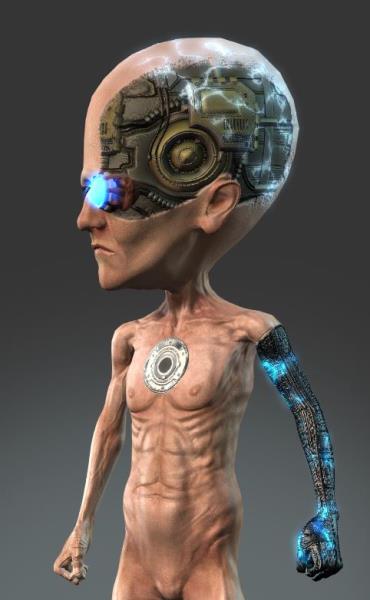 Reply by Mythcons · · Home› Contests & Challenges Archives› Reallusion's 3D Character Design Contest 2016Now that the Decals options are fixed, I'm able to add more dynamic detail to my textures. I use 3D-Coat for PBR painting. The cybernetic arm and the electricity are separate decals for the Body texture. I added the electricity decal texture to the 'Glow' channel to enhance the glowing effect.
 -
Re: New Year, New Tool? (aka using non-subscription specialty tools?)
 It shouldn't be complicated to replace the various models in the Shader anyway, these things tend to be pretty modular. Ue4 is quite old now, I wouldn't take it as the definitive example of how to do a realtime pbr Shader today. Certainly what we use at the office is more complicated and that's console based.
 -
Re: Gun turret
 You can change the reflectivity to "Metalness" and put the metal map there. Then put the roughness map into the Microsurface (Gloss) slot and invert it. An alternative would be to export the textures from SP with the PBR (Spec/Gloss) Template, then you can put the maps right into the correct slot. btw. Nice work. :)
 -
Re: ANSWERED: Blurred texture issue
i have sent you the maps, i kind solve the problem by unchecking metalness box, the texture isnt blurred anymore, but then im having another problem , how could i output pbr workflow now(sorry if it is a noob question)? i would like export to unreal. -
Re: Sketchbook: HarlequinWerewolf (SkullCat3D)

 Working on a little fan art of Rhys from Tales from the Borderlands (cos I can't get that game out of my head) And I'm trying to set it up for print I'll also do a PBR textured version (hopefully with some blendshapes) for my portfolio
 -
Re: Help needed: rendering all maps in a single image
yes! thats it, prebaked material, i want a tool where i can archieve that, gotta go try these options, i just though there would be a tool where i just can enable in export options the "combined material" and export it with the pbr illumination rendered on it -
Re: Low-poly Gun
Here's an update to the gun, didn't change much in the low poly considering the limited timeframe. I did learn alot making this gun, here's the result. https://artstation.com/artwork/pbr-steyr-aug-modded edit: forgot to say thanks to Carl for the feedback :) Bram -
Re: Maya 2016 StingrayPBS shader Lighting issues
 The PBR Shader in Maya is set up by default to only support 1 light. Open up shaderfx Click the "Standard Base" node, (the orange one) Open its properties and set the "Lights" attribute to however many lights you would like the shader to use.
>15793 results