Search
-
Re: Stromberg's Gameart book
 Beautiful! congratulations on finishing it! I'd like to see it with varied lighting setup, a shadow plane and near vertical main light, just to see some of the forms more...and so I can place this as desktop background...
 -
Re: detach all faces in maya?
 Select vertices, Edit Mesh>Detach Component, Mesh>Separate. Select objects, change Move Axis to Normal(Move Tool Settings), use the N axis handle to move/explode the now separated faces.
 -
Re: WIP Old Man Character Modeling
 It's sure I don't use smooth version for the screenshots, indeed I use that only to check if there are troubles concerned with bad geometry (as unfold vertices ...) Here some adjustments I was told to perform Uploaded with ImageShack.us
 -
Re: Answered: Quixel 3DO post processing menu won't scroll
 Sorry! But it is still not working. The scrollbar is only letting me scroll down when I have post processing turned off. When I have it turned off the scrollbar fills the whole window vertically.
 -
Re: what is a Warping collor or Tint,Texture/shader, Question
 A couple ways to approach this. Depends on which game engine. You could do a view-dependent falloff effect (like Fresnel) combined with a vertical gradient effect. You could do this with a BRDF function too.
 -
Re: Skin Modifier Issue (Max 2013)
 If you're having trouble weighting certain vertices, you can turn off "normalize" so you can set values for bones without altering the others. Make sure you check it back again!
 -
Re: Steampunk Gun, Slight Issue.
 Thanks for the reply perna! Will give your method a try.. I do tend to move vertices around a lot. By you intersected cylinders, do you mean you cut the shapes out using boolean?
 -
Re: Thoughts on this monitor?
 I bought a 1080p monitor, and i wish I hadn't. I thought I would get used to it, but the loss of that little bit of extra vertical resolution in 3ds Max means a lot more scrolling.
 -
Re: Newbie Character Modeling: Garnet

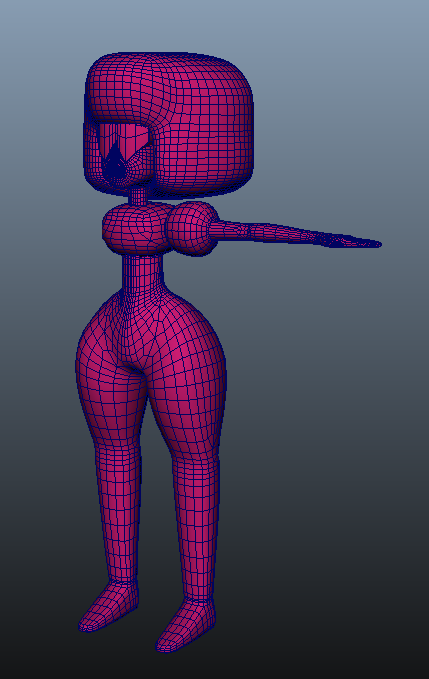 Ok well I cleaned up the topology. I decided to smooth it so now it has 26207 UVs adn 7609 vertices. Not sure that was a good idea. Is that within the average count for fighting game characters?
 -
Re: 3d <male & female> head topolgy ...
 so does that mean in your opinion that we can move the vertices of a male 3d head to get a female 3d head ? i started tweaking my male head but i wasn't so satisfied .
>7637 results