Search
-
Re: your texture library
 I organize by surface types, and this works pretty well. I usually know what the type of surface is that I need, and like to do my search accordingly. Asphalt_Concrete Brick_Cobblestone Fabric Foliage Grime Metal Skin Stone_Natural Terrain_Natural Window_Door_Framing
 -
Re: UDK: 3D Environment
Ok thanks :D I'll get a wireframe up but its a flat surface with a texture on it. I played with the vertices but it made it look worse, so I kept the flat surface. I'll use more careful dodge and burn :D More updates -
Re: [UE4] Rooftop Offices - mini-environment for a gumroad tutorial
 Love it! Fwiw, I don't get a hospital vibe from it because the floors aren't right for it. If they were a simple flat surface with a single material, then it *might* feel more like a hospital, but as it is I can't see anyone rolling beds around on that surface.
 -
Re: Upgrading tablet
 Nope the tablet always tracks the pen, at least the Wacom tablets do, I am not sure about cheaper ones. But the tablet tracks your pen about 2 inches above the surface, and then when you make contact with the surface it registers the pressure.
 -
Re: Max8: Wrapping a chain mesh around an object.
 You can also unfold a copy of your mesh, build the chain flat on that surface- skinwrap it onto the surface, then morph the model back into its original shape. This is better for doing all those complex straps and buckles, but works equally well with a chain.
 -
Re: Maps for Vision game engine (image heavy!)
 have you tried crazybump? I think the cobbles could look a lot better with it.. If you are going for the bright clean scifi env, use cubempas on a lot of the surfaces. Did you bake a AO map? Ao works great on clean surfaces.
 -
selection painting in Max?
 Is there a feature or script for paint selecting faces in modern versions of 3DSMAX (like how modo lets you click-drag on a surface to create a selection)? The old "paint selection region" is kind of worthless due to how it projects through surfaces. I used to do this with a script but unfortunately it doesn't work in…
 -
Re: [WIP] T-34/85 Tank
 Awesome work so far man, my only suggestion is to add some more surface irregularities like bullet dents or more pronounced scrapes to help break up a lot of those very flat surfaces. I'm excited to see more :)
 -
Re: Newbie question How to make a boot and shoelaces
 For Maya: Create a CV curve that outlines the path of your laces. Create a Nurbs Circle, and attach it to the end of the curve (Fast way: Hold D+C while dragging it on top of the curve) Go to the Surfaces toolset, open the Surface menu and select Extrude
 -
Re: Texturing human skull or not ?

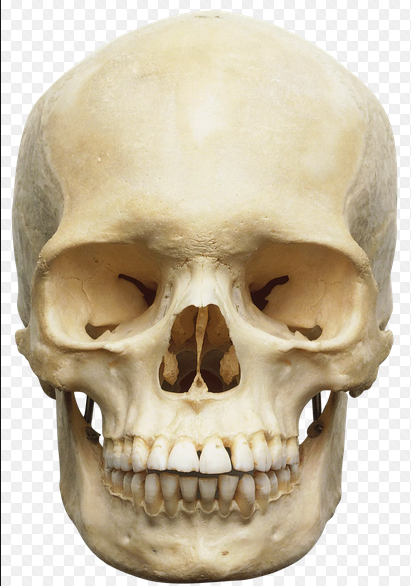 Realistic I think would include the surface level bumps and channels. Plus there is distinct color variation. I'd definitely texture it. The little bumps and surface noise I would probably apply as alpha's to the sculpt for normal map/AO map baking.
>18719 results