Search
-
Re: DS 3dviewer
 So you guys are gonna be able to release this for the public to use any time soon? I have a DS transformers scene I would REALLY love to test! If you need a test Im here to help *raises hand like a 5 year old with ADD*
 -
Re: Watchtower - UnrealED
 Mtg_kirin, I ended up dropping the size of the larger ones on the hillside by 25% and bringing up the ones on the tower by 200%. If anyone needs the scale faces on local I'll wrap it up in a nice gui and post it. Somewhere along the way Transform Component lost ALL of it's functionality.
 -
Re: Editing Vertex Normals - Maya
 You can use Mesh > Transfer attributes and set it to transfer vertex normals by ray casting. So you'd only need to first select the source (basemesh) and then select all the vertexes on the target that should be affected and hit Transfer. Should be faster than doing it vert by vert :)
 -
Anyone remember this (crappy) game?
 Since most of you were into pc gaming in the mid-90s I thought i'll make a post about it here if it helps any. mockup shot follows since it's vital from 1997ish, used DirectX, possibly freeware. Yes, your futuristic car transforms into an old ship with cannons. No, it's not shipwreckers. It's strictly 2d.
 -
Re: Creating environments without a Concept and having no Ideas.

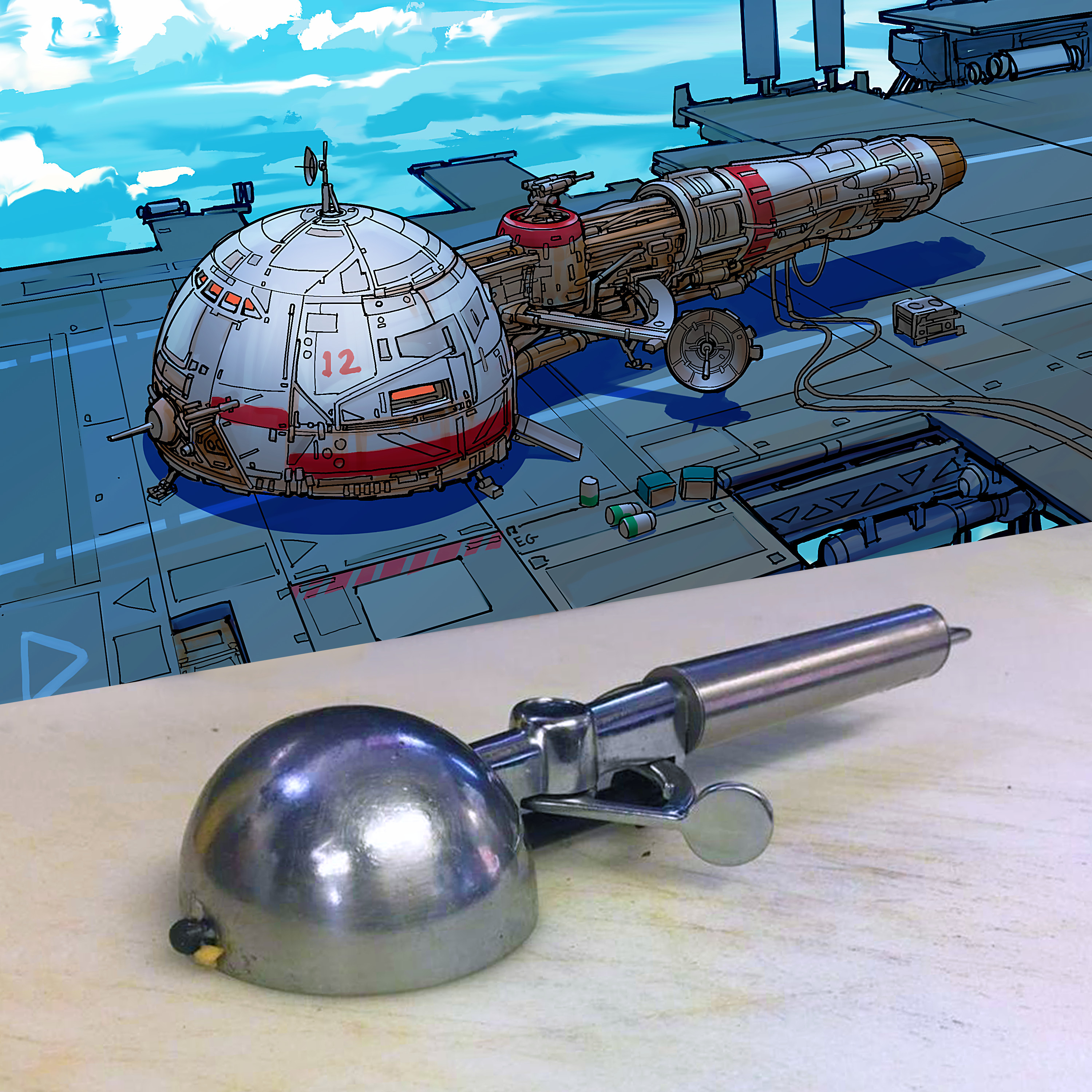 You don't have to start from nothing even if you're creating original art. You can get inspiration from the world around you. The best example of this is the work of Eric Guez. He transforms everyday objects into spaceships. like this: https://www.artstation.com/artwork/W28xxv
 -
Re: Importing animation from Blender
 For the last thing, you need an animation blueprint, and a standard blueprint to control it. You could have float values for which door is open by how much for example. The mesh can be rotated upon importing it. There is a transform field on the bottom of the import dialogue, and you can change the rotation there.
 -
Re: [Finished] Sturmgewehr 44 / STG 44

 Day 4 Stuck on ejection port for a long time so didn't finish receiver today :( Now this part is done so there are left not so many details Do you feel like this gun transforming into a real gun? :D Hope you like it Close-ups:
 -
Re: Substance Designer + Input image Size -> Projection-Tool
If there's no exposed scaling parameters on the projection node you should be able to use a transform node to scale the input image to the right proportions within a square - youll have to give it the original resolution and do some mild sums to work out the correct scaling but it won't be too tricky. -
Re: Brief tutorial on using the Google Photosphere camera to create cubemaps.
 Awww... I thought this was some new cool affordable camera when clicking this thread ;) Cool stuff though. That app seems to produce quite nice panorama photos. Thanks for sharing the workflow. By the way, doesn't HDRShop have any transformation filters for this type of panorama format?
 -
Re: Maya - Animation flips one Bone Randomly in Unreal Engine
I'd assume it was a wacky transform on the neck bone in maya tbh. It's not the sort of place you'd expect to encounter gimbal lock if it was properly frozen when you built the rig. This is assuming it's children have exported - I know unreal doesn't store rotation on the last bone in a chain
>9307 results