Search
-
Re: Please Help!! Objects in mudbox are black
 Also, check your normals. If they're backwards it'll be rendering the back face, which may be lit incorrectly. Right click off the model and turn on "Show both sides". It could also be light angle related, you can hold down L and left click or right click to reorient your lights, or you can just throw on a lighting preset…
 -
Re: AutoShop-WIP
 @SHEPEIRO Dude, I wish I saw that button a long time ago! @AdamBrome Thanks for the lengthy response mate. Your right about the pixel density. Though I'm unsure about changing the ceiling (as you'll never get that close to view it), areas were i want to get close to need to be upped pixel wise. Lighting, yeah, it is NOT…
 -
Re: [WIP] Stylized Witches Kitchen- UE4
 I think the lighting could use some attention. Right now the lighting is. . . well, confusing. All of the furniture (like the cabinet and cauldron) is lit on one side and shadowed on the other, which would suggest a directional light, except a directional light would/should be blocked by the walls, props and furniture.…
 -
UE4 Lighting problem?
 Whenever I delete the sky dome or add some background geometry my model slowly increases in brightness/bloom to stage of supernova. Any Ideas? [IMG][/img]
 -
Re: Shield of the Undevout (Baldur's Gate fan art)

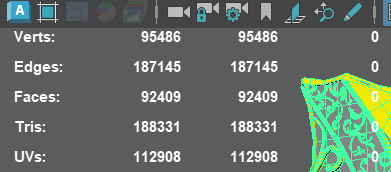 Here is my blockout in Maya. I’m going to take it into ZBrush and refine it further. My plan is to only do retopology on the more prominent pieces, such as the side decorations and the middle section, and bake the rest to keep the polycount as low as possible, because right now it’s far too high, as you guys can see. I…
 -
Re: Article: Game Art Art
 Santewi It might also nice to know that you don't paint the Normal Map directly. Instead you paint 4 different light situations (light from up/down/right/left) which might be more understandable than have to paint both information (up/down & right/left) at the same time in the same channel. I guess the only way to find out…
 -
Re: [UDK] Japanese Temple at night
 lookin mighty fine, sir! are you going to open that roof up to let the rain in or keep it closed? Those bright light hits on the floor are going to be a challenge to get right, but it'll make the shot!
 -
Terrain lighting problem
 When expanding on our first area of the environment, we copied the first terrain and edited to fit. when building the scene these shadows show up. Anyone had/seen this problem?
 -
Re: [Portfolio] James Benson, Animator
 I really like it, awesome stuff. I agree about the song. I love the horse running/walking and the ogre is great (minus the ridiculously over the top head movement in the run). I think the swing/wall climb is perfect and the disarms are great. It's quite a leap from the first reel, nice work. =) I liked the axe toss at the…
 -
Re: A stab at Hand painted textures
 *been busy with other projects* Added some *slight* color and highlights to the stone to make them seem less flat. Didnt look right at all using Screen mode =\ Ended up using Mahogany/Orange-ish on overlay and light grey on Multiply, both set to a very low transparency. Also dulled some of the bight edge highlights
>90485 results