Search
-
Re: The Monthly 'Newb' CHARACTER Challenge | May 2014 | Frogman, Demon, Illusionist
 JELLY-RAWCHIKEN-SEMITRANSLUCID FROG! :D (eyes are place holders) So I retopo'ed the body and baked this puppy with a temporary UV set. And everithing is all nice and pretty... except in the parts where it isn't: UGLY UV SEAMS in the normal! Oh dear how I missed you my old friends. Could have stayed away one more time, I…
 -
[WIP][UE4]Forest Road

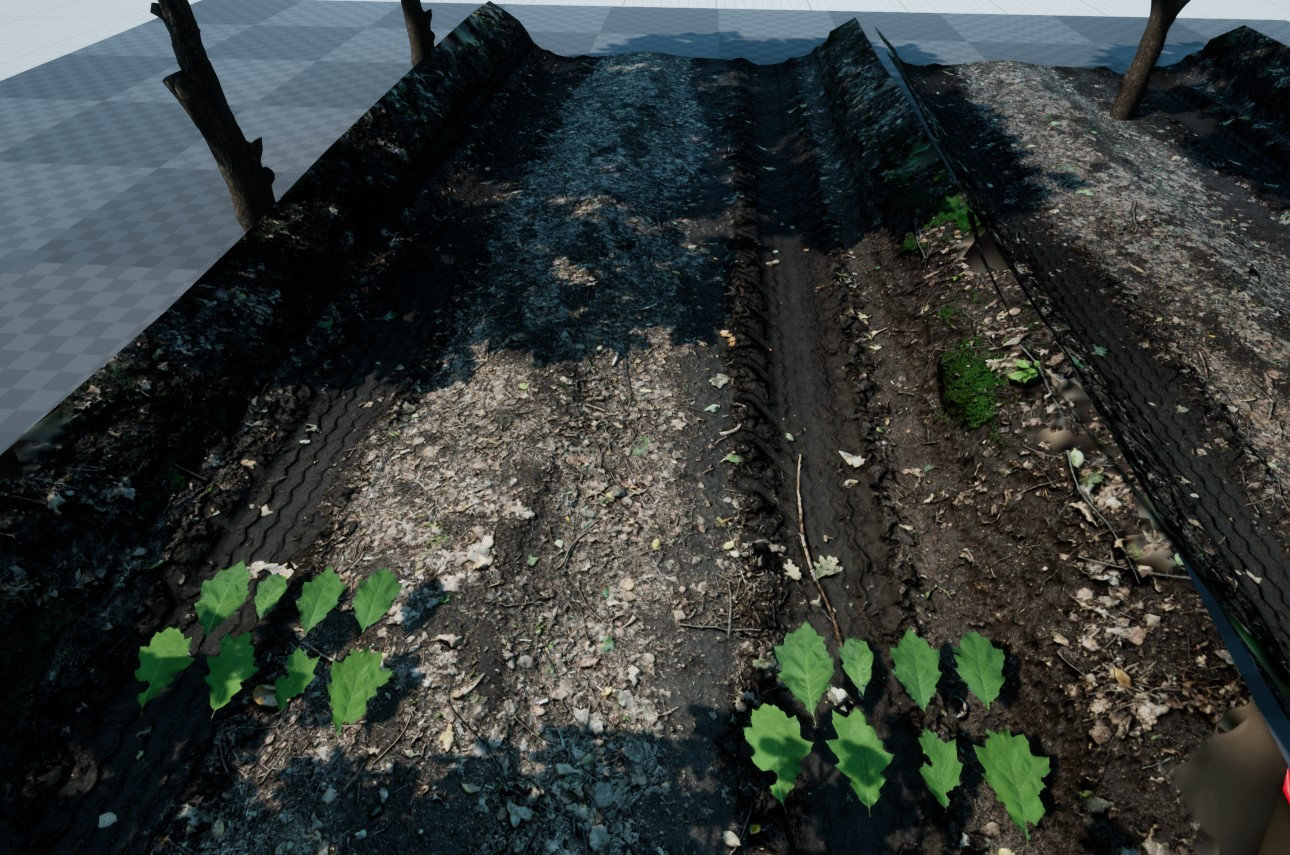 Hi, I am starting a new project - Wood Road - based on photogrammetry technique. First raw tests of 3d scanned road and some oak leaves. Road is 680 triangles with albedo and normal map, leaves are on a single plane with albedo and normla map.
 -
Re: [Shaders] Help creating masks for texture maps in UE5?
 I think the error at the "Pixel Normal WS" node is due to the input being the vector/normal of the pixel, which is then used to blend with a normal map which changes the input of the node. So probably this node can't be used with blends involving normal maps? Could blend by vertex normal (modified + height mask?) instead.…
 -
Re: Skull
 Hmmm, man, maybe that's what's causing it. I don't trust Zbrush for normal maps at all, are you at least using Zmapper? Try getting both meshes on 3dsmax or xNormal and see if you have different results there.
 -
Re: Bake Specific Edges ?
Curvature map was out of my mind. The idea was if we can have the curvature of hard edges from low poly, we can fake a fast normal map. Xnormal curvature map gives all edges. -
Re: Retopologizing multiple Meshes
 Maya actually bakes normal maps very well. I don't know why people keep saying otherwise. That said, Xnormal is faster and can bake out a bunch of other useful maps at the same time.
 -
Re: Chiappa Rhino & M720 Concept Revolvers
 Hey guys so Im running into some trouble with my normal map bakes not coming out right, Ive used handplane and xnormal for bakes, I may try topogun next to see other results.
 -
Re: UDK Environment: Hidden Nature
 Took forever, but I finally got the normal bakes done. Had some problems with Max screwing up my bakes in some areas, so took it into xNormal instead. All in all, it came out nicely:
 -
Re: M1911 Model
Are you rendering in 3DS Max? If so, your normal map needs to have its Green channel inverted in Photoshop to display correctly if baked in external apps like XNormal. Maybe that's why your seams are wierd. -
Re: Big fat art dump - Age of Empires 3 (lots of pics)
 DH, I'm pretty sure you can download a free plugin for Max6 to render normal maps in scanline renderer. It's called "GNormal". You can find it here: http://www.3dmaxer.dk/plugins.asp?r=5
>37666 results