Search
-
Re: Saving gloss map into Specular map?
 in photoshop you can make an alphachannel (window->channels) press the create new channel button, activate the channel and paste your map in there then save it out as a 32bit tga
 -
Re: "Best practice" to learn sculpting with Zbrush for free online
 Zclassroom is probably the best you're going to find anywhere. They cover specific modeling subjects too, not just the button-ology. http://pixologic.com/zclassroom/homeroom/#digital-sculpting
 -
Re: Mudbox viewport distortion
 yes, I was simply navigating around the mesh and suddenly it was like that. (but I tend to hold wrong buttons when navigating, that way I thought I hit a shortcut)
 -
Re: My UV workflow has a problem
 Just select the shells you want to offset and then use this: polyEditUV -u -1; I have that set as a button, so I just hit it whenever I need it.
 -
Re: Rising Storm Modification: Looking for Artists!
 likewise, I cannot locate the apply button. If the position is still available, additional info on how to apply would be greatly appreciated. thank you. Le Sun Portfolio.Lesunart.com
 -
Re: Unreal Engine 4
 Looks great, what game is it? The functionality of the buttons and menus look very slick as does the foliage. God I hope to get my hands on this before Christmas!:thumbup:
 -
Re: PRoblem with exporting Zbrush ?
 Do you need the UVs? If not, delete them. Perhaps try clicking the make polymesh3d button to create a copy that has no history, or doing some form of quick retopology on it.
 -
Re: Maya : transfer weight influence from a mesh to another
 hey thanks for the feedbacks ! I just tested the copy skin weight button, seems to work well ! Don't know why i didn't notice it before. Thanks :) :)
 -
Re: Broken Normals?

 So I isolated the area with the face for a better visual. the top areas are supposed to be missing out of the square. The 'triangles' that are out of place around the button openings are the issue at hand
 -
Re: Sketchbook: Yedp

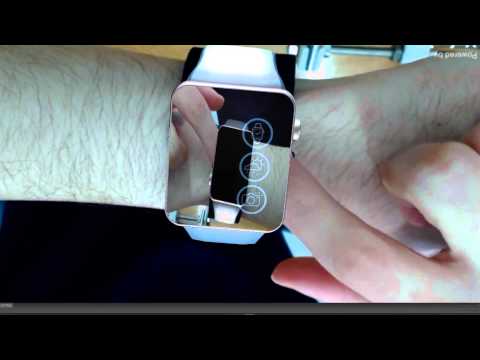 Hello, been a while since I posted anything! Latest work done at my company lab: This demo was done using Vuforia virtual buttons and cyllinder target.
>10228 results