Search
-
Re: Disk Boot Failure fun!! Help wanted. Love offered.
 SATA drives only give you crap if your motherboard doesn't have native SATA. That means that you would need to install drivers for windows to recognize it. Almost all newer computers have native sata, so I wouldn't worry about it. Download a copy of Ultimate Boot CD(http://www.ultimatebootcd.com/) and burn it. Then start…
 -
Re: Maya MEL Script help needed (UV border edges)
 *fingers crossed* string $objList[] = `ls -sl -o`;string $uvBorder[];string $edgeUVs[];string $finalBorder[];for ($subObj in $objList) { select -r $subObj; polyNormalPerVertex -ufn true; polySoftEdge -a 180 -ch 1 $subObj; select -r $subObj.map["*"]; polySelectBorderShell 1; $uvBorder = `polyListComponentConversion -te…
 -
Re: T-34/85
 yeah, tracks r not enough correct. Also their size is a bit too large (in height). Fuel tanks also seem wrong to me. I've see tons of images of T34-85 and can't remember fuel tanks being attached to the rear armor. Usually they r attached only on the sides (like Eraserhead's picture shows). Moreover, your fuel tanks have…
 -
Re: Hacky Normal Map Correction
 just toss this on a shelf, and run it on a object, after you do your UV's string $objList[] = `ls -sl -o`;string $uvBorder[];string $edgeUVs[];string $finalBorder[];for ($subObj in $objList) {select -r $subObj;polyNormalPerVertex -ufn true;polySoftEdge -a 180 -ch 1 $subObj;select -r $subObj.map["*"];polySelectBorderShell…
 -
Re: Maya preferences saving?
Version 6 gave me that hiccup with the clip plane values. I keep a mel script around that a coworker slammed out to properly reset the cameras. I keep the darn thing pinned to my shelf. setAttr "perspShape.nearClipPlane" 0.001; setAttr "perspShape.farClipPlane" 1000; select -r top ; setAttr "topShape.nearClipPlane" 0.001;… -
Re: WIP: Alley Way "grotto" Environment
ok, here we go. Here is a rough and quick example of what i meant in my previous post. Please note that some stuff (especially textures) r only basic and simplified examples which show my point, and they were not fully elaborated for final quality look :P First of all, when u deal with low-poly vegetation u need to look at… -
Re: select all joints and bake simulation maya
 When you press shift + strg and you press an command from the menu it pops out in your shelf with the current settings for the command. Then you can drop it into your script editor ;) i use this for example mostly for exporting animations global proc dm_bakeANI4export () { // select Bones which will be baked select -r…
 -
Re: UDK: July 2012 Release - Synced Normals!
 Maybe earthquake has a better one but I use this for Maya 2010 and it works pretty well. Just add to your shelf or a hotkey as MEL (not python): string $objList[] = `ls -sl -o`; string $uvBorder[]; string $edgeUVs[]; string $finalBorder[]; for ($subObj in $objList) { select -r $subObj; polyNormalPerVertex -ufn true;…
 -
Re: Anime Process + Shader Techniques

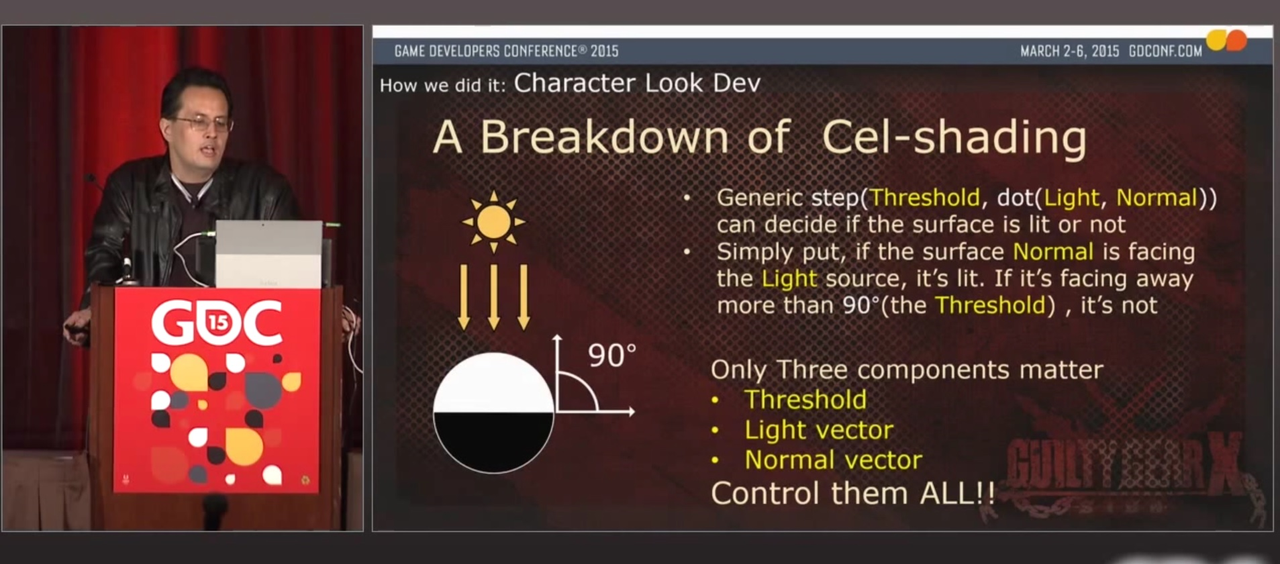 It doesn't look like you're using the step function in your shader, and it's absolutely necessary to make the sharp shadowing. They mention it in the GDC presentation on this slide: So you take the dot product (also called "scalar" product) between the vertex-to-light vector (going from the vertex to the light position)…
 -
Re: Computer Color is Broken - a short video on colors, displays, Photoshop, and blurring
No, the scale of 0 to 255 is not interpreted as linear to the DISPLAY. It is interpreted agnostic internally. So when you have two layers, and you multiply them, so for example, red and grey: Red = (R=1.0 G=0 B=0)Grey = (R=0.5 G=0.5 B=0.5)R = 1.0 * 0.5 = 0.5G = 0.0 * 0.5 = 0.0B = 0.0 * 0.5 = 0.0Red*Grey = (R= 0.5 G=0.0…
>161919 results