Search
-
Re: [Noob] Can't paint over a mask : No material
 You can find keybinds under Edit -> Settings -> Shortcuts. By default Y will remove the quick-mask, and T is to edit and use quick-mask (and I to invert). With that active you won't be able to paint on any areas that are masked out areas. As for your problem, it looks like your brush has somehow had its greyscale value…
 -
Re: Anyone know of a .ma batch exporter for Maya?
 Here ya go. Nothing fancy. If the scene is saved, it creates a folder called Batch_Exports and exports it there. If the scene is not saved, it prompts for a directory to save in. Ran some basic tests on it and worked so let me know if something bugs out for you. Also this is Python code btw as a headsup import maya.cmds as…
 -
Re: Need help learning MAX's SKIN modifier...
 Hmm, I don't know what to say. I have Max versions 5, 6, and 7 installed, but haven't used version 4 in a while. I can't really remember what features it did or didn't have back then. I guess maybe there's a reason that Physique was more widely used at one time. It sounds like the Skin modifier wasn't as fully developed as…
 -
Re: 3ds Max - Texture Atlas script help

 I fixed a bug in the script you should download it again. The workflow is a little funny because I ripped this code out of a larger script where most of this was automagic. But it's a lot of work to modify the code and I don't have time to make it simpler to use right now. 1. Create an atlas in texture packer with…
 -
Re: Extrude Problem

 http://youtu.be/VYEIT4i6Hr4 I did it faster the first time since I have a pretty slow internet connection, especially in upload, anyway. The suggestions in this thread are all part of the same technique, which consist on cleaning up the mesh after the extrusion. In this case it was easier to select the inner face from the…
 -
Re: Does Maya have an equivalent to Softimage Prop Model Tool?
 ah ok cool. The tool i was talking about is referred to as proportional modeling in The gnomon DVD by Vitaly Bugerov (I think that's right...) but may in fact be something else in XSI itself- and yes, it's basically an interactive soft select. Thanks for the "B" info- I've avoided soft-select cos it didn't seem very…
 -
Re: Welding
Steps ive taken 1.Saved 2Ungrouped everything 3.Selected element,attach,and clicked on all other objects 4.Went in select by name to erase objects that had no vertices for cleanup. //This is where i noticed that only my newly created attached peice had vertices so i erased the other objects leaveing only the newly created… -
Re: A better way to animate this?
 A few things could make this easier: 1) Unless the character is animated, you don't need to run an nCloth simulation to get a small patch to conform to the shape of the skin (or other object), you could always make the other object you want to conform to a "live" object by selecting the object, then clicking on the magnet…
 -
Re: We built a 3D Art Budget Estimator, and want to hear your feedback

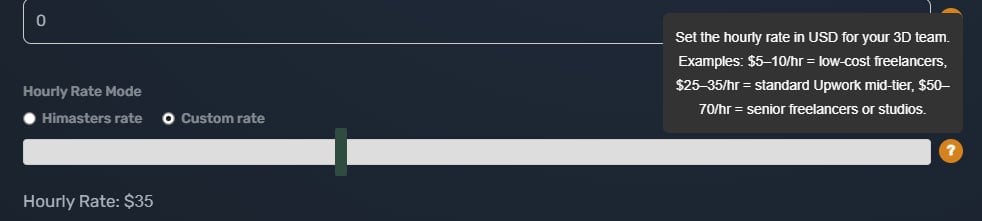 Thanks, edited OP The glorious AAAAA button? Vanished in 0.02b -- erased like it never existed, once the council of game devs declared it obsolete. But hey, if the industry ever bounces back, we might resurrect it from the dead! Yep, collecting all the possible feedback. The currency is USD. If you select the custom rate…
 -
Re: edge padding in photoshop?
Wouldn't selecting the alpha, and then expand the selection in the select menu?
>15393 results