Search
-
Maya Rigging/Physics Problem

 I have a fully rigged character, and I'm trying to set their mesh as a 'Passive Rigid Body' in the dynamics (aka FX) shelf. When I try though, it just pops us with this error saying '//Error: line 0:' Is there any way to work around this? If not, can someone drop me a tutorial on how to do a chain rig for a character?…
 -
Re: Shift keyframes to nearest multiple of 5?
![TorQue[MoD]](https://us.v-cdn.net/5021068/uploads/userpics/978/n9Y8GE4KMHMJB.jpg)
 Wow, Walterlow, that's incredibly appreciated! Unfortunately when I tried to run it, I get the following error: "Unknown property: "pos" in $selection" I copied your script and saved it as a .ms file then selected all of the biped bones and hit Run Script. Tried selecting the keyframes themselves and got the same error.…
 -
Re: Tutorials, Guides and Resources for Dota2 Workshop
 thanks for all the tutorials. I'm trying to view the models but I'm getting an error when I try to Load the Stock Hero Items. Error says: Could not find a hero that uses the currently loaded model. Any ideas? I followed this guide for the model viewer. http://www.cyborgmatt.com/2013/11/dota-2-model-viewer-guide/
 -
Re: Maya 2011 Transfer Maps not working
JackyBoy hey bro, i am getting the same issue.Recently i made an asset and then when i was about to bake it and transfer the details Maya 2011 cannot open Transfer Map Dialog Box and there was error in command line displaying "// Error: Value is out of range: 0".Don't know what to do, can somebody help please.... -
Re: Creating landscape materials?
Scratch that, I'm a fool. Looks like I was watching the video too small and didn't see the narrator's errors. If I had waited just a couple seconds longer I would have heard "now you're going to get an error here and that's because..." and then he goes on to suggest exactly the same thing you did. Thanks anyway man -
Re: Script: Align Verticies
 Ok cool. Just a few questions about your code. If I don't select any verticies (btn1) i don't get an error message. You used the line "format "No Verticies are selected.\m"" but shouldn't there also be a messageBox to display the error? And why is 'redraw off' and 'undo "Align Vertices"' when pressing btn2? Thanks again.
 -
Re: corner vertex baking - maya mel/python
 I open it with notepad or something of that nature and it get a bunch of random symbols. http://i10.photobucket.com/albums/a110/RdmLegend/test-1.jpg When I run it i get this error. # Error: name 'r7_vertCurvature' is not defined # Traceback (most recent call last): # File "<maya console>", line 1, in <module> # NameError:…
 -
Re: Problem with Normal maps exported from photshop
 Poopipe alluded to this but it should probably be stated more specifically… retouching a normal map that’s baked into a non-tiling UV is really bad workflow. The bake process creates normal map colors depending on the vertices of the model and which direction the vertex normals are pointing. As soon as you start painting…
 -
Re: Cassette Radio Recorder

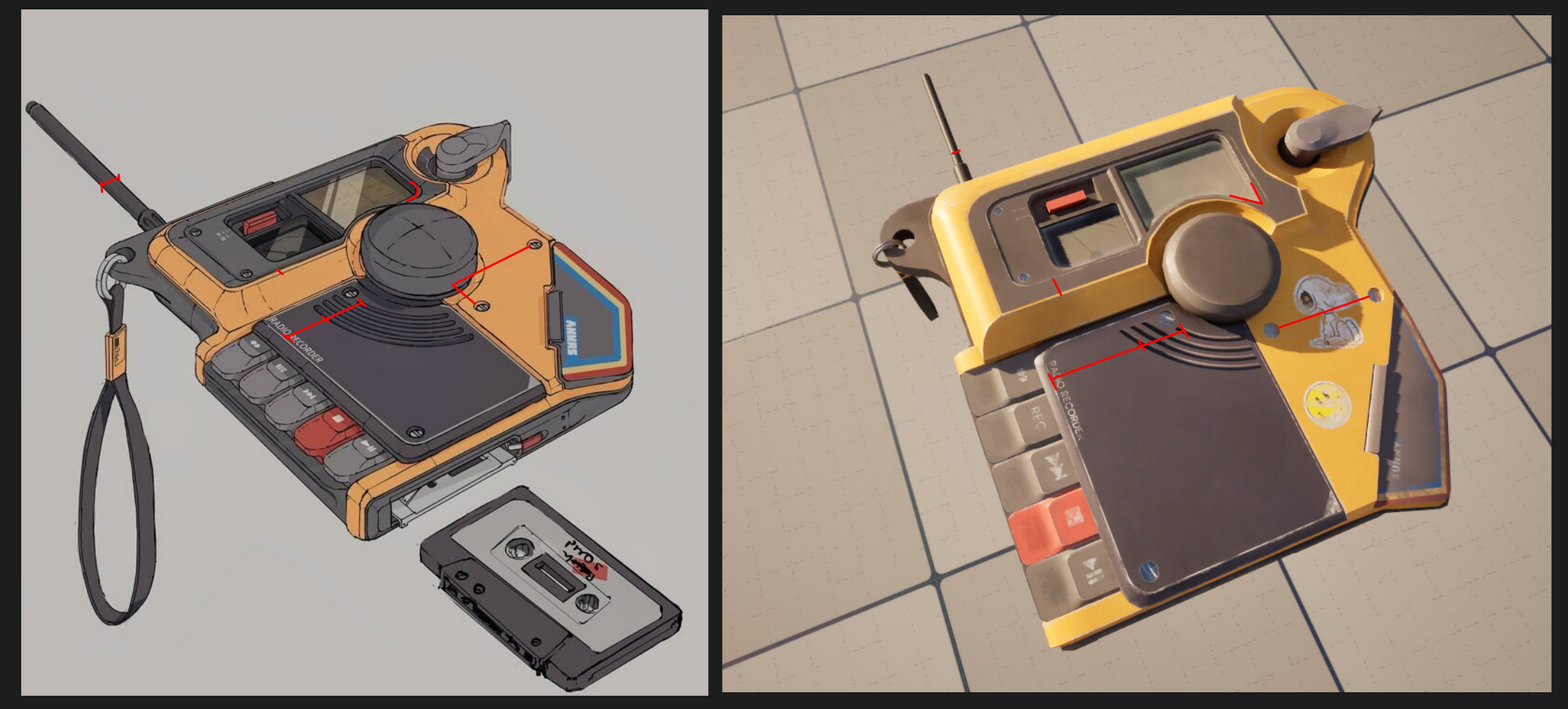 Nice project! In terms of modeling you have a fairly clean lowpoly mesh, good work here. I think it could use more polys all around since you have very visible facetting, especially on the big round dial in the middle and on the corner piece with where the lanyard is attached. In terms of proportions you have a few errors,…
 -
Re: Vintage chair real-time model

 Hey, I'd suggest maybe adding more polys to the curved part of the chair at the top (red lines) and rebaking. It also looks like a bake error where I've circled in red, but might not be an error, I can't really tell from this distance. I think if you put this model in a simple environment that was predominantly orange'ish,…
>11048 results