Search
-
Re: How do you find an idea for modeling?
 whenever something catches your eye on the internet just save that shit to a folder and then when you sit down to start a project open that folder up and pick something from it picking a project is never the hard part and often becomes an excuse for not doing anything imo
 -
How to add "favourite places" to File Open/Save dialogs
 hey guys does anybody know of a hack to add a custom folder to the tabs on the left because right now i have to click all the way to the folders , i tried making a shortcut on my doccuments, but then it got too cluttered and i kept clicking them by accident :(
 -
Answered: Duplicate option Suggest report
 May I suggest you to add a right+click option to duplicate a entire folder (like duplicate a layer) ? I don't like to have to save a folder with its content as smart material just to duplicate it. Otherwise i need to duplicate layers one by one and move out and... it's.... very long.
 -
Re: IN PROGRESS: why is Photoshop saving Ndo normals under AppData file location?
 It seems to put Custom Smart Materials there too Roaming > preset > Smart Material > Custom however when your in User... even if you don't see the AppData folder, you can still access it by typing \AppData in the bar and it will let you continue in the folder.
 -
Re: Crytiff does not work (HELP) :(
 Make sure the Settings Manager is finding all 3 files it needs. Did you just download 3.5.4 too? A few of the recent updates were missing the Resource Compiler. Do you have the RC folders in Bin32 and Bin64 of your CRYENGINE folder?
 -
Re: Derelict Candelabrum - Handpainted PBR

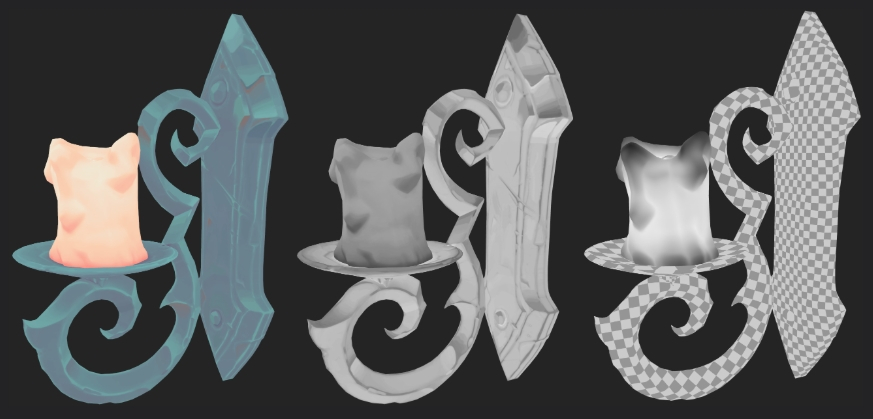 Love the handpainted style. I was a bit confused by the PBR part of it. Only thing I see for PBR is you have a Roughness map, but the map itself doesn't seem to make sense? The candle should be smoother where it has melted into drips, and nearest the flame. The lighting on the upward-facing parts of the holder shouldn't be…
 -
Re: Question about selling Unreal Engine 4 scenes
 Only the config and content folders are included in a asset package. The content folder contains all your assets; materials, textures, etc. and Yes, that does also include levels/scenes. You are allowed to have scenes in your package for demonstrative purposes, or even to serve as a backbone for an environment.
 -
Re: IN PROGRESS: dDo crashes on Mask edit
So I noticed one of the reasons its crashes, if you ask to create a Normal but don't have it below the normal folder/ weird circle symbol, it will crash. So as long as I leave it under the normal control layer and inside the normal folder, it wont crash. -
Re: Mousepad Thread: Why not?
 I take one of these and lay it unfolded and flat with the brown side up. I've been using these at work for 6 years. I replaced the folder once with a new one. So 2 folders total so far. I draw and jot notes on them sometimes.
 -
Re: cannot post images
 Also make sure you're using files from your dropbox "public" folder and not pasting the C:/users/[name]/documents/dropbox url. Copy your files to the public folder and then right click > copy public URL and past that between the IMG tags on this forum. Good luck!
>11634 results