Search
-
Re: getting ready for hl2
 nice, keyser, I never knew you modelled. This is actually the first time I've mesh smoothed since my first 3 models. I'm not good at doing high polies, so I add a mesh smooth. It was like 1500 polies before mesh smooth. anyhow, I'll get fixing tomorrow.
 -
Mose useful and best edge brushes in Zbrush?
 Hey, So I haven't used zbrush that much but I am recreating a Mario level for fun and portfolio hopefully and I am making the tubes I have hard edges and I want to get those smooth edges like that, what are some good zbrush brushes that are good for smoothing edges? I tried the smooth brush and it just doesn't do what I…
 -
At what Angle do we consider an Edge to be hard (when do we split?)

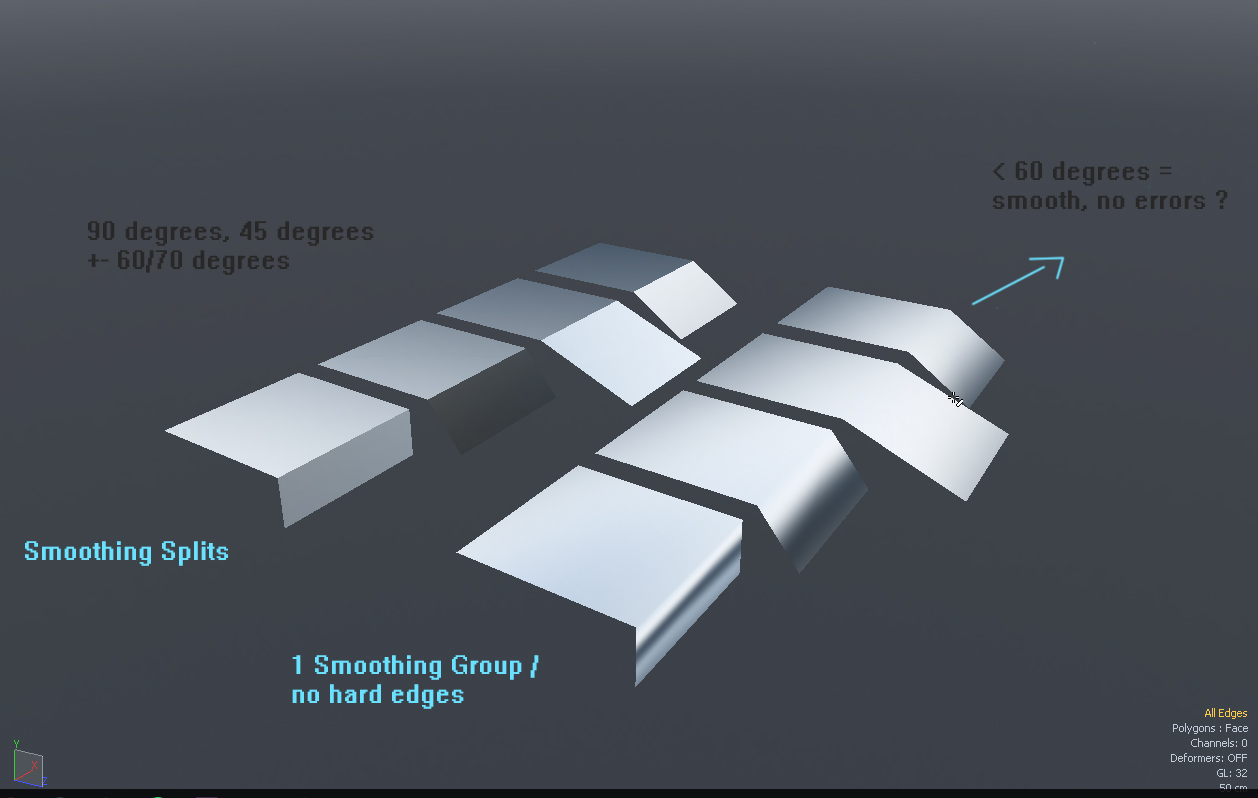 I used to think that only 90* edges should be split / smoothed seperately but after baking several objects I got confused. At what "angle" would you start to see smoothing errors and would require a split ? So I made some test planes to test it myself and it seems that everything under +- < 60 degrees smoothes fine on 1…
 -
Re: Big Awful Artifacts in my Normal Maps.
Hello Eric, thank you for your reply! As "last image", are you talking about last image of post #1 or the image of post #4? About the last image of post #1: In order to try different approaches and try to fix my problem, I tried to increase the polys of my original low mesh in two ways: 1) I manually added some edges in… -
Re: UDK, xNormal and tangents : what the hell is wrong ?
 I little time ago I found the origin of the problem. I forgot to write the answer of the problem here. It my fault in the end and how I manage my vertex normal in Maya. So what is the problem ? First I will explain how UDK import FBX : when UDK import any FBX it tries to find any smoothing group. With Maya there is no…
 -
Re: [3ds max] [maxscript] script to export/import explicit normals
 Are smoothing groups lost as well when using the skin modifier? The Edit Normals modifier can be used to unify or split normals per-vertex, but smoothing groups split them per-face, so to keep all potential normals I think to you'd need to use both a Smooth modifier and Edit Normals modifier together.
 -
Re: phong shading errors in bakes
 Correct. Smoothing groups are simply a way to control vertex normals. Smoothing groups are meant to simplify editing vertex normals, but I think they actually make vertex normals harder to understand. Vertex normals are a mesh-specific control. Phong is a shader-specific setting. They both control the "smoothness" of the…
 -
Re: Quixel SUITE - News
 Hey guys, I've looked the pages on this topic about smoothing mesh problem, but still didn't figured out. So, my mesh has one smoothing group from 3ds max. There it all looks smooth, but in 3DO it's not. Can you help me with this? [IMG]file:///C:/Users/Admin/Desktop/screen01.png[/IMG]
 -
Re: High poly to low poly normal map baking
 thank you so much for the clarifications. one more question, what about smoothing groups? dose my high poly smoothing matters? or its only the low poly one's? I've read somewhere that you put all ur low poly under smoothing group 1 for hard surfaces modeling. Is that a good approach?
 -
Re: Any help with Normals Artifacting - Castle Wall
 Depends what your uv layout looks like. - You could split smoothing groups at the UV shells ( my favorite ) - You could keep it all on one smoothing group ( first option is better imo ) For option 1, you can run a script inside "TexTools" that splits the smoothing groups at UV shells. :)
>15011 results