Search
-
Re: Can You Hide Faces in Maya?
 ctrl+h only works at the object level. Select the faces you want to SEE and isolate them. Viewport menu: Show -> Isolate Selected -> View Selected Click again to unhide everything.
 -
Re: 3DSMax - Script - Quick Pivot Center and Align to another mesh?
 ( if $selection!=undefined then ( Obj1=$selection[1] Obj2=$selection[2] Obj1.pivot = Obj1.center Obj2.pivot = Obj2.center Obj2.transform = Obj1.transform ) ) Should do what you want.
 -
Re: Creating diagonal extrusions

 You'd use shortcuts but this way with global search input, it's more descriptive (add invert selection and convert edge selection to poly selection after dot loop + ring). Starting with evenly subdivided geometry:
 -
Designer Filter to Painter. Exposed bool parameter appear as integer selector. Why?

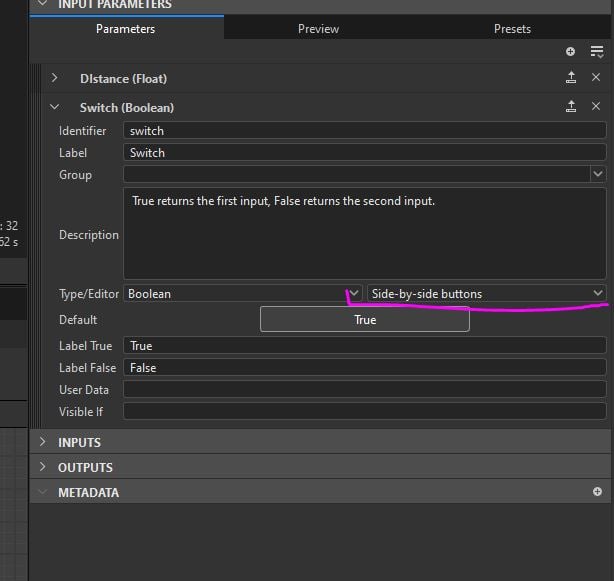 So this is how it looks like in Designer: Switch is set to "Side-by-side button". Designer Preview section also looks correct. But as soon as I import this to Painter that bool variable for some reason appear as integer selector instead of expected 2 buttons
 -
Re: [Maya/Free] Face-Weighted Vertex Normals Tool
VN feature in ADN Modeler Tools works better and I just use ADN Hard Edges selection tool, bevel it, select the flat surfaces with Angle Selection Constraint and use ADN Vertex Normal feature. -
Re: [ZBrush] Overlapping geometry on imported assets
 I guess you have double checked the meshes in Maya before export by selecting one vert and activating select connected? Once the mesh is imported you can select one tool, activate auto groups, hide one group and then delete hidden. That should work.
 -
Re: [3ds Max] Mesh wont react to bones
 You still have vertex selection model turned on in your edit poly base. Got here and turn that off and see if it helps. Some modifiers will only apply themselves to selected parts if the selection is left on.
 -
Re: 3D Max Transition between two different angles
 Volume Select selects a subobject within its volume. It's there just to force that end of the model to stay selected, so the Twist above it will confine to that part, while you're adding & editing geometry in Editable Poly below it.
 -
FBX Export Maxscript Error "no "+" function for undefined"
Hi Guys, I've just reopened a script i made a while ago, however I know it was working last time I used it, it's now not working. When going through the export part of code it gives the error no ""+"" function for undefined The code is as follows: fn ExportFBX filePath createFolder ObjName = ( The error occurs on the… -
Changing the Center of Transformation in 3ds Max?
hi! i'm new on thread. just a question, how do I move the pivot point during the sub object mode. for example, If i selected 5 polygons, then the pivot will go to the center of the selected polys. but what if I want to just put it in the end of the 5 polys that I selected.
>15393 results