Search
-
Re: Player control problem
 I tried cleaning up my code and used the sidescroller example code from http://udn.epicgames.com/Three/CameraTechnicalGuide.html#Example Side-Scrolling Camera Again it works just great in PIE but doesn't work on a device. Everything is ok except the player doesn't rotate (which works in Editor).
 -
Re: I model in my dreams...
 Programming makes you mentally tired? Not for me! When I had a coding rush a couple months back, all I could dream of were lines of code, theories and formulas (all for thinking toward to colored lighting into a 8bpp renderer). You're having the same thing with modeling. It's normal!
 -
Re: Creating a Prototype MegaScanner
 You can't simple subtract the images, diffuse is 2*X and Specular is X-Y. Also they are stored on the camera in sRGB so you must first make the conversion to Linear space. Its best to do these in shader code. For Gloss just solve for G using the BRDF shader code.
 -
Re: Sketchbook: DeepSpaceBanana
conditionals are 'expensive' in the sense that they aren't hard branching code, they execute all code regardless of whether or not a conditional is matched. if the logic going into a conditional is relatively effective, they are generally okay. math operations are 'cheap' on current gen hardware. texture fetches are not. -
Re: Wii Launch Thread
 The sensor code is really long. I have no idea in feet. But it's a big un. Also we need to get a thread for the system codes going. I'd like to see some PCer Mii thingys showing up in Wii Sports.
 -
Maya Python Script - Trying to Fix Issues
 It has some issues... I thought I'd post up the code and see if anyone has ideas... I'm finding it difficult to connect the floatFields to the value of the functions... and the selected vert mode doesn't work... Here it is. It's mostly an exercise in scripting #Import Necessary Modulesimport maya.cmds as mcimport random#…
 -
Re: Sci Fi Corridor
 I think that for the last gif, the one with the moving code on the display, it would make more sense if the rest of the hud was moving as well because the lines of code doesn't really blend well together with the rest of the hud. It seems that they are pasted on top of them.
 -
Re: Anatomy study entirely made on my Ipad

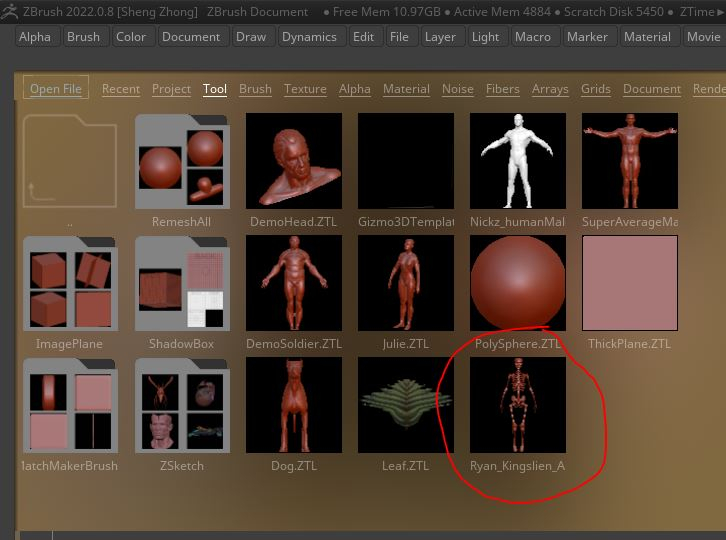 that's actually pretty impressive for ipad. She's leaning too much forward. Wrists are too thin. Pick up a copy of Anatomy for Sculptors. I don't know if the ipad version comes with subtools, but Zbrush is prepackaged with Ryan's ecorche model that you can drag in to compare and reference
 -
Re: Which software do you hate the most to work with (for whatever reason)?
 I think the standard UI is okay, like you said the muscle memory and knowing where things are comes after a little bit. Still there are items in menus which don't really make sense like the camera and perspective controls being under the Draw panel. Or like all of the different modes for Transparency, isolate subtool and…
 -
Re: "AAA"-Focused Video Game Art Contest *Speculation Thread*
 This is sort of piggy backing off of Swizle... but maybe they are using one definition of Death Match in order to allude to the second definition: (In computer gaming) a mode of play in which the aim is to kill the characters controlled by other players. So what if the art takes a Death Match type of focus to design...…
>58105 results