Search
-
Re: Texturing feedback - AKM

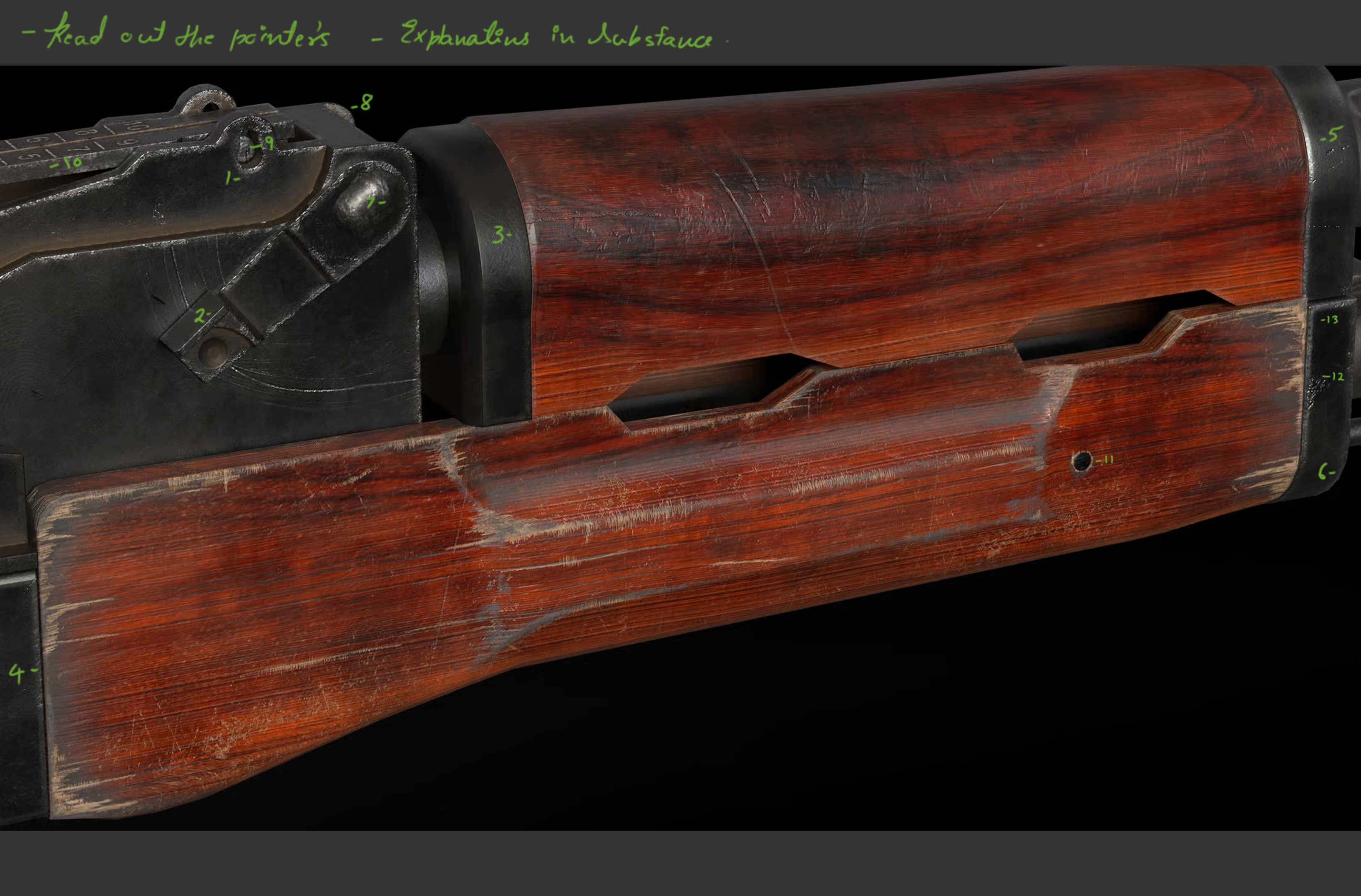 Hi Akshat, Akshay here I genuinely think its looking good but yes you need to refine the use of generator in Substance basically the curvature and Dirt-Generators that you have used. Im terrible with words but let me show you an image and a few techniques I use to polish things. Hope that helps. Dont get stressed just…
 -
Re: [WIP] DBAL-A3 — CAD-to-Game / Mid-poly Workflow (Internal Mechanics)
 my guess to the above request: Seems like a "art-test" or some variation, 6 month(probation) timed trial & this maybe wasn't supposed to be posted? Some parts seem very busy with the edges where they might not be needed otherwise this is pretty sharp looking so other than what i mention as a possible issue i do not see a…
 -
[FILLED] Technical Artist Needed — Custom Shaders & Volume Profile Template Creation
 Hello, I am an indie game developer working on a first-person 3D narrative game (mid-poly, atmospheric/stylized — not photorealistic) built in Unity 6 URP. The game spans five distinct environments ranging from warm domestic interiors to cold institutional facilities to overcast outdoor settings. The same room geometry is…
 -
Re: Max & Maya -Familiar Help-
Wow, so many questions :P 01 - Realtime Mirroring Make a duplicate of the object using "instance" setting and set scale to -1 in x (normally). There are some gotchas with this workflow to watch out for which you can read about here: http://www.polycount.com/forum/showthread.php?t=82052&highlight=mirroring 02 - UV Selection… -
Re: Unreal Engine 5 Tangent Space and Triangulation Problem
Thank you for answer my friend but i don't know edge flipping. What is the edge flipping ? -
Re: Need help in baking related problem

 1. Hm as for UV. That also happened to me. I uv the mesh in rizom-uv to check it out. Whenever I imported the mesh the UV was broken but when I re-imported the mesh the UV was as good as it was in rizom-uv. I don't know what the problem is. 2. About using less support loops. I wanted to have smooth areas in those areas,…
 -
Re: Back to Zbrush and Photoshop ?
It's sot of hard to resist , a subject somehow looks ok at close inspection that way. Same issue you have when draw something on a canvas up close and often need a few steps back and try to catch an impression your work lefts in a corner of your eye. While Zbrush does it automatically since you go from low res to high.… -
Re: how to use displacement for bricks
I forget what Unreal's implementation does but in principle the mesh only "needs" to split where you have hard edges - obviously UV seams will cause discontinuities as well. if you were to soften all the edges on the original model it would probably do roughly what you want. it might look a bit weird in places. In most… -
Re: Speed Portfolio Building!
I don't have access to post a paint over on your geo, but your problems are stemming from some bad edge loops and triangles >:| Grrrrr HAHA Yes, found it. This is a good breakdown by Perna of how to quad your triangles. Doing this where the edge meet the flat surface on the top of the blade would allow you to get rid of… -
Re: maya to mudbox import issues :(
 take a close look on your mesh... there are some edges moved to the site... some verticies are really close together... they look like one vertex... and to get the hard edgdes... 1. go in object mode 2. shift + rmb --> soft harde edges --> soften/harden this will set hard edges based on a face angle...
>27970 results