Search
-
Re: Zbrush 3.5 R3 Help
 That's a strange one. Aside from the random scaling issue which I've now got sorted, I've never had any issues importing or exporting with the latest version of Z. Used to get random crashes if I was trying to import something with dubious geometry.
 -
Angle maps
 I posted this in the other thread, but I would like to make a knew one that is specifically for the topic. I've been thinking of using spherical coordinates to describe my normalized bump maps. I believe you could do this practically by rotating a spherical coordinate system around the Y axis and adjust you angle values to…
 -
Re: Zbrush : Surface Noise Problem
I had that same problem with a mesh I was working on. A workaround is to use the X Y or Z offsets. At least, that worked for me. It didn't get rid of the seams, it just moved them so they weren't anywhere on my mesh. -
Re: Zbrush 3.12
 I'm with Super here, that would be a great one. Being able to rotate freely and smoothly is just as important as being able to push Z-illions of Zwhatever, well to me anyways. SpaceNavigator support would be fun to have too.
 -
Re: Beginner 3D Model – Need Feedback on Topology

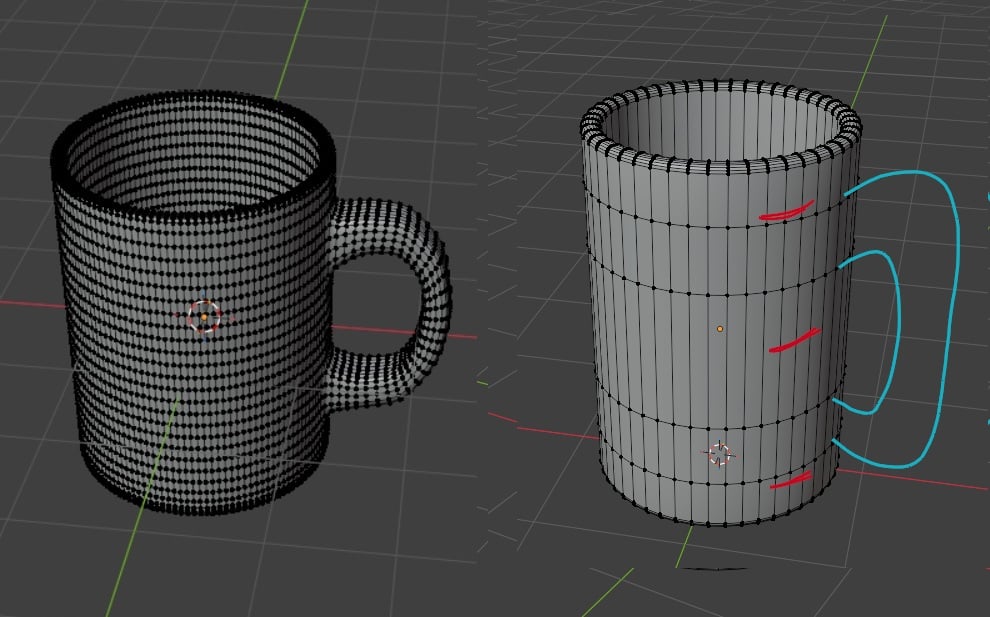 This is really overkill for a game but I can't really suggest much (detached handle example) without knowing the type of game and how you wanted to use the mug but as it stands I'd argue it's even overkill for a movie prop If it's a hero object in a first person game (like a gun in call of duty) then you want higher poly…
 -
Re: Can one import vertex colour into Zbrush from another app ?
 Cheers - Yeah I guessthats gonna have to be the plan - I believe that .FBX supports vert colour will save out he mesh in that format and dump some uvs on the mesh and bake the vert colours onto a texture take it back into Z brush for the fun part.
 -
Re: [Riot Art Contest] - Ziggs
Reply by Tard1Grade · · Home› Contests & Challenges Archives› Riot Art Contest› Riot Art Contest - Character ArtAn update, Thanks for the feedback Dantert, I did make Ziggs a bit thicker, redid a bunch of the hard surface stuff. I would really appreciate some tips on how to model hard surface in z brush more efficiently. -
Re: [Zbrush] brush that ignores surface and sculpts on top?

 If you store a morph target, the layer brush will only sample from the stored surface depth. As a result you can get something like this just be changing the z-intensity (higher value strokes will be on top of any lower ones).
 -
Re: Rogue spike in my zbrush mesh
 I had a rogue recently and have no clue were It came from so I clicked Go Z and went to It's location and deleted that f-cker! all is well, no holes or anything. :) Hope that can help someone one day.
 -
Re: Zbrush 3.5 Polypaint crash
Do you have photoshop running in the background? I have been getting very weird crashes lately on Vista64 - both Z and Mud crash if CS3 runs behind them, as soon as the stylus hits the tablet (mouse is fine)
>45476 results