Search
-
Re: Max : Turn off sequential numbering when duplicating
 Doesn`t really fix your issue, but you can always rename all selected objects at once by using tools ->rename objects.
 -
Re: [Blender] Animation Versions Kit
 We got new updates. Version 1.0.2: * Check if version name exists while renaming version * Don't select all objects while renaming version
 -
Re: maya question re multi sub object
 I just wanted to avoid doing that since my scene has hundreds of materials, but its only an issue when I have imported a scene via fbx and have to rename my materials. Once they are renamed it s not an issue, but I swear maya used to do this like blender, where you click on a face and the associated material is highlighted…
 -
Re: Tell me the Best UV unwrapping software
You mean the button in software? Because latest installer already is renamed to RizomUV. But the algorithm under U button is called Unfold. This will not change. And latest exe is also renamed to rizomuv.exe. -
Vista + XnView
 Alright, this is going to seriously hamper my workflow...apparently XnView's rename, and batch rename doesn't jive with Vista, due to the wonderful security measures they've implemented. Is there anyway around this without disabling Vista's security measure? :poly127:
 -
Re: [Blender] Node Kit - Add-on to manager nodes tree
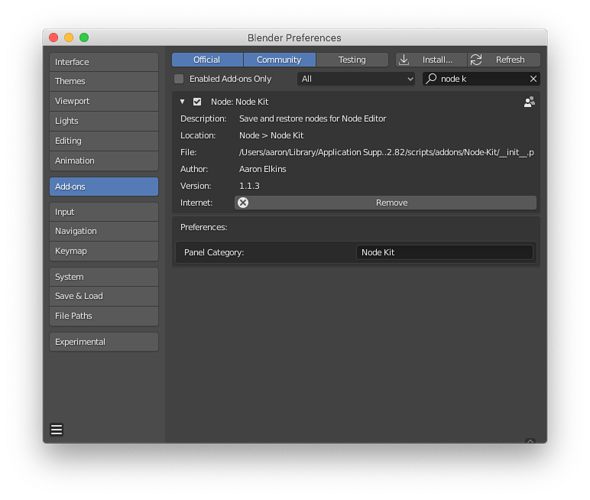 Node Kit just updates. Now we can rename the N panel tab of this Addon in the add-on preference. Version 1.1.3: * Add on preference option to rename add-on tab name in N panel
 -
Re: Huge Modo Normal baking issues
 It should rename the target UV map when you rename the UV map. But be sure that the high and low UV map names are different, otherwise it'll try and bake both. Bit annoying.
 -
Re: The end of xNormal? (nope)
 Put those high pollies in a group. Use renamer tools and it should auto rename to bag_high_01 - bag_high_99. I've had up to 250 high poly pieces for 20 low poly pieces and it worked perfectly.
 -
Re: Solved: 3DO not talking to NDO
 Rename your *.PSD to BaseMaterial [Normal].PSD - that will fix this. The primitive objects' meshgroups are called BaseMaterial. Since 3DO links textures by meshgroup naming, renaming the *.PSD to the meshgroup name will resolve this after a force-refresh. :)
 -
Re: SOLVED: DDO not showin texture on Model
 Did you change the name of the mesh? If that's the case, you'll either have to rename it back to what it was, start from scratch, or change the name of the mesh inside the project.xml file and rename all the .psd files in the project folder.
>1409 results