Search
-
Re: WIP- Elderly Character- Need Honest Feedback
 Curious if you're a traditional artist transitioning or dabbling in digital art? was browsing this board's new entries amongst those requesting critique earlier and noticed a side profile among your images (now missing?) where a 'painterly' style/depiction applied too these studies, for me at least was quite noticeable…
 -
Re: [MaxScript] Polygon to mesh projection

 try this (convex only though so concave would need to split into convex then recombined after being wrapped individually)... -- creates a ray point along the edge fn getEdgeRay msh edg = ( ze = edg - 1; a = (mod ze 3) + 1; b = mod a 3; fverts = getface msh (ze/3 + 1); v0 = getvert msh fverts[a]; v1 = getvert msh fverts[b +…
 -
The custom node tutorial - Basics

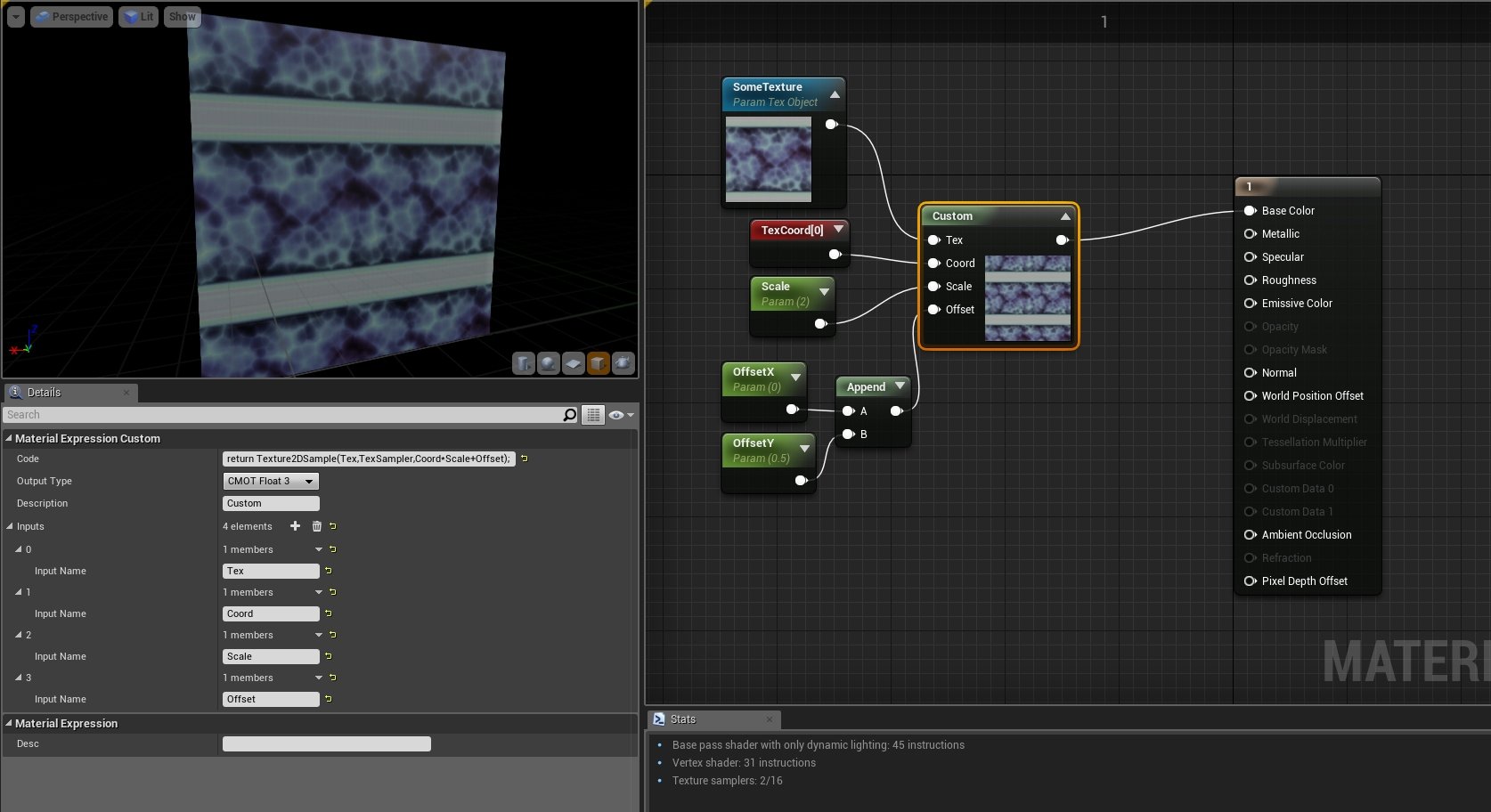 Hi, in this one, I'm going to show you some basic usage of the "custom" expression in the material editor in Unreal Engine. For "additional" information, check out the following link: https://docs.unrealengine.com/latest/INT/Engine/Rendering/Materials/ExpressionReference/Custom/ Make sure, you noticed the limitations of…
 -
Correct way of baking normals for UE4
 Feeling lost. I've been having trouble trying to bake correct tangent space maps for UE4. My first approach was the traditional one. I use Maya 2014. I exploded my mesh, triangulated, managed smoothing groups according to UV splits, and baked a Tangent Space normal. The results looked clean in every application I had…
 -
Re: Viking Jinx
 Reply by RachaelBriner · · Home› Contests & Challenges Archives› Riot Art Contest› Riot Art Contest - IllustrationQuick color tests! From set "A" I am leaning towards 1 and 5. For set "B" I like 1 and 2. Thoughts? Questions or concerns? I think I'm abandoning the composition of set B. Feedback welcome and encouraged.
 -
Re: [Riot 2017 Art Contest] Project: Xayah and Rakan
 Reply by RedSinistra · · Home› Contests & Challenges Archives› Riot Creative Contest 2017› Riot Creative Contest 2017 - IllustrationAll of them look amazing! Mhmm I like B and C: B moslty because it focus the "face / eyes" with that neon , and the hood and ears of C ( I think that In game would be more appealing and distinguishable for that camera angle.) Keep it up!
 -
Re: NEWS - GA Montreal Closing and DWV Hacked
 Now to wonder how much monies he made from A to B, A being Oh my god closing... DONATE NOW B being Oh I think I can hold up more in fact Rinse and repeat.
 -
Re: Sketchbook: MrN
@MrNinjutsu Really top notch stuff! Didn't realize you've had a presence here for many years, also your YT channel helped me out while ago after stumbling across Blender tutes for making zip ties and sticky tape - I'm into large air/land and sea vehicular assets so like the mirrored solution freeing up UV space for that… -
Merging two Maya scenes
 I am trying to merge two Maya scenes in-place. Where I import scene A into scene B and it will move items from scene A into the correct hierarchy position in scene B. Other than name-space shenanigans, what is the best way to go about this in Python? Or is there a script already that does this?
 -
Re: Grapple Hook/Rope Swing...?
>154737 results