Search
-
Re: DAM soft for 3d files?
 Thanks pior. it still have t copy the file in Eagle special resource folder and the link is not updatable if you move the file somewhere. I think woud be simpler to just make file shortcuts and keep them in a "project folder" .
 -
Baking Problem in SP (Modelled in Max)

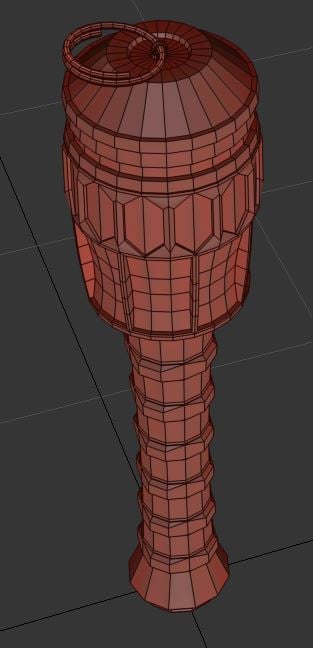 Hi guys. I have a problem. Experienced Max user here, and I was making a little stick grenade, just as a portfolio piece. Trouble is, I cannot for the life of me ge it to bake properly. Shown below are the low poly and high poly, along with the object names. The head section of the high poly has been split into multiple…
 -
Re: Game Industry Layoffs - WTF?
In most cases they don't own the building and while I have literally no idea how it works in the states it's reasonable to assume that most landlords will take a dim view of their tenants sub-letting and There's usually a pretty significant financial penalty to bailing on a license in my experience - partly cos the studio… -
Re: [Maya] Hotkeying Shading -> Wireframe on Shaded
 Well yes absolutely, just go under C:/Users\***youruserID***\Documents\maya and *.zip everything in this folder. To reload it unpack it at the same exact location and order you picked it at first. Hotkeys file is located in the pref folder and is named "userHotkeys.mel"
 -
Re: Note to Self - Sajeet's Improvement thread (Environment & assets)
 When you are working with substance... make sure you put things in folders, and then collapse the folders you aren't currently working on. It helps the program being a bit nicer to the computer... and definitely helps when saving/exporting/up Or Down Rez'ing
 -
Re: Annoying things that can -- and usually -- happens when 3d modeling
 Zbrush not saving auto-backface mask setting. have to turn it on again after closing/opening zbrush. Zbrush saves project to the last location you accessed and you end up with saved projects in Brush folder or Alpha folder or whatever.
 -
Answered: Filters for Materials in Mixer??
 So I noticed Quixel Mixer does not allow for use of filters on surface layers or folders containing solid layers. Filters like blur, contrast, levels, e.t.c These only work for the mask stack. Any plans for adding filters to surface layers and folders in Quixel Mixer?
 -
Re: substance painter, how do I paint 'above' the lower wood texture without its normal/height showing?
 By default the blending for height is set to linear dodge so under details in the height will propagate. Select the height channel and set the blending of your layer to replace , if you are inside a folder you also have to change the blending of the folder to passthrough.
 -
Re: Overcast clouds in an HDR sky.
 This is the one you want. And if you didn't want to type that everytime you open your level, you can put that cvar in a user.cfg file in your root SDK folder or in a level.cfg file that would go in your level folder.
 -
Re: Scifi portfolio level, UDK
 Hey Divine Rage, Just a couple questions regarding the scene if you dont mind me asking. How much thought have you put inot the level itself? looking at the screen shots you posted it seems to be a lot of trial and error which is a good learning experience but wastes a lot of your time which could be better used on making…
>11637 results