Search
-
Re: LOW-POLY ART

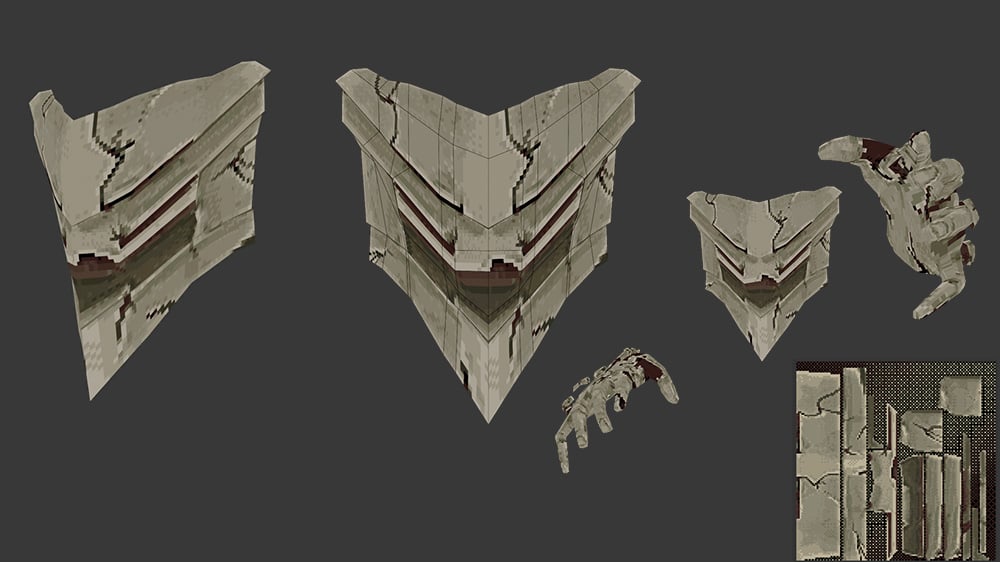 Ancient god 216 triangles, texture size 256px Model I made and animated a while ago. I painted it on blender and then processed the texture with SLG_img2pix for that crispy look, it's an amazing free tool I really recommend it for editing retro textures or making them.
 -
Re: Paint my wood!
 I'd take some images of painted surface and put them over the wood layer, probably 2 or more layers of different colored paint to really make it look worn and painted multiple times. First I'd marquee select each boards worth of wood and flip it so that the paint pattern doesn't continue from one board to the next. Then…
 -
Re: Tokoyas Hand Painted Stuff
 @Jessica Dinh and Mcejn: Thanks a ton for the crits and paint over :) I've incorporated some of the shadow variation in this latest version, I think it's added a nice variation to the bricks and makes them appear to be of various sizes and depth, I'll probably come back to this tomorrow and increase the shadows and depth a…
 -
Re: Problems with values and focal point
 I disagree that there's a focal point or contrast problem- with a human face in the center of the image, people are going to jump to it and stay there. The amount of contrast between her and the light feels good to me. I might crisp up a couple more of the edges on/around her face though - especially with whatever is over…
 -
Re: UE4 - material blending, vertex painting and LOD's
 If you're talking about walls and floors that are basically just planes /boxes or other simple geometry with a few verts added for painting there's not much point in lodding them. Lodding anything architectural with under a couple of hundred tris is of dubious value unless you can see a shit load of them at once.
 -
Re: Maya Python, inconsistent results when running script. [SOLVED]
 I noticed you are calling reloadTexture() inside a for loop. Each time it got called it will loop through all file nodes to set texture path. It's doing that loop over and over which I don't think is what you intended? If you want a fail safe reload you could call that separately just once at the end. I may be wrong but I…
 -
Re: Uberren's Hand Painted Barracks
 Thanks Brad. I tried darkening the ground a bit more and also desaturated it some. I also went through the beds and tried sharpening the texture up by painting in some more light into the grain and brightening the tops of planes to separate them better. I think I'm slowly creeping up to the point I can call it done. Going…
 -
Painting on cubemaps?
 Anyone here work with cubemaps/skymaps much? Sometimes I want to paint out rendering errors, or paint in some details, and have yet to find a nice way to do it. There used to be this plugin for Photoshop called SkyPaint, purported to let you paint on the six images while seeing them stitched together, but I couldn't get it…
 -
Re: WIP Mortuary: What I wish someone told me 8 years ago (but to be honest, I couldn't listen)

 Now that I've more or less come further than I did before it's hard to write this thread like "feedback to my former self", so I guess this will just turn into a WiP thread where I make some jabs at my former self, "this is what you should have done". Did some further tweaking of the lighting to get a softer result. I know…
 -
point me in the right direction for a MEL script
 I've gotten really interested in the fur via alpha mapped dots: example from bobo And I was wondering if there is any way, within maya, to take some paint effects grass or fur, place 3 or 4 planes bisecting the grass/fur and run a MEL script to say "wherever a blade of grass/fur passes through a plane, render a cross…
>57736 results