Search
-
Re: maya script delete empty groups?
 try import maya.cmds as cmdstransforms = cmds.ls(type='transform')deleteList = []for tran in transforms: if cmds.nodeType(tran) == 'transform': children = cmds.listRelatives(tran, c=True) if children == None: print '%s, has no childred' %(tran) deleteList.append(tran)if len(deleteList) > 0: cmds.delete(deleteList)
 -
Re: Rotating Text with HTML?
 Create a div container which has the shape and text inside and then use this code in your stylesheet to rotate the container. [html]div { -ms-transform: rotate(); /* IE 9 */ -webkit-transform: rotate(); /* Safari */ transform: rotate(); }[/html] For learning: http://www.w3schools.com/ https://www.codecademy.com/
 -
Re: Baking Artifacts That Disappear When Moving the Mesh
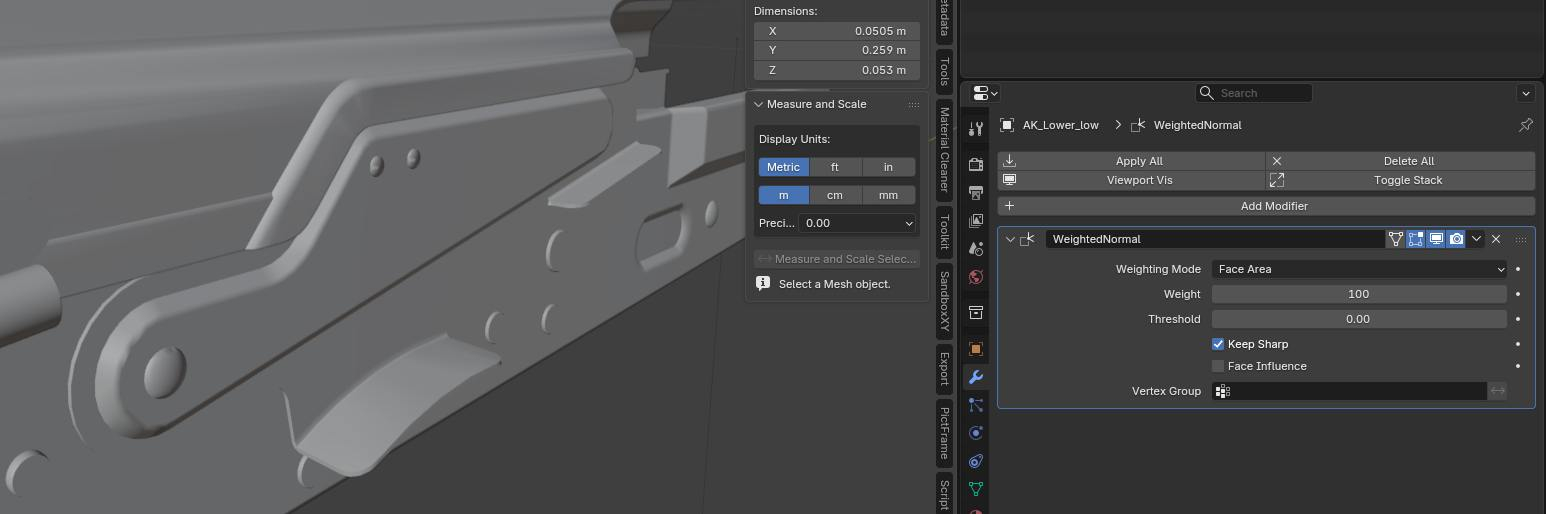 I assume this long triangle shading gradient isn't in hi poly mesh . But it could be if its sub-div model . Most probably although it's low poly model . Easy fix would be just fixing vertex normals/ split normals or whatever they are called in your software. Here I fixed the gradients by just putting Weighted normals…
 -
Re: Texture Atlas - Placing 2k into 4k
 Ok, then you would need to set your transform to Relative to Parent, because that's where you will scale down your different elements before blending them together. Set each transform to Relative to parent, set the tiling to no tiling, and scale down by 50% in the Transformation settings.
 -
Re: Quick max Question
 right click on move-transform tool - opens the "move transform type-in" window, switch to scale right click x axis spinner, switch back to move transform right click x axis spinner. rightclick always sets a zero value in the spinners, pretty handy.
 -
Re: Texture /photo straightening techniques?
 Something like this? This is a mesh transformed into curves then filled and passed through a triangle tessellation group, all with Blender's geonodes. Corners are preserved in the conversion to curves by being marked with a Boolean x Point attribute so they get temporarily split. You may need to tweak the Corner Angle…
 -
Re: MODO | Vaughan in 60 Seconds Videos

 MODO 11 | Transform+Duplicate When using the Transform, Move, Rotate or Scale tool, there is a qualifier key that can duplicate on mouse down using the Shift + Control keys. This video is a quick introduction to the Transform Duplication options in MODO 11.…
 -
Re: Internet Rot and brain drain: The loss of technical knowledge as sites and forums decay
 I would suggest reading thru a couple official archive file type recommendations from different archives and countries. Like this one; https://www.archives.gov/records-mgmt/policy/transfer-guidance-tables.html Screenshots of full pages (which I made a couple years ago) worked imo better than saved out htm, html files since…
 -
Re: Scale two verts in Maxscript?
 have you tried just using the transform typin tool? if you select the two verts, select scale and go to tools > transform typin, putting in zero should instantly scale them together EDIT; ah just noticed u mentioned transform type in. still its not too bad to just use that is it?
 -
Re: 3ds Max Rigs:: Wire Parameters offset and Constraint conflicts
 I guess the confusion is I am dealing with 2 separate issues. Per the Transform Expose. Thats the thing, the listing it has does not correlate to fixing the offset if I plug in the numbers to the wire parameters from the other thread I linked. I also attempted freeze transform, and when I attempted to reset to frozen…
>9305 results