Search
-
Re: Reallusion Character Design - Mythcons

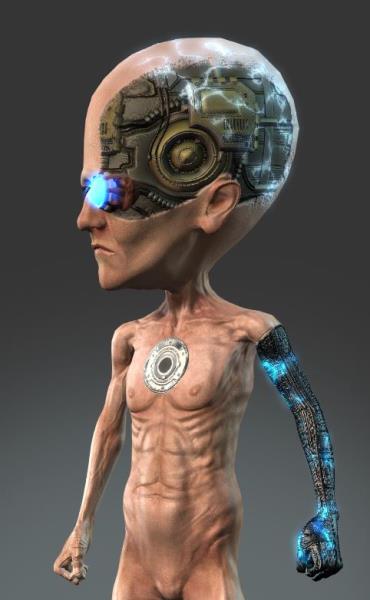 Reply by Mythcons · · Home› Contests & Challenges Archives› Reallusion's 3D Character Design Contest 2016Now that the Decals options are fixed, I'm able to add more dynamic detail to my textures. I use 3D-Coat for PBR painting. The cybernetic arm and the electricity are separate decals for the Body texture. I added the electricity decal texture to the 'Glow' channel to enhance the glowing effect.
 -
Re: Multiple UV Performance?
 You should create a default Decal UV layout, to which you try to conform all cars and all decals, that way you don't need to create a new unwrap for every decal, which sounds like a bad idea (too much work, impossible due to max 4 UV's).
 -
Re: Old French City Street [UE4]
 See the link for explanations on decals in shadows and in GI (cause there were also problems to see decals without direct lighting) https://answers.unrealengine.com/questions/25508/decals-not-rendered-without-direct-lighting.html -> i think it will help you ;) Cool scene you have, gj i like the mood :thumbup:
 -
Re: The Bi-Monthly Environment Art Challenge | May - June (96)

 I'll be honest, I messed up in a huge way by completely forgetting that this is meant to be a dungeon entrance :'( but I still had a really great time! Tried out trimsheets, decals, foliage, and also Substance for the first time and learned a whole bunch.
 -
Re: Star Citizen - Weapons
 Thank you all for comments :) @Next these do have unique texture sheets for AO , wearmaps and dirtmaps, but yes we are using decal sheets to add parallax and "diffuse" decals @AlefinWariner yes same as ships, its bevelled and using parallax decals @Mehran Khan it depends, but usually a couple of weeks
 -
Re: Answered: A few features I think Quixel Mixer needs...
 Nice to haves: Group layers into a folder (I'd like to be able to group all my decals). Decal mover (instead of using the x/y - a move tool that allows me to drag the decal across the tile (hold key for rotate). Holding "shift" locks tile to 45's and 90's (similar to zbrush). Hovering mouse cursor over a layer name will…
 -
Re: BIG WIND [ Vehicle / Hard Surface ]

 @Joci Kösz! (Thanks!) Do you have any more of those pics? I haven't got those in my reference folder, and I thought by now I'd collected every picture on the internet of this thing :D I've also been trying to hunt down where I can buy the Hungarian TV show 'Attraktor' season 1 online, as ep. 3 features this vehicle, but I…
 -
Amplify Bundle, because who doesn't like a good deal? 50% OFF

 We're trying out bundles at the Asset Store, you can already save $35 with the bundle but it's currently at 50% OFF. We weren't initially going to be part of the Unity Asset Store Reboot 2020 sale event but It's the best time to get it, I don't think we'll be doing this promo again soon. This bundle includes 3 of our…
 -
Re: Amir's Portfolio environments
 I've been experimenting a bit with the mesh decal technique in cryengine. I have to say that cryengine was built to make use of premodeled decals. It handles transparency really well and there isn't a single sign of Z fighting when overlapping two polygons together. Since we don't have access to an advanced material/shader…
 -
Re: Beveled Assets and Tiling Textures. Techniques?
 sadly UE4 is not stable using deferred decals and so far I do not think there will be improvements coming anytime soon. I did manage to sucesfully use normal/roughness/metal decals which is great but its just a step-up to deferred decals method which could be a game changer if combined with the weighted normals workflow.
>16854 results