Search
-
Looking for a level designer for a plateform video game.

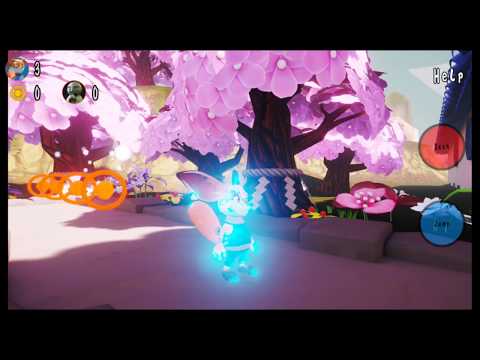 Hello, I am looking for a Level designer to help me design the layout of all the plateform level of the game. The game run on Unreal Engine 4 and it is a stylized game. Here a video of the prototype of the game : https://youtu.be/OFdoH8hG4z8 If interested, feel free to contact me via mail : aartscyan@gmail.com Best
 -
Re: The Bi-Monthly CHARACTER ART Challenge | September - October
 @Saaamoth hehe you are right. I forgot to meantion that I usualy start with a basic muscle layout and that is not yet supposed to look "final". I do this to have some guidance and to understand the character better :) @Calvin may I ask if you did this with Zmodeler?
 -
Re: ArenaNet Internship [Environment] - Oniram vs. Paragon
 im going to probably be putting my speculars in the alpha of my diffuse maps. and if i use masking or something for overlays ill put that in the alpha of the normal. im planning out my map layout now. ill post it up when its done.
 -
Re: What Are You Working On, Animation Editon 2015
 Loving all this 2D art, I'm thinking of trying a 2d rendering style with my next shot. Doing some test with layout and blocking first though. Still not sure if I want to model a background or just leave it blank and get to blocking this out.
 -
Re: Tabletop and a shader question
 Here's the most recent update as of 11/24/11. The goal is to get all the following nailed by end of the month - basic layout, texture maps, shaders. After that, I will be moving onto giving each prop some individual love - wear and tear :P
 -
Re: Sketchbook: Andrew Bishop
Working on the layout of the First GaW map Forest Grove, had to disable the icon display of tree resource on the minimap since theres a 2000 icon limit and it wasn't displaying half the trees in game or the player units since the icon limit had been reached -
Re: Criticize my work please
 Looks good so far. You have some nice layout/construction. Everything reads well. I am finding the textures to be too flat though. Even if you're going for a flat look you could use more variation of color and saturation.
 -
Re: bewsii's Dota 2 thread
-
Re: Couple of questions about closed meshes and smoothing groups
 In Maya you have hard and soft edges. You select an edge and define it as hard by going into Mesh Display>Soften/Harden Edge. Generally the 1st is better. It gives better shading, there is less wasted space in the UV layout and there less of a chance of z fighting.
 -
Re: Monthly Community Noob Challenge November 2013 (13)
 Thanks @ iniside. I'd like to see some texture sheets and even layouts for the pillars in particular. I've had a lot of problems in the past trying to get the deformations of rock forms to work with my texture sheets. I'm sure it's a no-brainer issue that I'm stuck on.

>8530 results