Search
-
What is the method for texturing holes in walls to expose the bricks?

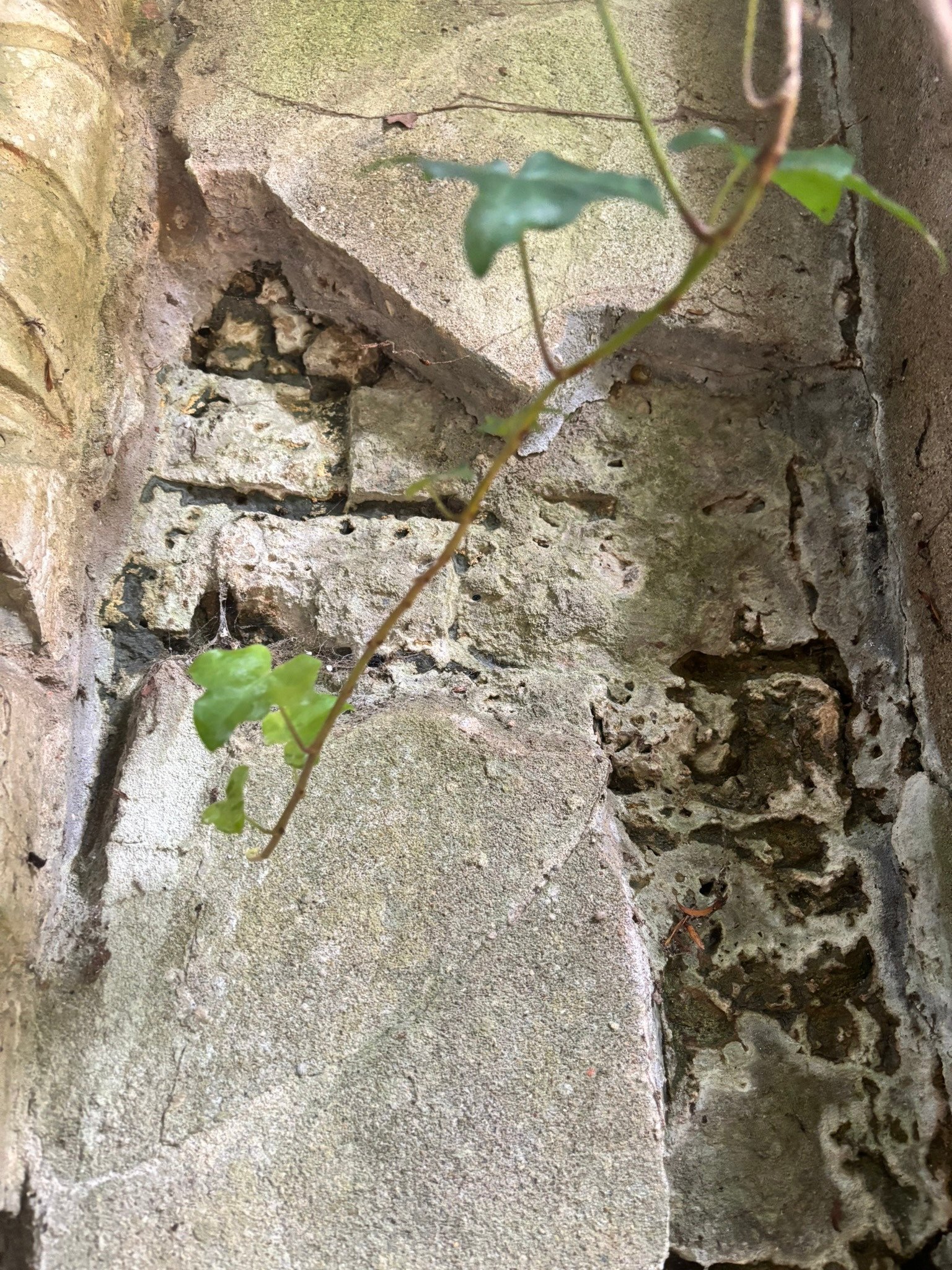 How can I replicate this texture featuring holes in walls that expose the bricks behind the stone? Should I create it on a trim sheet, utilise decals, or actually model the broken sections? As I have not attempted this before, any helpful references or tutorials would be greatly appreciated. Thanks
 -
Re: Retro Space Age Jinx - "Set phasers to HAVOC! Teehee!" - League of Legends
Hey! Good work, keep it coming :) - I saw you on the WYWO thread and noticed you asked how to add thickness to the belt you've made; in zbrush you can go to the Geometry Panel > Edgeloop > Panel Loops. You can actually select you thickness using a slider and it'll create those new parts as separate Polygroups; you can then… -
Re: Hackers Hideout (Apartment Environment)

 Starting with the light assets first so I can get most of the lighting up. So that when I create the rest of the assets and bring them in, I know how they look in my scene and how they react with the light. This is so I can then make changes to the textures if they don't match up with the reference. Also It just helps me…
 -
Re: Dragon/Demon Champion WIP
 Update! The normal map. This is the area i'm least confident at, and so it's taken me a while to get it to this stage. Along the way i've encountered multiple problems: the Spikes on the model were a real pain to unwrap, but now im happy with how they are laid out on the UVs. I used Xnormal to create the normal map but…
 -
Re: WIP Character Critique Wanted
Hey Peet, thanks :) mh I made some thumbnails for the overall shape, but you could not call that a precise concept I guess. Since I watched the mentioned tutorial of Marc Brunet on this character here https://www.artstation.com/artwork/Lal8P , my goal was to create a character with a similar degree of abstraction and… -
Re: New Software - PhotoSculpt - What do you think?
 Hi again guys, I'm posting some news about my software Photosculpt www.photosculpt.net. New this month: my web site features a very nice :poly124: Flash 3D viewer in front page (see it at www.photosculpt.net) featuring some great models and textures created with my software. This month I've also uploaded new FREE 1024x1024…
 -
Re: [UE4] Botanist's Temple - WIP - Darksiders Fan art
 @ThomHeaj Thank you! That is a great idea. I would create some geo bricks that match your textures and use them for the edges of the broken parts. Yes, create unique (reusable if possible) using your clean ones as a base to save time.
 -
Ponyo
 I gotta say, a lot of my inspiration as an artist comes from Miyazaki's work. He's a really inspiring guy. He writes most of his stuff, he's an amazing animator, he's really a great role model. His movies are always a joy to watch. The characters' subtle movements and human tendencies, the amazing sense of composition,…
 -
[WIP] 15 Million dollar mansion in UE4

 I want to make this house in UE4 at a photorealistic level: UE4 archviz has been around for a while and creating small scandinavian apartments just doesn't cut it anymore. Creating this magnificent home would really put me on the map and I'm sure it would lead to a job. I am willing to spend 6 months on it as well. (in…
 -
Re: toolbag contest + wish list
Yea, shadows are a bit jaggy as well. The autoreload function is amazing, you can be texturing in photoshop and have marmoset open on the second monitor, and just click over to it and the textures update without having to click anything. Its a great tool for realtime preview of textures. After using it for a few days,…
>88650 results