Search
-
Re: Concepting level design HOW?
 Yes you can actually export any geometry or bsps you like.. Just select all you need and go up to File>Export Selected
 -
Re: Maya Planar commands not working when clicked from shelf
 It works, but only on a face selection. The UI/hotkey you're using has something to convert the selection first. Try adding this line into your shelf button: ConvertSelectionToFaces;
 -
Re: PSA: Forum Tricks
 macroScript LockAllTransforms category: "HowTo" ( setTransformLockFlags selection #all ) If you select the code, then click the P button, and choose Code, you get this. Imperfect however, hmmm.
 -
Re: ndo 2
 1. Click convert 2. Select Normal to AO 3. Select "File" and find your normal map file 4. Alter settings to your liking
 -
Re: Baking out 16bit normal maps in Maya
 It's weird, you have to select tiff16 in the drop down menu when selecting your output path and file name. I'm pretty sure that's what it's called.
 -
Re: maya: how could we reset all the pivots at once?
 if you're working in maya: -turn on snap to grids -select all objects -with move tool selected, hold down D -middle mouse drag to center of grid
 -
Re: good old 3ds max corruption
 well that code snippet doesn't work apparently. i found the bug by individually selecting objects for baking, and got the exception when i selected the object with no mesh.
 -
Re: Showing polycount in Tris (3dsmax)
 Right-click on the viewport name, and select 'configure'. Then, go to Statistics and you can enable and disable polygon / triangle count from there, for the scene or scene and the selected object.
 -
Re: Help with too-square models
This might help. I started off with a box, illustrated by the selected faces, then I extruded outwards and did a Select and Uniform scale on them to achieve a rounded shape. -
Greeble Generator for Blender

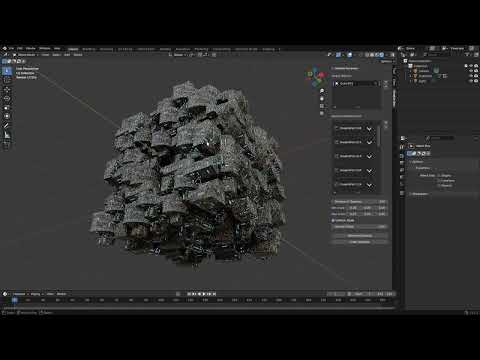 https://www.youtube.com/watch?v=X7i8tsdNN2I Key Features: * Automatic Surface Alignment: Greeble parts automatically align to each face’s normal—no manual rotation required. * Instant Parenting: Each newly scattered part is parented to its target mesh, so moving or transforming the original object keeps all the detailing…
>15393 results