Search
-
Re: Project looks dark on different monitors: What do I do?
 The OP needs to render things out in linear space; calibrated monitors has only to do with getting correct color representation, especially when printing etc. Once rendered in linear space, then composite in sRGB as that is the most common format for a majority of monitors, unless you have a 10-bit monitor.
 -
Re: Tom's Journey Into Animation Part 1 - The Bouncing Ball
 The graph/curve editor is your friend here. Make sure the keyframe of the impact on the ground is linear in the vertical motion(y in maya, z in 3ds max). The graph should have similar shapes as the mcdonald's logo. So linear(fast) when it's low, curvy(slow) when high. Hope that helps.
 -
Re: Smoother character movement for NPCs?
 So sorry I didn't read this until now. I have a terrible habit of monitoring a thread for a few days and forgetting about it. Sometimes I figure things out slowly, but this one persists. The video you linked to was the one I arrived at too. I know he calls it smooth, but that's linear rotation - hardly smooth :s I've been…
 -
Re: Support
Thanks. I had been importing them using sRGB, but when I imported them as linear it was much more accurate. Maybe something broke with the exporter and it started exporting linear maps with the UE4 preset? Couple other people (who made their own thread) seem to be having the same problem. -
UE 5.3: Unpacking and Recalculating Normal Blue Channel Issues

 Hello, I am looking for advice on how to combat an issue. Process: Sculpts in Blender -> Baking in Marmoset -> Texturing and Channel Packing in Designer -> Import into UE (Compression Settings BC7, DX11, optional A; Sampler Type: Linear Color) I've been getting data loss in my normals when trying to recalculate the blue…
 -
Re: The Final Fantasy XIII Thread
 Been playing this game for about 17 hours already, and the game looks and feels amazing. Although it is more linear than other Final Fantasy titles, doesn't mean it isn't great. Final Fantasy X was linear, and it's a great game! Definitely recommend picking this title up guys, fantastic visuals included :) .
 -
Re: ROOKIE in need of advice on RENDERING? Can you pls help?

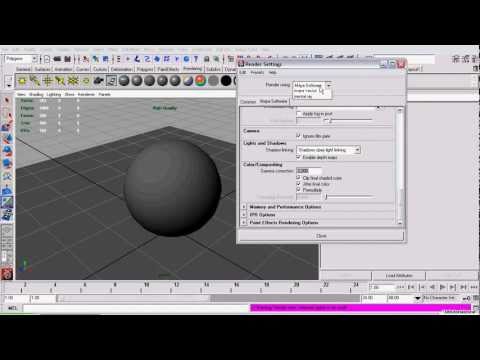 Hi there. You've stumbled upon gamma correction and linear workflow. To keep it short, try this: https://www.youtube.com/watch?v=47qVn4uv3bI Since you're a beginner and this is a very common issue allow me to suggest googling "linear workflow maya mental ray" and try to understand why that stuff happens. It will pay off.
 -
Re: Animate a Book - HOW TO ?
 Opps, sorry I missed this when you replied and it slipped off my radar. If you haven't figured it out maybe this will get you rolling again. Your post is a little cryptic too... "move key to frame, have trouble, stuff screwing up, I'm pissed" It's a bit of a mystery as to what's actually wrong. Can you post the files? or…
 -
Re: Knald - Master Thread
 Heya @metalliandy - thank you for taking the time to check these suggestions/mockups. I do understand most of the reasoning behind the design choices, but I still believe that in quite a few cases the end result remains problematic. Now of course everything can be argued for or against, but overall my one main suggestion…
 -
Re: Shader Forge: Multiple masks packed into single channel
 Stuff like this is usually hassle. I'd try to avoid if possible. You might need to account for DDS compression precision errors depending on what you're doing. Consider if this is a gamma or linear space texture. If this is purely a mask then linear is given. Also, is anyone else going to be working with this? Will they…
>2740 results