Search
-
Re: anyone have the SORT CIRCLE TOOL for Maya?
 Spherize can do that. http://www.creativecrash.com/maya/script/spherize-selection-maya-plugin-pymel Also, this might work: Select the vertices you need>Create Deformers(Animation)>Sculpt Deformer(default settings) and then scale the locator accordingly to start ¨spherifying¨ the selected vertices accordlingly.Maybe will…
 -
Re: Blender sharp from uv isles
 In UV editor go to UVs -> Seams from Islands to make sure all your UV islands have corresponding seams on the 3d model. Then on the model itself, select a seam, press shift+g (select similar) and pick the Seams option. This will select all of your seams. Now simply mark them all as sharp. (ctrl+e -> mark sharp).
 -
Re: Maya seems confused
 Normally you'd go back to object mode or have a face selection to do the mirroring. If you're still in an extrude, it's trying to mirror the faces you had selected for the extrude (even though they're not visually selected). And failing in fun ways now that I'm playing with it. The control box not popping sounds like a bug…
 -
Re: Modo 801 live: Last chance to sign up!
 For edges and verts, it looks like these for options (can have any combination of these options except for having the middle two at "unchanged" - because nothing'll be altered then). For edge selection, it works on each edge selection, for verts it works across all selected verts at once. So, aligning between endpoints and…
 -
Re: Diamant Modeling Tools Alpha 1.0 (Formally Diamant UV) release!
Its all in the help file if you have not checked it out.. By using the Advanced modeling tool and selecting multiple edges, by holding down ctrl and middle clicking you will cut the edges.. as far as the "influence", its a soft selection.. use middle click and drag to increase or decrease the soft selection radius.. you… -
Re: [UNITY] How do I import lightmaps and lights?
 Thanks for the reply. I tried exporting the package a few times and it didn't work. Like I said, I only got the models and textures. I figured it out by selecting the scene file in the asset browser tab, right clicking, then selecting "select dependencies". THEN ctrl click the scene file to include it in the package(with…
 -
Re: Imported highPoly FBX from Maya comes in multiple pieces -- lower poly versions of same model do not
Not sure what Maya supports but I either make a selection and copy the mesh and delete that selection and the invertion of it in both meshes, or I simply copy the selection. Anyway as mentioned the newer versions of Unity support 32 bit buffer for meshes so that problem would be solved. On the other hand, you can just… -
Re: How to detach preserving normal orientation?
If the normals were averaged and didn't have any custom normals, you can average them manually on an already split mesh, you select both objects and add a edit normal to both then manually select pairs of the border verts and average selected, Recommended to not do that and just lock the normals before doing things that… -
Re: Maya 2016 EXT 2: a pretty dam huge update.

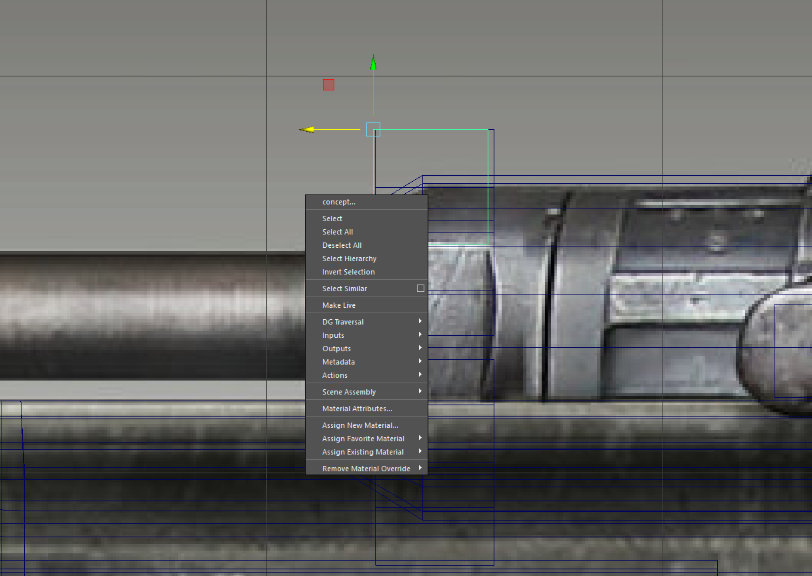 Ahh I see. That's too bad. I've been doing a lot of creasing for zbrush and being able to remove everything in 1 click was very nice. Also, it looks like they changed the rmb functionality. Before, I could select an object and right click to select face/vert/etc without actually touching the model. Now it seems to select…
 -
Re: IN PROGRESS: Preview and Applied textures completely different?
![TorQue[MoD]](https://us.v-cdn.net/5021068/uploads/userpics/978/n9Y8GE4KMHMJB.jpg) Ok so I noticed that I forgot to select the region (by default it was selecting the empty bg) cause I'm really tired but now that I selected the skin, its still not quite working. For the sake of speed I decided to load a preset (inflamed skin) and this was the end result: Better but only just. Still can't figure out why…
Ok so I noticed that I forgot to select the region (by default it was selecting the empty bg) cause I'm really tired but now that I selected the skin, its still not quite working. For the sake of speed I decided to load a preset (inflamed skin) and this was the end result: Better but only just. Still can't figure out why…
>15392 results