Search
-
Re: 3DsMax: UV along Splines.
 There's a spline option in the unwrap. you need to generate a new spline from your mesh though. Maybe with the pelt ? textools has some useful tools too http://www.renderhjs.net/textools/ Now the dirty way i do it quickly : planar mapping select one uv edge loop break relax select one horizontal uv egde, ring+loop, align…
 -
Re: Clean bakes
 well, i read it that you should use hard edges instead of having the normal map do the work for that, so you have a real hard edge in the model, i guess it runs in conjunction with number 1. i got that info btw from a pc thread on normal maps. seemed to the standard work that is suggested to folks when they have questions…
 -
Re: Sketchbook: DeusExMatteo
 Dude! That game looks sweet! Will it be playable to the public? Nice work. I dig the styles... and quirkiness you inject at times is fun! Indeed... i was gonna say finish the space bug... and you did! Like it. edit... Maybe you can get a bit darker in the folds e.g. under edges round the metal plates, make the spec pop…
 -
Re: [3dsmax] UVW seams to Smoothing Groups?
 Here's a script "UV borders to hard edges". The algorithm is quite simple: 1) Select UV borders (used part of Renderhjs' script for Roadkill uwrapping) 2) Convert UV edges selection to EditPoly edges selection (Max is a real pain in the ass!) - my part of the script 3) Make smoothing groups in hard edges style (used script…
 -
[MAYA] Creating a normal map with rounded corners of a low poly model without baking high poly
 I once used a script that transferred the selected edges and maya to photoshop, creating a ready-made normal map with rounded edges. Has anyone seen anything like this? (I tried Quixel Suite/nDo, but they didn't give me what I needed...)
 -
Maxivz's Interactive Tools for Blender
 About: This is a collection of intuitive, context sensitive tools to improve productivity that I did to improve my workflow as I transitioned into Blender. They are designed to be used as hotkeys, removing the amount of interaction with the menus and allowing for a less interrupted modeling experience. This is the first…
 -
Re: [UE5] Stylized watermill
 Hey, looking good! I think the some surfaces are starting too look a bit busy (e.g. stone wall) partly due to exaggerated shading of the surfaces (displaced mesh + normal map?), which swallows some of the primary shapes (undefined edges). Transferring the normals from the original shape to displaced mesh could help to…
 -
Re: Tips on making the transition from Max to Maya
Editable Poly is your friend. Avoid Editable Mesh, which is just legacy code. Within Editable Poly: Cut tool: Is Max's equivalent of Split Polygon. It will snap to neighboring vertices or edges as you use it, or you can cut free-form right in the middle of a polygon with no snapping to edges. Connect tool: Allows you to… -
Re: [Finished] Weapon Art - McMillan CS5 (Sniper)
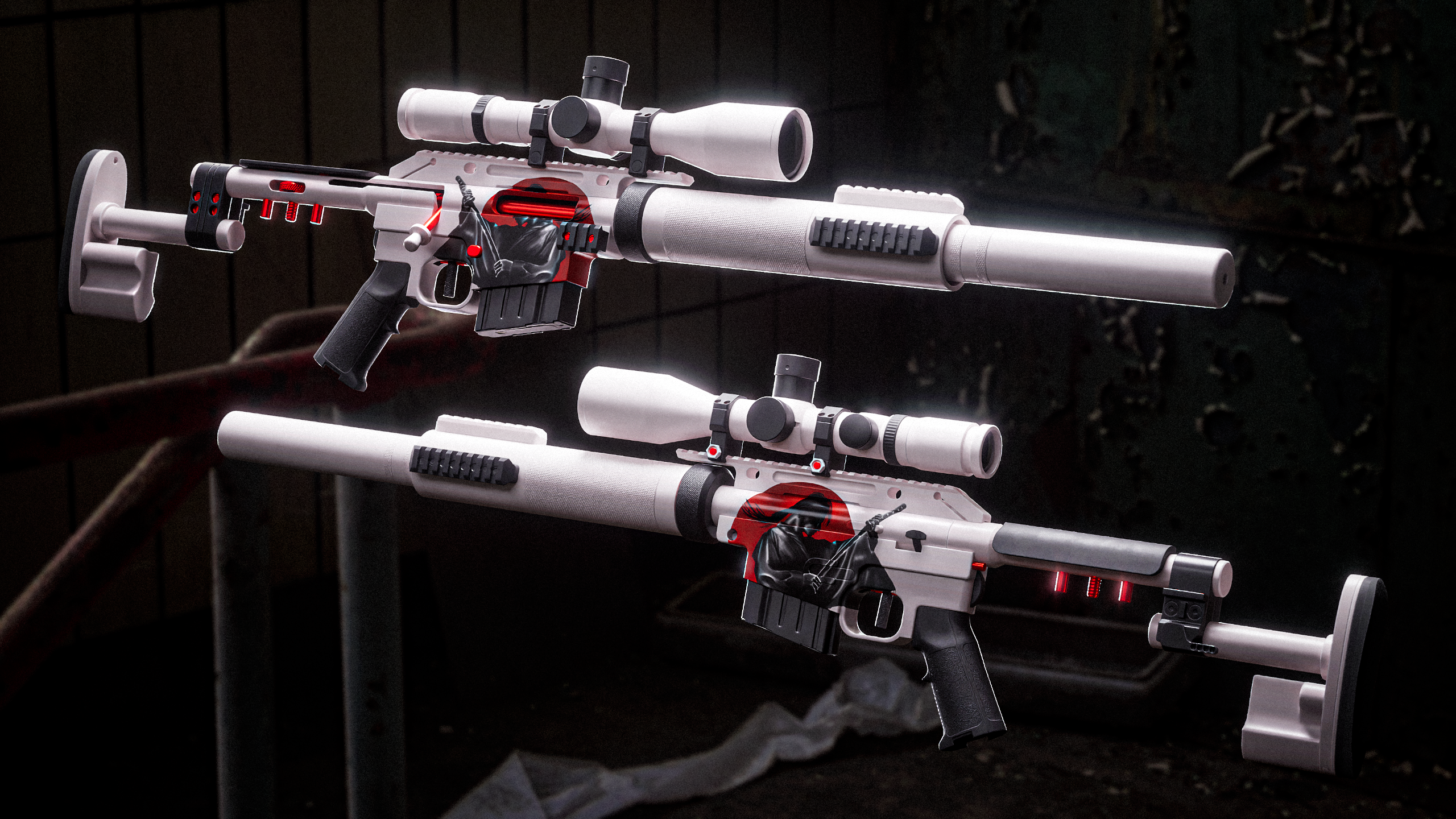 I have started designing the skin for the gun, made an additional texture pass and tested some renders of how the final images can look like: Ronin artwork made by a friend of mine, I just projected it on to the side of the gun. I am basing the colors and rest of the design on this artwork. In the image above of the gun…
 -
Re: How can I make powerlines?
 I would suggest NOT using an alpha blended surface for these. The texture is going to be filtered with distance, and the lower MIPS will be very blurry. It's generally better to just use pure opaque geometry. Include enough cross-sections to reduce long thin triangles, which can cause performance issues with some GPUs.…
>27984 results