Home 3D Art Showcase & Critiques

[WIP] Stylized Forest Cabin – Lighting Experiments (Maya/Arnold)

polycounter lvl 5
Online / Send Message
Pinned
PlagueMichael66 polycounter lvl 5
Hi everyone!
My name is Misha
I'm currently working on this stylized forest cabin scene and would love to get your feedback and critiques.
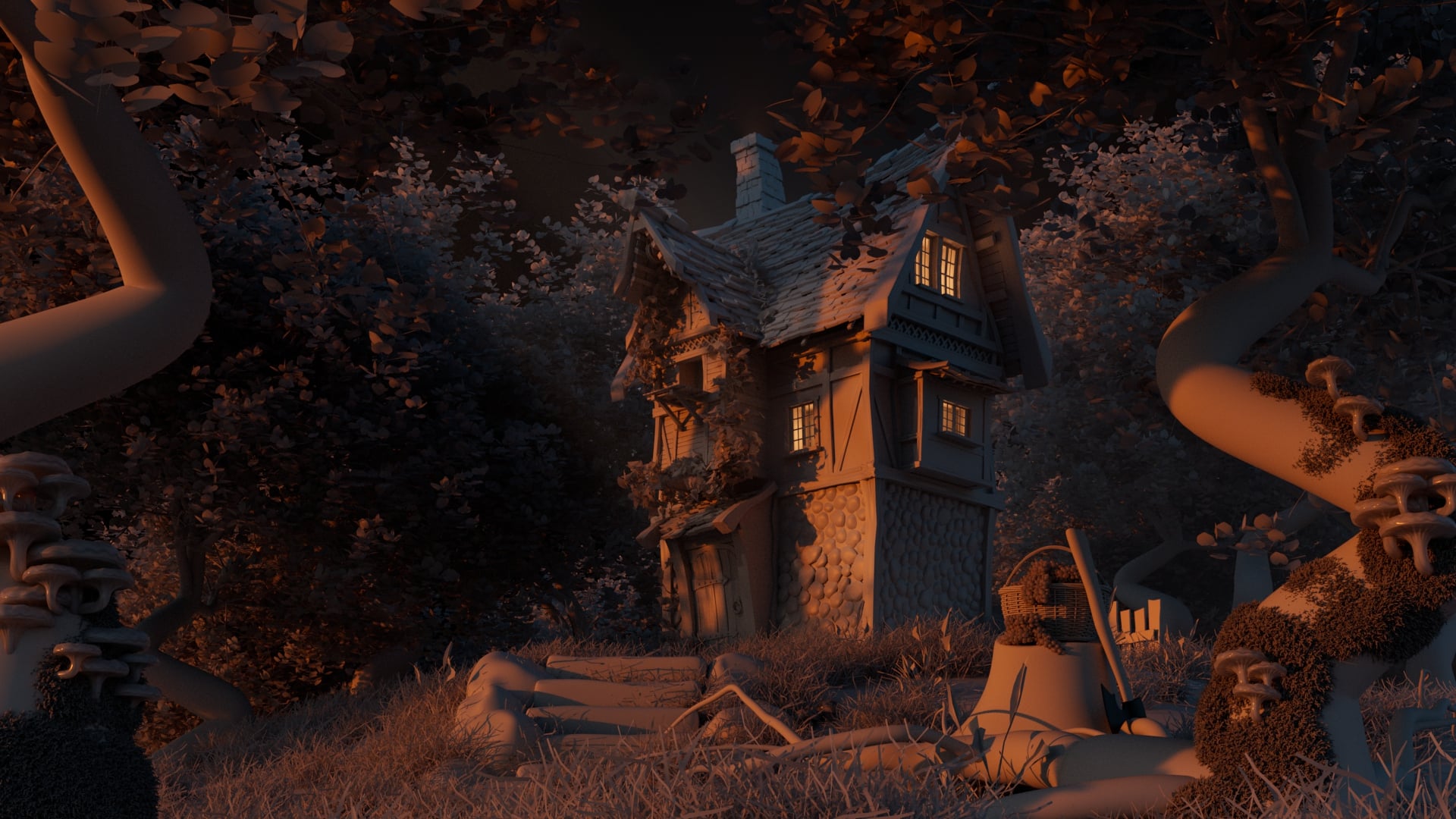
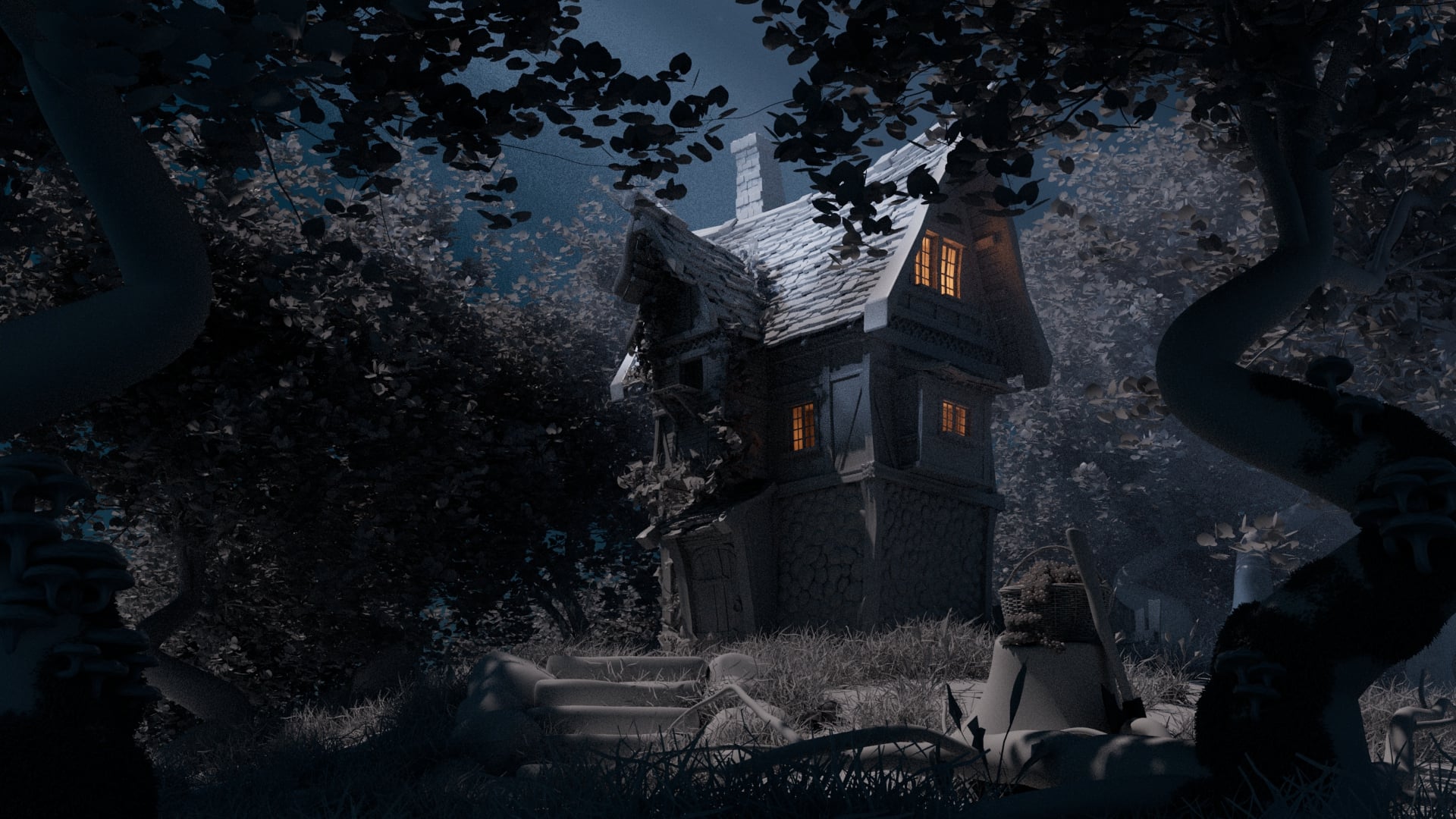
I’m aiming for a whimsical, slightly Disney-inspired or classic stylized look. This is still a work in progress, and right now I am mainly experimenting with different lighting scenarios and moods to see what fits the environment best.
Here are two lighting setups I've rendered so far (Sunset/Warm and Night/Moonlight):
  • Render 1 Sunset Mood
  • Render 2 Night Mood
Software used: Maya + Arnold.
Since this is not the final version, I'm especially looking for feedback on:
  • Composition & Framing: Does the staging of the trees and foreground elements work well?
  • Lighting & Mood: Which lighting scenario feels more compelling or fits the stylized vibe better?
  • Readability: Are the shapes and details holding up under these lighting conditions?
Any critiques on the models, composition, or lighting adjustments would be highly appreciated. Thanks in advance!


Replies

  • Eric Chadwick
    Neat scene. Do you have a set of references you are looking at?

    It would help to have materials in the scene before digging too far into lighting, since the materials will influence your global illumination bounces quite a lot, especially transmissive surfaces like all those leaves and grass which will brighten considerably from subsurface light bounces. 
  • PlagueMichael66
    Online / Send Message
    PlagueMichael66 polycounter lvl 5
    Neat scene. Do you have a set of references you are looking at?

    It would help to have materials in the scene before digging too far into lighting, since the materials will influence your global illumination bounces quite a lot, especially transmissive surfaces like all those leaves and grass which will brighten considerably from subsurface light bounces. 

    Thanks for the feedback!
    Regarding the references — I do have a solid ref board for the house model itself, but everything else in the environment and the lighting scenarios are being created from my imagination.
    As for the materials, I’m actually not planning to texture the assets anytime soon. The final goal for this specific project is to present it as a clay render, focusing purely on form, composition, and mood through lighting.
    Knowing that it will stay a clay render, do you have any tips on how to push the lighting further?


  • Eric Chadwick
    Then I would keep the leaves gray and simply add translucency to them, so they transport the light from behind them. This will greatly improve the "glowing" and magical feel you're aiming for.

    I also highly encourage you to seek out lighting references, rather than just from your imagination.

    You could even desaturate whatever you find, and do some simple paintovers with light colors to try things out in a very quick manner. This is why concept art is a thing... it's vastly quicker to iterate in 2D than it is to iterate in 3D.
  • Eric Chadwick
    quick little paintover!

     
  • Eric Chadwick
    Also, some of the surface look very soft and un-detailed, like the upper tree trunks and stairs and the rock under the basket. I would consider at least adding a tiled bump map to those, just so they don't stand out so bad, looking like marshmallows!
  • PlagueMichael66
    Online / Send Message
    PlagueMichael66 polycounter lvl 5
    Also, some of the surface look very soft and un-detailed, like the upper tree trunks and stairs and the rock under the basket. I would consider at least adding a tiled bump map to those, just so they don't stand out so bad, looking like marshmallows!

    Thanks. You're totally right about the 'marshmallow' look. I'll add some tileable bump maps to fix the details and polish the scene. Btw, you asked about references -a while ago, I used AI to set up some lighting scenarios. Here are a few of them. Regarding the trees -I exported them as aiStandIn proxies, so I can't tweak the shaders right now. I don't know where to access them and haven't been able to find any info on how to do it yet. Maybe i would try Arnold Operators, idk

Sign In or Register to comment.