How to reduce normal map baking artifacts caused by low/high poly mismatch?

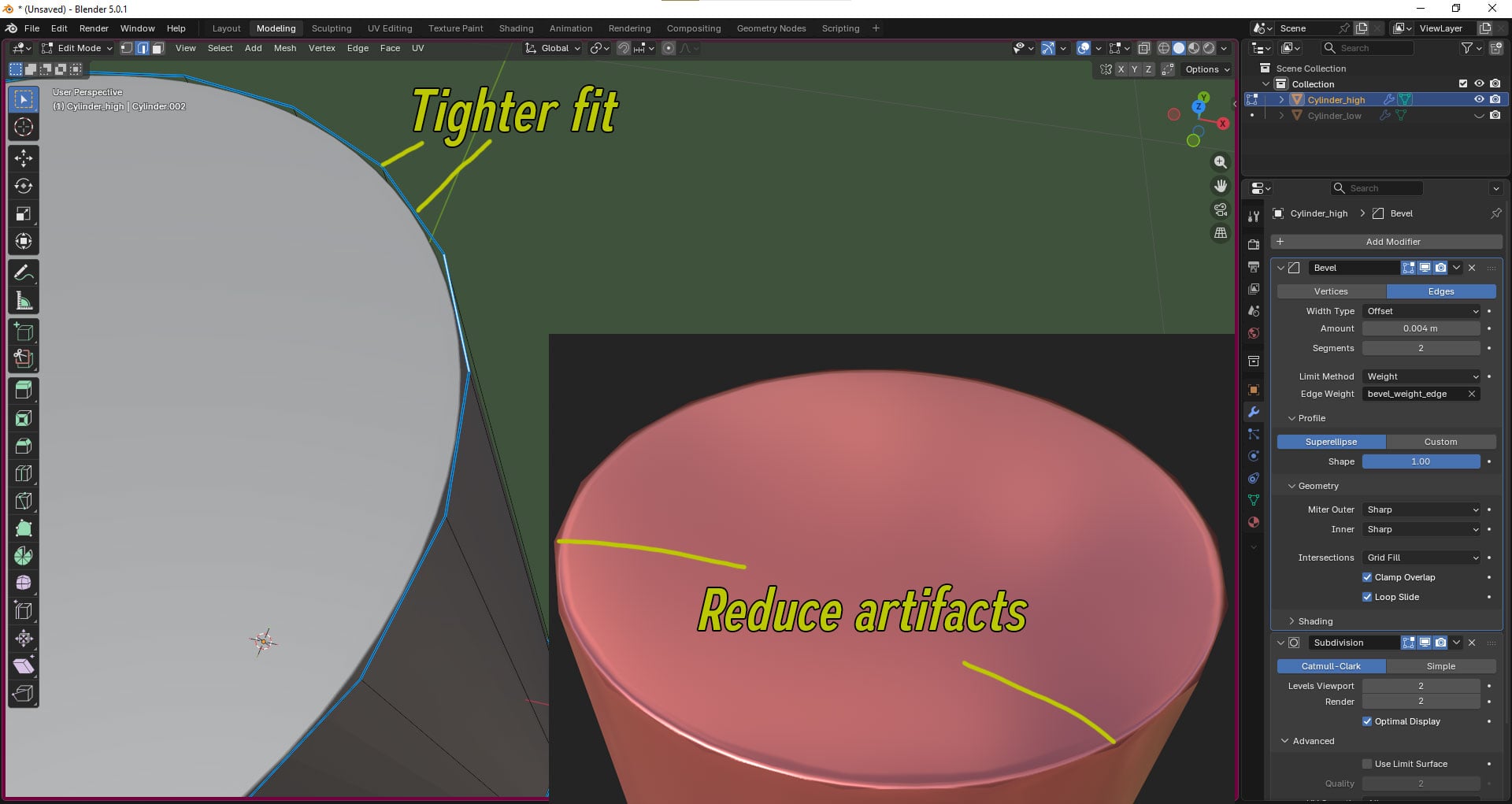
When I try to bake the normal map, I get artifacts caused by a mismatch between the high-poly and low-poly models. Because the meshes diverge, the angles smooth out worse than they could.
Even though this only shows up on glossy surfaces, which I’m not planning to use, I’d still like to understand what approaches exist for solving this kind of problem and how closer mesh correspondence can be achieved. I don’t want to go with an “eh, good enough” approach, even if nobody but me will ever notice.
I found an example of what I’m aiming for: https://sketchfab.com/3d-models/curvedelements-nm-test-f2bdc226edf441609a67d82fb1a8e6c6
But I can’t get any further than LP 01 RESD. I don’t understand what repurposed normals and matching curvature mean. Any result starting from 02 would be fine for me, but ideally I’d want something like LP 02 REMC RPNM. Or am I doing something fundamentally wrong? (The tutorials I watched did not cover cases like this.)
P.S. I hope mentioning Substance Painter doesn’t make this post off-topic. I’d rather not cross-post if I can get answers here.
Replies
https://polycount.com/discussion/81154/understanding-averaged-normals-and-ray-projection-who-put-waviness-in-my-normal-map/p1
I think you're ending up in this situation because you're starting with some arbitrary cylinder size, and an edge width plucked from the ether.
Why is your cylinder 60cm in diameter? Why is it 20 sided? Why are the edges so sharp on such a large object?
If you have answers to these questions before bake time, you won't end up in this situation.
Model a lip-balm instead. Or a knife. Follow refs. Start with what you want to make and how big it should be. Then place it on your screen so it takes up as many pixels as you want it to. Then choose how many segments you want for the look/feel/job the model has to do.
Then choose how wide you need those edges so they'll be captured by the lowpoly properly.
This is a balancing act, something you need to practice.
As for how to REMC:
Take your highpoly, delete the CatmullandorClark, chamfer the edge a bunch.
Now your highpoly and lowpoly are the same, except for that edge.
If you didn't use support loops, use support loops. Or weigh the normals so they point straight out the cylinder like flag poles.
Bake
You can call me a perfectionist (and that would be true) but if there is a correct way to do something (even one I may not know yet) and a “good enough” way, I will always choose the first, even if the second is faster and cheaper.
Sorry if I caused any unnecessary fuss, but this is my first prop and it should be the best. I’ll use this as my starting point.
First of all, I found this topic on StackExchange. I created the same node, and closed that (ahem!)king gaps:
I used completely identical cylinders and the only difference was subd. As you can see, the silhouette of the left is MUCH closer to the original shape (it also seems a bit cleaner) than one on the right. You don't see dark artifacts from the original post, because bevels here are too big to introduce them. But believe me, custom subd also fixes it (which is not surprising). So if another poor unlucky bastard like me ever comes along — well, not quite so unlucky, if they can at least be pointed to this thread. ;-)
As for the second question, it is still a problem for now, but no longer quite as difficult. I connected the clue I was given in reply to the question I asked on StackExchange, namely — to bake the top face from the low-poly version — with a relevant post by @gnoop here, which says roughly the same thing.
If someone could suggest a workflow for that, the topic would be fully resolved
I can see no technical flaws in neither your Lowpoly or Highpoly, everything seems to be baked and rendered correctly.
The only thing left you can be unhappy with then is your Lowpoly's ability to convey the illusion of being a Highpoly.
I'm pretty sure what you're missing now is to chamfer the edge on your lowpoly. I suggest making the chamfer's size so your lowpoly just barely covers the highpoly's edge.
If that doesn't do it for you, add more segments around the circumference.
Really cool that you've learned about manipulating the shrinkage of Catmull-Clark. That'll come in handy
As for the second question, what I think you're looking for is bevel shade baking. IDK much about it, but google does.
Searching "Bevel shader blender" on YT:
It's definitely a workflow you should have in your tool chest.
There isn't one god-tier workflow that reigns over all the others, that will always be optimal for all scenarios. There are almost as many ways to rome as you can imagine, and they all have their strengths and weaknesses. All of these find their nieches in different CG categories because of their usefulness.
You'll find them in people's work, generally summed up in what software they use.
I for one prefer variations of subdivision modeling. I find it gives me the most control, the most accuracy, and takes the most amount of time.
I don't do this for work. This is my hobby, and I am in no rush at all. I like solving the geometry puzzles. I love spending time making tiny details look good because it makes me feel good.
If I was on the clock, I wouldn't do the things I do the way I do. Takes too much damn time.
Hah, I'm pretty sure that's the opposite of derailment.
I would gladly spend three months on that, and I'd love every second of it.
If a professional spent three months on that, they'd get fired ;D
A round edge shader can be baked to texture.
Unless I'm mistaken?
- provide clear screenshots of your low, high, and bake.
- describe clearly what you would like to improve
- provide high and low source models
- ask people for their opinion on ways to improve things.
This will allow people to provide you with actual relevant examples and test files, rather than suggesting things that may not be that helpful in the long run. For instance : indeed, a round edge shader can be baked down. But going down that road at such an early stage of your learning would be ill-advised IMHO. At this time your focus should be on modeling, UVs, and baking.
I would also suggest to use a test model more complex than a mere cylinder. Nothing crazy, but at least something more representative of an actual asset.
You have baked a highpoly's surface detail information into a normal map onto Model_X.
You now have a normal map that is tangentially related, forever connected and intertwined, inseperable with Model_X.
You logically save this normal map as Model_X_TangentSpace_Normals.png
For whatever reason, you decide that Model_X is inferior.
You therefore make Model_Y. It has more segments, and has some chamfered edges where Model_X doesn't.
You don't want to rebake.
You want to just slap Model_X_TangentSpace_Normals.png onto Model_Y.
Is this what you mean?
You want a Tangent Space normal map that can and will work on multiple different variations of the same model?
I want an answer to this before I go any deeper because answering is very involved and time-consuming, and I have other very time-consuming things that I'm obsessed with right now.
..since you are struggling with this and.. ( maaboo said:)And some others already made a lot of suggestion. ¯\_(ツ)_/¯
https://www.artstation.com/artwork/rlGqrE