Sculpted Dragon Head (wip)

polycounter lvl 9
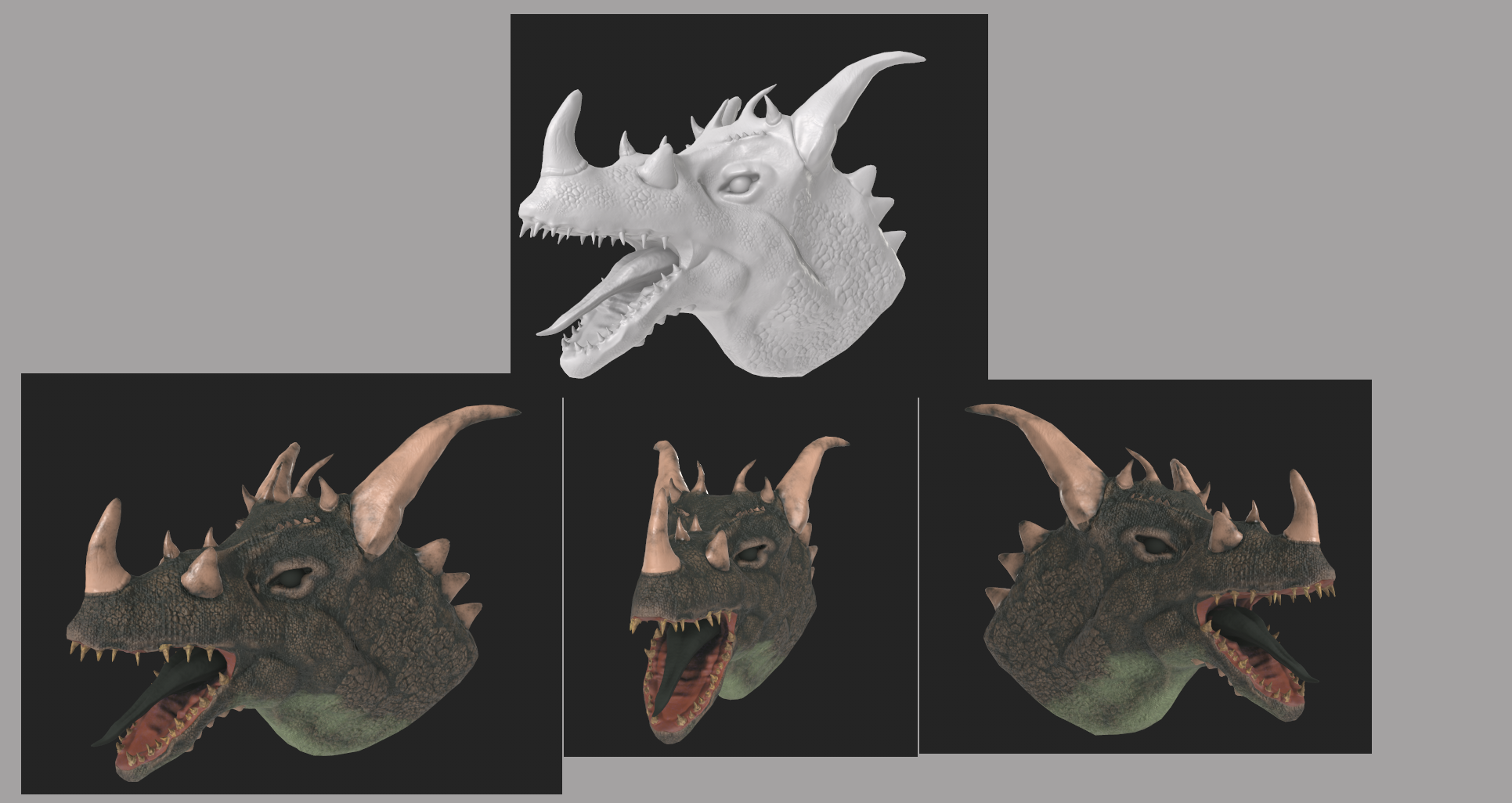
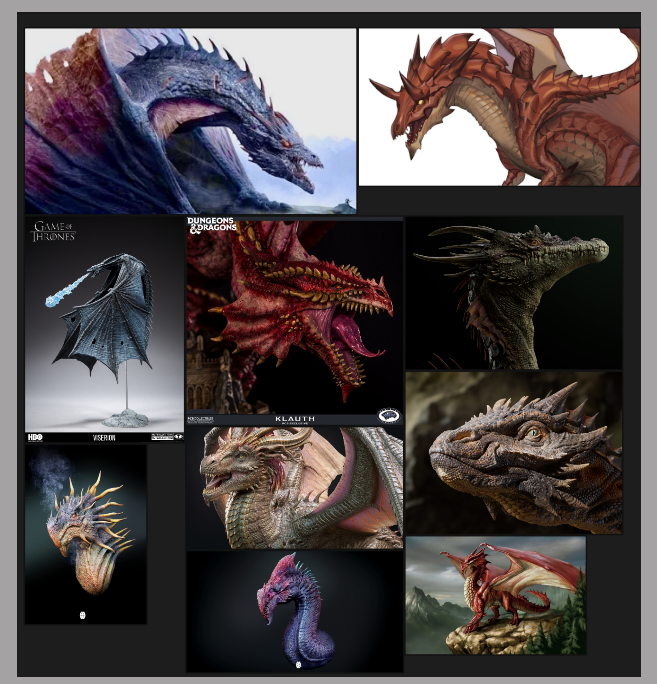
So been working on this dragon head. I was able to sculpt it, retopology it, uv and bake it and it turned out well. Now trying to texture it. Thought I show it here to see if I could get any feedback on what I could to improve it. I haven't gotten to the eye and tongue yet so it still wip. I'm including references i used to help me out with texture below it.


Replies
It could have been good to post your very first steps here, to get feedback before heading down the full baking path. I feel like the overall design of the head is not working as well as it could.
Just my 2 cents though. I know it’s hard to put the genie back in the bottle, once you’ve gone pretty far already. But I think you’re struggling a bit because you’re fighting against the foundations you’ve laid.
Right now, it seems to sit below or even in front of the eye while it should be a good bit behind it. See your references (the blue dragon at the top left might be a bit hard to read, but the same is true, there).
As for the textures, some of the smaller scales seem to run through the bigger, sculpted ones and anatomical structures. See for example the vertical bands running through the snout and from the cheeks across the eyes and brows. Ideally, they would follow the anatomical features a bit more, like following the brow or bending around the eyes.
Keep up the good work!
Will look into that for the scales. Thank you for bringing that to attention to me.
It would likely mess up the teeth and any detail work, and techically, you'd then have to worry about creating enough space for the muscles, but it would improve the overall impression.
I’ve made a dragon sculpt myself, so I know firsthand it’s no walk in the park. Proportions are always super tricky to balance, and then you have to tackle the UV unwrapping and get the textures to look good.
Honestly, dragons are so complex, but it’s awesome that you’re taking in feedback while still steering it toward your own vision for the creature. You've done an awesome job pushing through the tough technical parts!
A tip, perhaps make the throat and neck a lighter color. In many of your reference images those dragons have a separate distinct color on the neck and throat. Just a suggestion. Like the blue and red dragons in your references, both have quite strong light beige, pinkish colors.
This is feedback i got.
"can see you have used a grungy, much more yellow saturated texture for the teeth. I can see some height values taking place, I'd avoid this. They look too repetitive and generally I think teeth for a dragon is rather more smoothed out and polished, tho don't get me wrong, they have depth but its fine details, and you'd do this with sculpting, maybe not texturing. If your going to have such an affect, then consider using it for the base of the tooth where it merges with the gums, build up of gunk. Again, avoid repetition but this time for the horns. If you want nice results always try avoiding repeating things. You could of made the front horns more prominent by making the texture more dirty, duller, or if you wanted, brighter, perhaps more saturation. I'm considering real life scenarios here, you'd expect the horns more in front to be the ones taking damage, seeing change in its shape. The color pallete overall for the model looks nice. I suggest using a lot of masks with texturing, especially if you are using substance painter. For example, your losing some height information in some of the finer scales on the front part of the model, so you could paint over that area in substance, black mask, select the height channel on your layer and adjust. Tongue texture done really well. Gums in mouth could do with little less grey texture in the middle, its really wet the gums, so some gloss for this texture is ideal when being lit. Consider altering the saturation and color for the whiter splotches around joining areas. For the eye I'd make it redder transition, tho I understand for all if your just doing quick texture."
So will look into fixing those but wanted to see if anything else I should fix up while at it.
Totally agree! Stepping outside your comfort zone is exactly how you push your boundaries and level up. You can't be afraid of the learning curve or of growing.
Honestly, I went through the exact same thing with my own dragon sculpt. I think I started over like 5 times because I just kept looking at it like, "ish, this isn't right." But going back to a clean slate actually helped so much. Each time I restarted, the result got better and better. Finding really good, clear references was a total game-changer for me too, it guided me to the result I was after.
Since you already got great feedback on the textures, the only other thing I’d look at is the overall silhouette and anatomy. Sometimes playing with the scale hierarchy, like making the main horns even bigger to contrast with the smaller teeth and spikes, creates a really strong focal point. Also just checking the placement of the teeth to make sure the jaw silhouette looks menacing. It’s already looking awesome though, just some food for thought.
You've got a great mindset for this, and the render is coming along great. Can't wait to see the next version.
And your right about doing it again
Also yeah i learn i have trouble with my proportion, something i am already working on in my art class so definitely something to keep in mind.
And thank you i appreciate hearing that.
Generally, if you're doing something from scratch, you will be both developing the idea/ design as well as executing it in 3d. If you want to focus on 3d, it might be more efficient to translate an existing design. I think that would be close to the reality of most teams making games, where you have a concept artists and modelers. Of course, over time you can become proficient at both. I think by closely observing designs and filling in any gaps, you might get better at the designing part too. I think any weaknesses in the design that goes unnoticed may carry over into the 3d model, weakening the finial result.
Keep it up!