Home Technical Talk

Nvidia Control Panel

ngon master
Offline / Send Message
iam717 ngon master
using a cool app that shows me what things are doing.
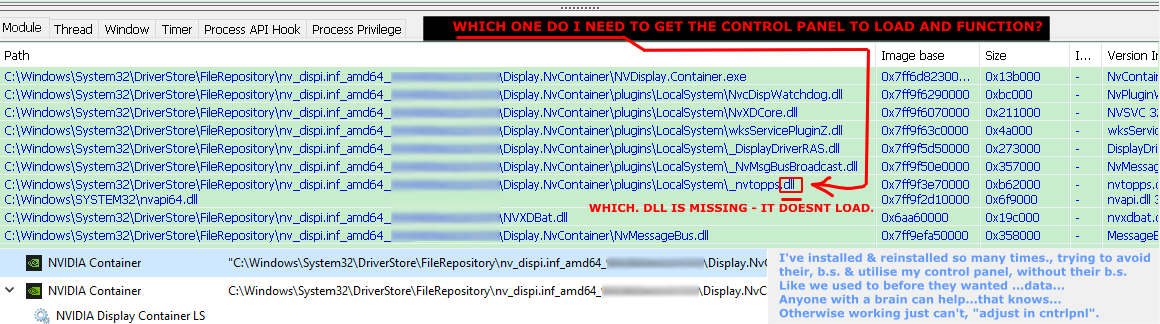
so for the whole life of this new p.c. this has never worked ever since i learned about the new "inner workings" of the installer, i got all the "editing tools", that removes the issues.

Got everything else working, the control panel won't load though any ideas?  not paying for reddit nor going to their site cause i already know they won't help with a person who is working around their, data harvesting. 

So anyone found solutions who go in-depth on these things to make things work, probably when they shouldn't? (//without vanilla installing the installer in full...)

"technical/talking".

Replies

  • Eric Chadwick
    I just accept that NVIDIA is all or nothing. If you try to reverse-engineer their installer you're bound to have random issues like this. Though I do recall a time when they used to have a vastly-simplified driver-only installer, maybe they still have that.
  • poopipe
    Offline / Send Message
    poopipe grand marshal polycounter
    You can still skip the Nvidia experience still I think.
     I thought they were deprecating the control panel and leaving it to the OS - maybe not, I leave that stuff well alone 

    Anyway, if you're that bothered about privacy windows is a dead end.

    A good middle ground is to move your day-day computer usage to linux(not Ubuntu based, that's just as bad), pay for windows pro so you can set up a local account/turn off some of the invasive crap and do the things you can't do on Linux there..
    It works fine for me


  • iam717
    Offline / Send Message
    iam717 ngon master
    Eric Chadwick said: they used to have a vastly-simplified driver-only installer, maybe they still have that.
    Yeah, i used "slimmer" a neat little tool (the "town square" of people) had to create to avoid these new moves.
    poopipe said:
     I thought they were deprecating the control panel and leaving it to the OS - maybe not, 
    I leave that stuff well alone, pay for windows pro so you can set up a local account/turn off some of the invasive crap and do the things you can't do on Linux there.. It works fine for me
    Ah , hmmm how would we then utilize the options though? like enabling settings on the gpu & such, i am all for it if we can somehow do it "ourselves".  

    (GN report on Nvidia YT link 2video)This happen & i stopped checking their site so perhaps there is a real solution here after all, guess they are done doing whatever since the square(of people) have said they've moved onto high levels of development we "the people/public" can not afford.

    Yeah probably best not to fiddle with things but that nifty little tool showed me some things i was not very aware of which is pretty badass the person whom made it just wanted some donations. 

    Just wanted the options we've paid for, i.e. the control panel to the gpu working so i can adjust as needed, when needed... like it used to be, what they promoted all along...

    Just wondered if anyone got as technical & figured out work arounds for things like if win7 could have all these new do-dads (dx12 + stuff like that) they've restricted only to newer os's, but yeah just moving on to a different o.s. is probably the move, till that too gets retarded.
    Just h8 things are like this probably for some good reason, we the outsiders do not see...

    Thanks peeps

  • poopipe
    Offline / Send Message
    poopipe grand marshal polycounter
    The settings I generally used it for (eg, selecting the gpu to use etc.) are handled properly by windows now

    but

    the control panel does appear to still be present on win11  - perhaps they got pushback and left it there or perhaps i misread something. I'm probably not on latest but im likely on the one before that


  • iam717
    Offline / Send Message
    iam717 ngon master
    poopipe said: the control panel does appear to still be present on win11
    If i were a programmer I'd make "my own" & negate whatever they are doing with their "new one". ("control panel")
    //slightly-.o.t.
    You programmers are a "lucky" bunch to avoid most of this stuff, at least you got that going for ya, surprised all you, programmers haven't already made your own, o.s.'s.  Strange really... oh well. //endslightly-.o.t.

    They did remove it("control panel") recently, for the, what i suppose is the always online? settings version, that conveniently doesn't "lag".

    Uh, just hate having to redo (o.s.) things & i already know since I've heard news of movements in "attack vector directions", that they are already planned/planning to ruin all linxu distro's... so yeah its just getting boring now really.


  • poopipe
    Offline / Send Message
    poopipe grand marshal polycounter
    making your own is a bit on the 'easier said than done' side - i'm not exactly well versed in driver authoring but my surface level understanding is that it's a bit of a black box as far as Nvidia are concerned.  AMD opensource their linux drivers but afaik not the windows ones.

    if we're doing conspiracy theories (facts) ...
    The linux ruining process is well underway -  its nothing as cool as exciting hax - the corpos are working hard to replace as much GPL licensed code as possible with a rewrite under MIT/similar so that they aren't forced to open source.
    It can't happen fully  - at least not while Linus is still alive  - but the distros that are most likely to attract normies are already falling. 
  • myclay
    Online / Send Message
    myclay greentooth
    the newest Nvidia driver removed the control panel.
    If you are upgrading from an older version, it is (still) usually residing in  WindowsApps like msix sandboxed programs.
    control panel is nvcplui.exe

    control panel Files for newest drivers as seen here:

    C:\Program Files\WindowsApps\NVIDIACorp.NVIDIAControlPanel
    there are at least 12 dlls 

    2019 version of Nvidia drivers had just three files shipped(or what i am capable of seeing...) and I can open the controlpanel via nvcplui.exe 

    usually was in :
    Program Files\NVIDIA Corporation\Control Panel Client

    if you did a clean delete and new install and want the worst possible control panel for NvidiaGPUs, you have to use the version from the Microsoft "Store"
    Big warning: Microsofts Store doesn't have the option to use older versions of software. 
    I got burned once with a forced update via that Microsoft "store" and warn everyone to avoid it as best as you can.

    you could also look into the NvidiaProfileInspector, imo much more options to setup.
    https://github.com/Orbmu2k/nvidiaProfileInspector


Sign In or Register to comment.