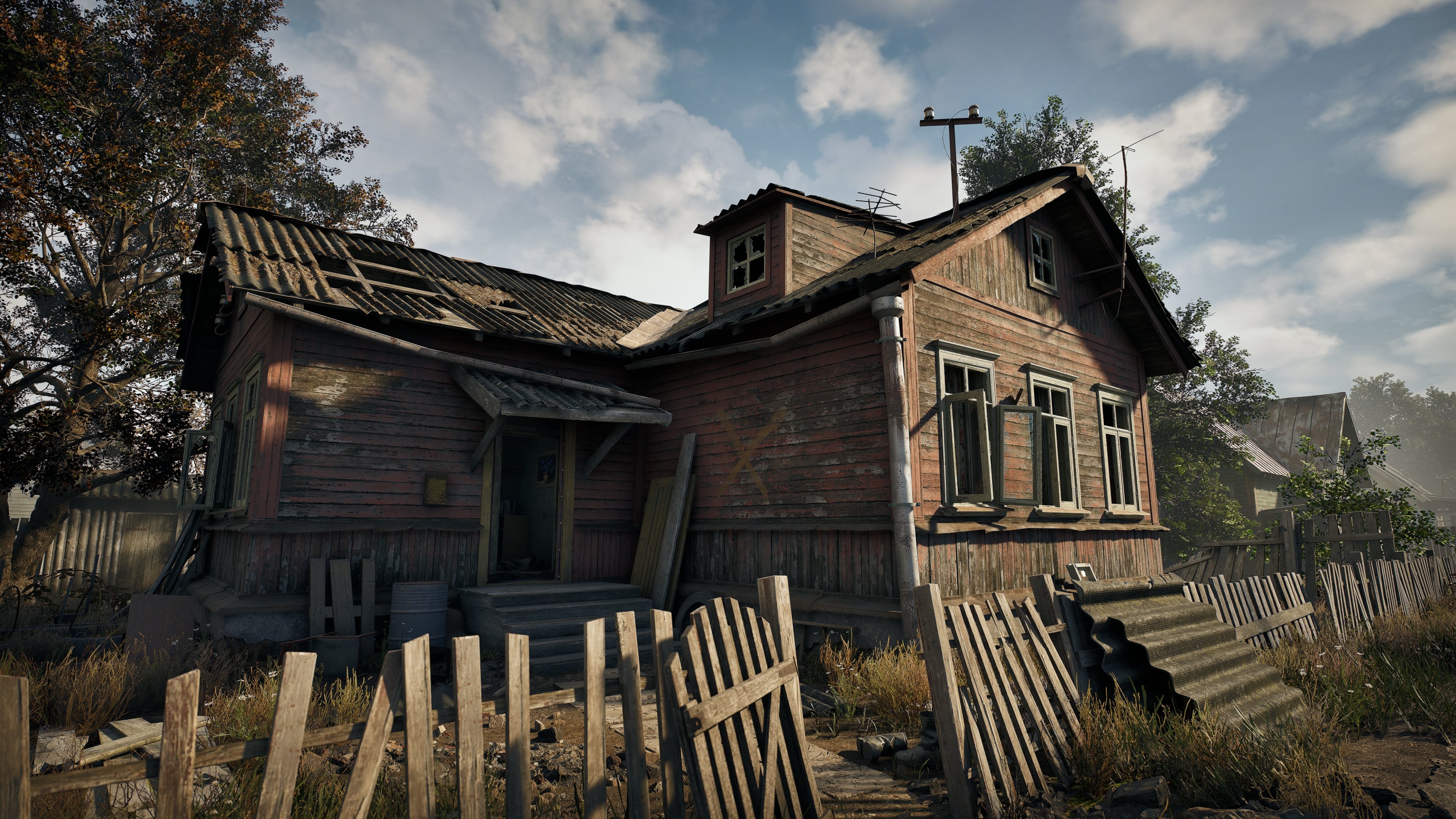
Abandoned Dacha Environment - Modular Kit with interiors

Hey everyone!
I’m a Senior/Lead Environment Artist with about 7 years of industry experience. For the last 3.5 years, I've been heavily focused on building modular environment systems for a VR project.
Anyone who's worked in VR knows the constant struggle between visual aesthetics and aggressive optimization (though to be fair, that's not strictly limited to VR!). So, for my portfolio, I decided to take these exact game-ready assets and render them in UE5 using Lumen just to see how they hold up without VR limitations.
A bit about the workflow and technical side:
Modeling: Everything was modeled in Blender.
Modularity: The system ended up being extremely flexible. From this single kit, you can build several distinct villages with completely unique houses (small shacks, massive 2-3 story buildings, varying roof sizes, etc.).
Texturing: Created from scratch, mostly in Substance Painter (I personally prefer it over Designer for my workflow). For some base textures, I used Megascans normals as a starting point, but heavily reworked them and added a ton of custom layers and grime on top.
Engine: Fully assembled and lit in Unreal Engine 5 using Lumen.
This is actually my first time posting my work publicly in 7 years. Emerging from "production hell" to finally show what I’ve been making is a pretty emotional moment for me!
If you want to see the full technical breakdown and more renders, I’ve uploaded the full project on my ArtStation: https://www.artstation.com/artwork/8BAOPE
I'm totally open to answering any questions about the VR pipeline, texturing workflow, modular systems, or just my experience in general!
Replies
Really impressive work! Especially the modularity and how well the assets hold up outside of VR constraints.
I’d be very interested to hear more about the VR pipeline you mentioned. How much did it change your approach compared to a more traditional environment pipeline, particularly in terms of geometry, materials, and modular design?
I implemented a flexible process by blending the mid-poly approach I used back at Call of Duty with the harsh realities of VR. In virtual reality, players can lean in and inspect every corner, so the priority was a polished silhouette.
In the final version, once the building layouts were approved and finalized, individual modular wall pieces were merged into solid meshes (Shells). This drastically reduced the actor count in the scene (essential for our high-density maps) and eliminated lightmap seam issues. I ended up with 7 main shell configurations for all building types.
Visualizing the 'Shell & Box' approach. On the left: the merged exterior shell. On the right: the single-sided interior room box
Lightmaps
The separation between shells and interior boxes was primarily driven by lightmaps. Using a single mesh for both would require massive atlases to get the necessary density. After the split, we pack the exterior shell faces into the available space, while the interior faces of that same shell are treated with minimal resolution (acting only as plugs to prevent light leaks). The interior boxes get their own high-density lightmaps because they contain more props and local light sources.
Lightmap density optimization. Blue indicates lower resolution for the exterior shell, while green shows higher density for the interior surfaces where players spend most of their time
You’re absolutely right about Layered Materials. They are both a blessing and a curse. From a workflow perspective, they’re great for creating rapid variations. You can stack layers, swap blend modes, and get results quickly. But under the hood, there are plenty of pitfalls, and our team definitely ran into them.
Hey everyone!
Just wanted to share a quick update on this project. I was recently invited by the 80 Level team for an interview and a deep-dive technical breakdown of this environment.
Since it turned out to be a massive 19-page piece, I won't cross-post the entire text here, but I really wanted to share the link with the community.
If you’re interested in my personal journey into the 3D industry, the challenges I faced, and a more detailed look into my environment workflows, you can check out the full article here:
https://80.lv/articles/how-to-create-a-nostalgic-and-abandoned-environment-for-vr-survival-shooter
To any beginner artists out there who might be doubting themselves right now: just know that it is all in your hands. I wouldn't necessarily recommend repeating my exact path, but I truly hope my story shows that anything is possible if you keep pushing forward.
Thanks again to everyone!