Quadify Ultra — ML-Routed Retopology for Blender 5.0 | Tool Release

Hey Polycount,
Releasing Quadify Ultra today, and wanted to share it here since this community has always been where serious topology conversation happens.
https://youtu.be/1_7xRSyeLUc
What it is
Quadify Ultra is a retopology addon for Blender 5.0 with an ML routing engine. You select a mesh, hit Ctrl+Shift+Q, and it figures out which of 5 algorithms is right for that specific mesh — then runs it.
The routing is the main thing. Most retopology tools give you one method and expect you to know when to use it. Ultra analyses 18 geometric features of your mesh and picks the right approach before you commit.
The 5 algorithms
Smart — edge flip and greedy quad matching. Never moves vertices, never changes your silhouette. This is the right choice for open curved panels where you need to preserve what's already good. Car doors, fenders, and hard surface panels. Gets 88–97% quads on typical vehicle bodywork.
Hard Edge Preserving — detects sharp feature edges first, marks them as boundaries, then constrains quad generation within those boundaries. For CAD imports and boolean results, where edge definition is the whole point.
Dissolve + Requadify — dissolves coplanar edges to recover the underlying panel topology, then requadifies for flat CAD surfaces that come in as dense n-gon triangulation. Often gets you back to clean panels in one pass.
QuadriFlow + Transfer — field-guided remesh using Blender's built-in QuadriFlow, then transfers UVs and vertex weights back from the original mesh, for flat closed panels, windshields, and hoods. Needs a target face count but the engine sets it automatically.
Voxel Remesh + Transfer — voxel rebuild via REMESH modifier (not the voxel_remesh operator which freezes Blender), then data transfer. For organic meshes, scans, broken topology, anything where the existing mesh structure is too damaged to work with. The burger result in the screenshots used this — 39,190 tris to 100% quads.
What the ML confidence score means in practice
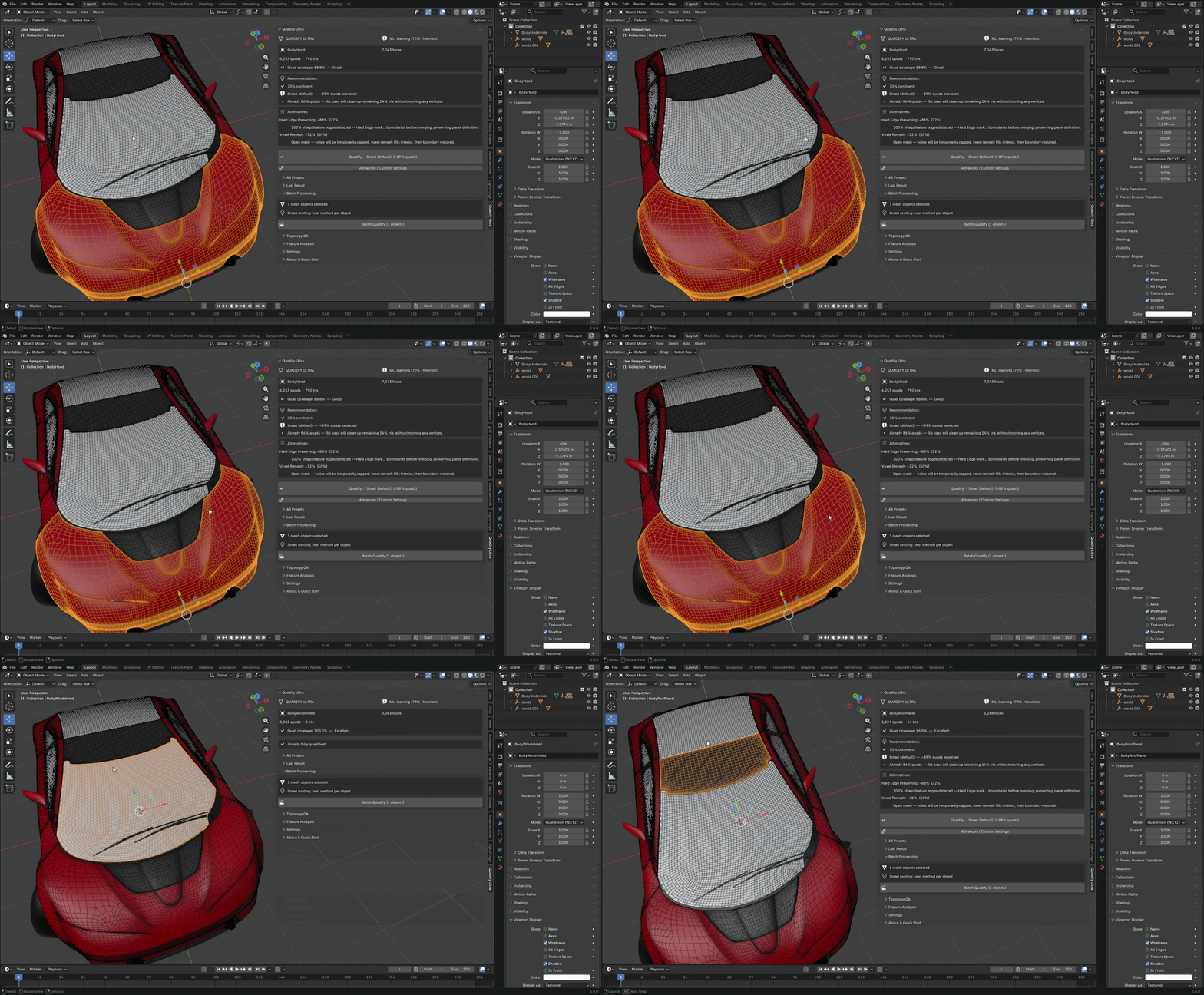
Before every operation the panel shows:
Smart (default) — ~89% quads expected
70% confident
Already 86% quads — flip pass will clean up remaining 14% tris
70% confident means 3–4 of the 5 nearest neighbours in the experience DB agree on Smart mode for this mesh type. If it says 40% confident that's a signal to look at the alternatives listed below.
The alternatives panel shows the other algorithms with their expected quad coverage so you can override if you disagree. The engine is a recommendation, not a lock.
Actual results on production meshes
These are real numbers, not cherry-picked:
Vehicle body panels:
- BodyHood: 7,043 faces → 88.8% quads, Smart, 0.9s
- BodyRoofPanel: 12,984 faces → 91.1% quads, Hard Edge, 0.9s
- BodyRoofPanel: 1,268 faces → 96.5% quads, Smart
- BodyWindshield: 92% quads, QuadriFlow + Transfer
- BodyRearWindow: 91% quads
Batch processing (3 panels selected, one click):
- 3/3 passed quality threshold
- 93.2% average quad coverage
- Each panel routed independently
Organic:
- Burger mesh: 39,190 tris → 100% quads, Voxel Remesh, 7.7s
Post-process tools
After processing the results panel gives you:
- Reduce Poles — dissolves 5+ valence vertices where it can be done without creating non-manifold geometry. Runs up to 3 passes, batched dissolve per pass
- Compare Before/After — toggles the original mesh as a wireframe overlay so you can judge topology quality directly
- Restore Original — reverts to the backup saved before the operation
- Run Full Topology QA — heatmap analysis with vertex colour overlay, exportable as HTML
The community ML model
There's an opt-in telemetry system. When enabled it sends 18 anonymous geometry ratios and the algorithm result to a shared database. No mesh geometry. No vertex positions. No filenames.
In Settings → Community ML Model → Check for Updates pulls the aggregated data from all opted-in users and merges it into your local experience DB. The KNN immediately benefits from every operation in the database.
Currently ~160+ operations from early testers. This number will grow as more people use it.
Off by default. Completely opt-in.
What it doesn't do
Being straight about limitations:
- Not a replacement for manual retopology on hero assets — if you need perfectly flow-optimised topology for a character deformation rig, do it manually. Ultra is for reducing the hours of cleanup before you get there
- Shape keys — can't be transferred through remesh operations. Bake before running Voxel Remesh or QuadriFlow
- Non-manifold geometry — run Mesh → Clean Up → Merge by Distance first on badly damaged meshes
- QuadRemesher comparison — QR replaces your entire mesh with new topology. Ultra works with your existing mesh and preserves UV seams, material boundaries, and sharp edges. Different tool for a different situation
Pricing and availability
Superhive: https://superhivemarket.com/products/quadify
$200 one-time purchase, no subscription. Blender 5.0+. MIT licensed.
The other tiers are on the same listing if Ultra is more than you need:
- Base: $10
- Premium: $20
- Pro: $50
Posting some before/after renders over the next few days. Happy to answer questions about the routing logic or algorithm selection — the topology conversation here is always worth having.
Asset credit: Car mesh © 2017 Khronos Group. CC BY 4.0 — https://creativecommons.org/licenses/by/4.0/
Replies
Also, the car mesh is provided with a CCBY license, which requires attribution when it is used. You should provide the copyright notice near any image that uses it: