(My English is not very good)…When performing hard surface normal baking, this issue often arises: strange fine ridges appear along the low-poly topology. How to fix it?
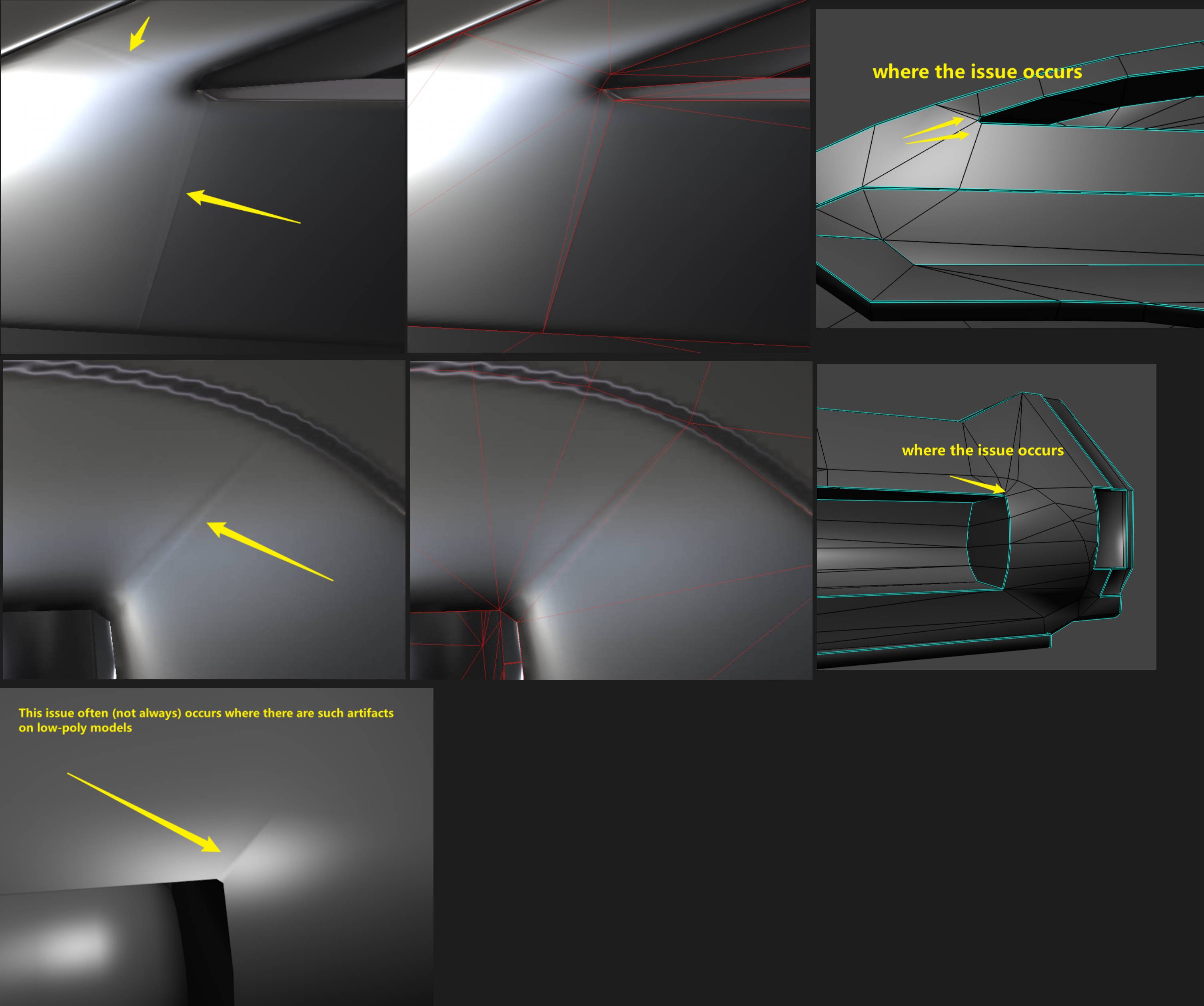
The issue with this is, too little texture space to compensate for too much shading. Basically you have very strong low poly shading going on. The normalmap tries to compensate but there aren't enough pixels (or bit depth 16bit vs 8bit) to cover it.
You have 2 options basically
Upping the texture resolution and possibly bit depth
Or
Reducing the lowpoly shading
I would opt for the latter, get rid of the long thin triangles. Use some more geo or custom normals to flatten what the normal map has to compensate
Just look at the lowpoly without any normalmap, all that strong smooth shading is what the normalmap needs to carry, help it a bit
Eric Chadwick, Thank you for your response. The cyan edges in the image represent the hard edges and UV seams. I baked the texture using Marmoset Toolbag, and the issue appears both in Marmoset Toolbag and Substance Painter. As Neox mentioned, I tried it, and it is indeed due to the texture space being too small.
The issue with this is, too little texture space to compensate for too much shading. Basically you have very strong low poly shading going on. The normalmap tries to compensate but there aren't enough pixels (or bit depth 16bit vs 8bit) to cover it.
You have 2 options basically
Upping the texture resolution and possibly bit depth
Or
Reducing the lowpoly shading
I would opt for the latter, get rid of the long thin triangles. Use some more geo or custom normals to flatten what the normal map has to compensate
Just look at the lowpoly without any normalmap, all that strong smooth shading is what the normalmap needs to carry, help it a bit
You've been a huge help. That was indeed the reason, and the issue has been resolved. Thank you so much.
Replies
What tool
are you baking with? What tool are you rendering in? What file formats are you using? What bit depth is the normal map?
You have 2 options basically
Upping the texture resolution and possibly bit depth
Or
Reducing the lowpoly shading
I would opt for the latter, get rid of the long thin triangles. Use some more geo or custom normals to flatten what the normal map has to compensate
Just look at the lowpoly without any normalmap, all that strong smooth shading is what the normalmap needs to carry, help it a bit