Simple, artist friendly version control?

grand marshal polycounter
Anybody have a recommendation for some version control software that's relatively easy to pickup and foolproof?
I only need it for local backup and revisions, no collaboration.
I have some storage space with unity collab. That might be easiest thing because its dead simple. But it's also kind of buggy and I don't really trust it. Mostly I am backing up assets, but there is some scripts as well.
Replies
Create syncronity is the cheap ass solution, just writes backups each X hours to another harddrive but no versioning
I used a cloud drive from Sync.com which has versioning when I worked by myself, that worked very well but such should not be recommended for teams. There can be sync errors but so far I got everything back, and this is automatic no annoying manual versioning, as such I would recommend that, as you have to do nothing and can bring it with you.
https://www.perforce.com/products/helix-core/free-version-control
https://www.reddit.com/r/qnap/comments/dehngo/how_to_protect_your_data_raid_is_not_a_backup/
svn is shit by comparison but it's better than git for art stuff
Tldr: just use perforce - it's free
On storage..
SSDs are expensive and AFAIK have a shorter expected lifespan than magnetic disks, as such they make very little sense for mass storage. They're fast but since any network is significantly slower than the access speed of even an ancient IDE disk you're gaining precisely fuck all in practice.
If you need mass storage invest in capacity and redundancy, not speed. Go for the raid options that duplicate data, back anything really vital up to a cloud service and save up some spare cash for data recovery in the future.
The above is not to say it's impossible to have superfast mass storage but it's not the sort of thing you buy with your own money
Once a project is complete, or inactive, it gets stored on HDD. Which for me is NAS.
SSD is automatically backed up on the NAS as well. It just works.
Our NAS also has home movies of the kids, all our photos, our bank and tax documents. All encrypted, so if someone steals the NAS they just get a brick.
Yes, takes a bit of work to learn all the options, and set it up. But ultimately very worth it. Data and memories are irreplaceable IMHO.
But yeah. Unless you actually need revision history on the files it's a waste of disk space and simple backups are sufficient.
SVN is pretty complicated and a bit too technical for artists.
You should try Clustta. It's a simple asset management and version control app for artists.
Essentially all of your project files exist in an archived '.CLST' format that you can always read through the UI without 'unzipping' the entire archive.
Another advantage is: one can make some own "branch" to test out ideas and then merge this (or parts) into the main trunk.
For binary files this is a bit more complex and usually there have to be some communication about who and when someone allowed to change what. Sometimes this will make people to wait for the work of others.
Of course this can all be done by making copies of the original directory.. But as usual someone will sometimes make some error and overwrite or delete something.. (this can also be done in a CVS.. if there are no work procedures ; especially if not "controlled" by some automatism).
NAS: a network attached storage makes it easy to make files "available" to anyone in the network (but is no VCS) and/or as the the first step for a backup strategy: direct and fast copy of the data from the working computer.. or directly working "on the NAS". If the NAS has *error correction code memory* (ECC memory) then it helps to make the data a bit saver. But it can only correct on bit of error and detect only the next wrong bit as error. For disk error detection using more and more disk own can correct and detect more and more errors.. but also more disks increases the probability of disk errors (and a failed disks will not only tell you to replace this one but also start to replace the other ones because the are at the same age).
Also:
If one wants this then the work computer should have ECC already because it make no sense to "secure" data (with a lot of disks) which might be already comprosmissed (so a more simpler NAS with maybe only two disks may be "enough" ).
The second step might be another NAS or a backup disk.. maybe connected only once a day.. and another once a week. Again: a NAS is not a full backup system/solution and does not make the data more save if the working horse is already "on it's limit" ( for example overclocked ).
Any further "advice" depends on the use case and the "knowledge level" of the advisor
It's like the decision what car, tools of the trade, kitchen tools or clothes even food to buy.. multiple individual use cases and "the best solution" might simply be not affordable.
Covers all my needs as an artist, and though it would be nice having more thorough control and recovery of the versions, I don't need them as long as I keep good file hygiene and don't need collaborate on the projects. I've looked at version control for my files in the past, and although it's tempting to have it on the cloud, I just can't shake the feeling of what would happen if there was a service outage, which unfortunately seems to become more common as we rely on monopolies for hosting.
The only other very useful thing I'd recommend is WizTree, which is free software that lets you look at your files through a hierarchy, and tells you exactly how much space which type of data is occupying, and automatically sorts folders by size/percentage of occupation. Helped me figure out what was taking up space, and also to select all of X file type at once (even if they're in different folders, without opening each folder) to delete them.
While we were building it to improve our pipeline internally, we realized it's this is also problem a handful of other Artists and Studios had so we spun it off into an open source project of its own. The Blender Studio had an interesting blog post about this a while back and we have check-ins with them every other month as we're developing it.
Clustta is open source on GitHub and there are multiple repositories for the source code to the various components:
- The Desktop/Client application - Which acts as a file manager and launcher for your projects. GitHub source
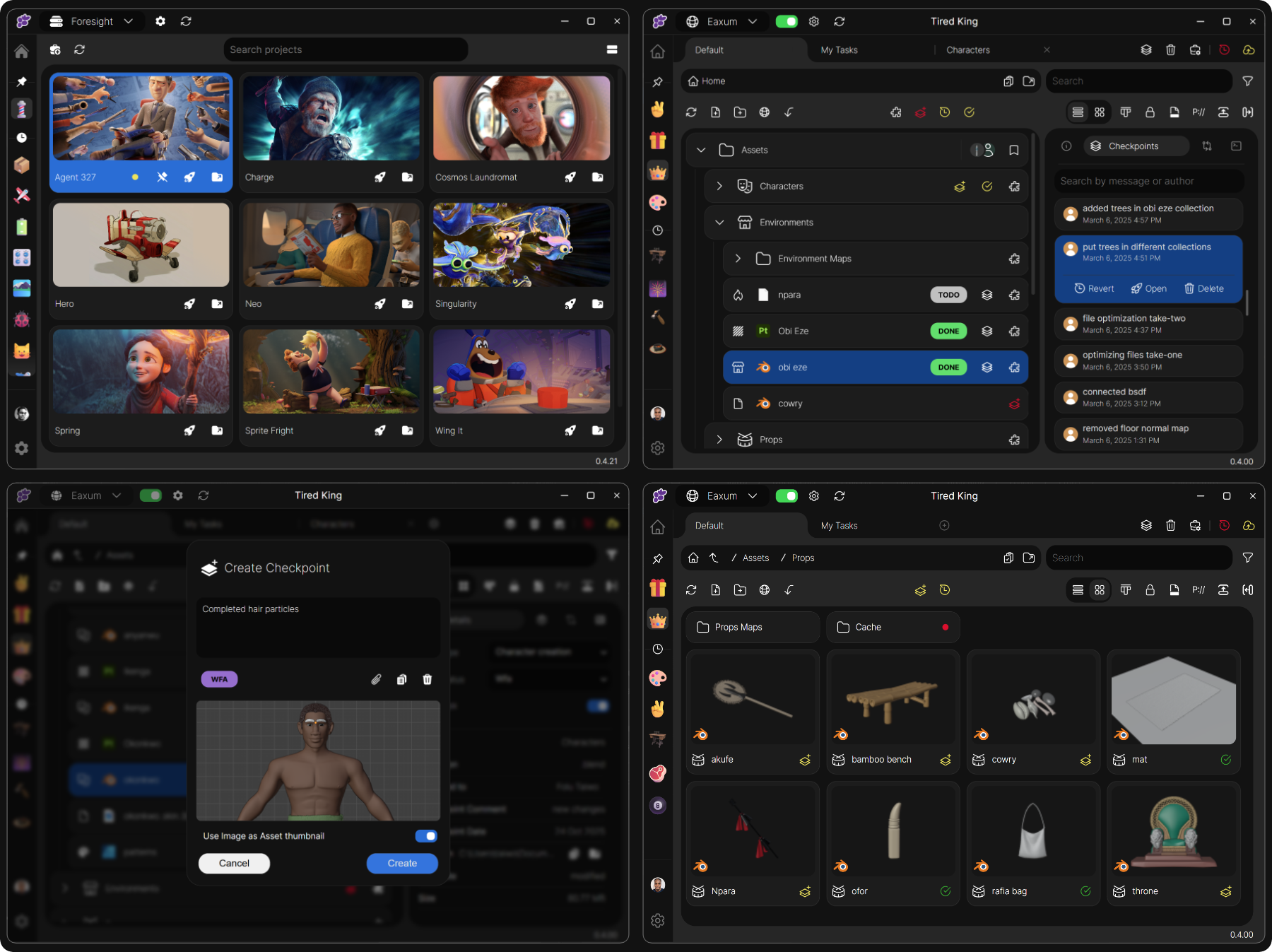
- The Studio server is essentially the central 'Repository/Depot' where collaborators sync to. GitHub source
For where the data is stored:With the client, you can work on local projects with full version history etc. and without needing to communicate with any external servers (besides authentication).
This is very likely what the OP is looking for.
We are working to release a 'Cloud' solution where individual accounts can back up their work and sync between multiple computers but presently the only way to backup/collaborate is by deploying a studio server:
This is deployed through Docker and can be self hosted on a Linux machine. We also offer a solution where we manage this for some studios.
(Don't forget to star the GitHub repos)
Locally, whether you create the project through Clustta or initiate it from an existing one, a '.clst' file is created in a location you would have specified during your initial setup.
The '.clst' archives are similar to '.svn' or '.git' folders only in this case, it's a 'portable' SQliteDB. You can set this to anywhere you want as long as it's accessible by the file system. Deleting the .clst files wont delete your project files, only the metadata and checkpoints you created along the way. If you have versioned/tracked all of your project assets in Clustta, then it's essentially compressed and stored in the '.clst' archive and you can easily backup and or import it for example whenever you switch machines/Hard drives etc.
We've just only launched Clustta out into the wild and are gradually building a community around it.
If you're interested in being a part of the community or following up, you can join our Discord, your feedback will be very helpful in shaping it's future.
Presently to support it's development, Clustta is priced on the MacOS Appstore and Microsoft store but you can get it for free via Gumroad (This just provides a redemption code to download from Apple and Microsoft stores as we do not currently distribute an executable yet.)
Happy new year!