Home Technical Talk
The BRAWL² Tournament Challenge has been announced!

It starts May 12, and ends Oct 17. Let's see what you got!

https://polycount.com/discussion/237047/the-brawl²-tournament

How do I do a realistic Eye?

manilamerc
polycounter lvl 6
Offline / Send Message
manilamerc polycounter lvl 6
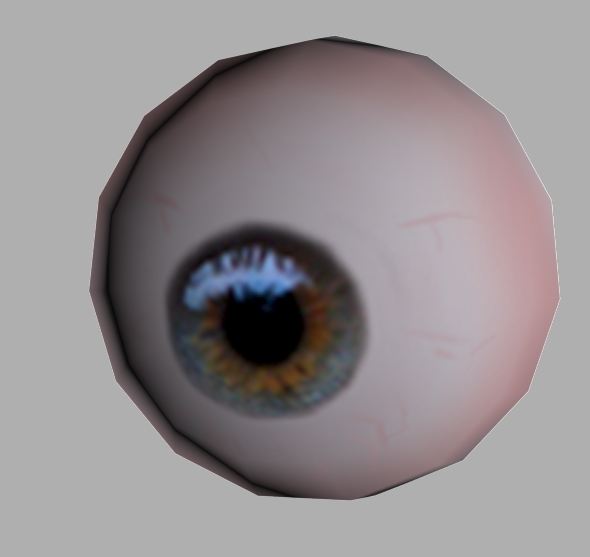
Hey guys I'm a noob at doing eyes and my school didn't really teach me about doing eyes. the way I did them were quite noobish. I modelled it just by adding a sphere

eye1.JPG

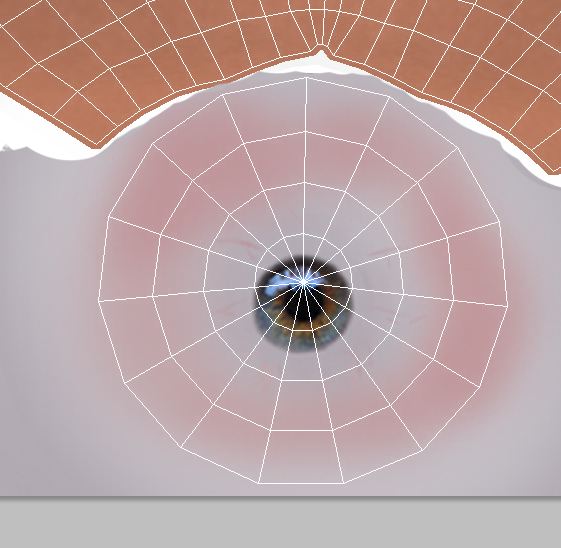
then I textured it here's my uv layout
eye2.JPG

eye3.JPG


and now my character looks weird

eyes4.JPG


Can someone tell me how to do proper eyes?

Replies

  • 16bit
    Offline / Send Message
    16bit polycounter lvl 15
    Ben Mathis has an article over next gen eyes.
    http://www.poopinmymouth.com/process/eyes/ng_eyes.htm

    Eyes are not so hard to model. Most people do the same thing you did. But now technology has advanced and a lot of times people model in the iris as well as the cornea.
  • glynnsmith
    Offline / Send Message
    glynnsmith polycounter lvl 19
    There are a few very good threads on the forums if you do a search, too.
  • LoTekK
    Offline / Send Message
    LoTekK polycounter lvl 19
    It would also probably help if you actually centered the pupil+iris...
  • ZacD
    Offline / Send Message
    ZacD quad damage
    This thread also talks a bit more about Ben's eye tutorial.

    http://www.polycount.com/forum/showthread.php?t=97962
  • MeintevdS
    Offline / Send Message
    MeintevdS keyframe
    To be honest the eyes are not the ones making your character look weird at the moment. You have some really weird shading going on, especially on the nose and ears. Normal map issue perhaps?
  • manilamerc
    Offline / Send Message
    manilamerc polycounter lvl 6
    MeintevdS wrote: »
    To be honest the eyes are not the ones making your character look weird at the moment. You have some really weird shading going on, especially on the nose and ears. Normal map issue perhaps?

    well I'm using the 3ds max viewport so it tends to show up like this, but when I put lights on and render it the weird shading goes away
  • Gestalt
    Offline / Send Message
    Gestalt polycounter lvl 11
    Right now you have specular highlights in the diffuse map (your diffuse map should not have directional lighting info) and you are only using diffuse shading.

    Find a good reference of an eye and try to mimic the specularity and the shading in your material setup. Keep in mind that not only are eyes somewhat reflective, but they also have subsurface scattering. In order to integrate the eye into the head (so it looks like it's in the socket and part of the head) you need to account for the ambient occlusion. I believe ways of doing that are described in the link above.

    Before any of that though you need to figure out why you're getting that weird shading...
  • manilamerc
    Offline / Send Message
    manilamerc polycounter lvl 6
    Gestalt wrote: »
    Right now you have specular highlights in the diffuse map (your diffuse map should not have directional lighting info) and you are only using diffuse shading.

    Find a good reference of an eye and try to mimic the specularity and the shading in your material setup. Keep in mind that not only are eyes somewhat reflective, but they also have subsurface scattering. In order to integrate the eye into the head (so it looks like it's in the socket and part of the head) you need to account for the ambient occlusion. I believe ways of doing that are described in the link above.

    Before any of that though you need to figure out why you're getting that weird shading...

    as I have said above, the 3dsmax viewport show up like this. But when I put lights to render it the weird shading disappears
  • Ghostscape
    Offline / Send Message
    Ghostscape polycounter lvl 18
    manilamerc wrote: »
    as I have said above, the 3dsmax viewport show up like this. But when I put lights to render it the weird shading disappears

    That's nice, but your EYE TEXTURE has specular baked into the diffuse map. No rendering feature in Max is going to change the texture you showed us.

    the nasty lighting is probably Max using the 2 point default light setup, which sucks a cubic fuckweight of dicks.
  • dirigible
    Offline / Send Message
    dirigible polycounter lvl 8
    Ghostscape wrote: »
    Max using the 2 point default light setup, which sucks a cubic fuckweight of dicks.

    And that's my phrase of the day.
Sign In or Register to comment.