Home Adobe Substance

How do people get so much resolution in their textures on low poly models?

SeanWink
polycounter lvl 8
Offline / Send Message
SeanWink polycounter lvl 8
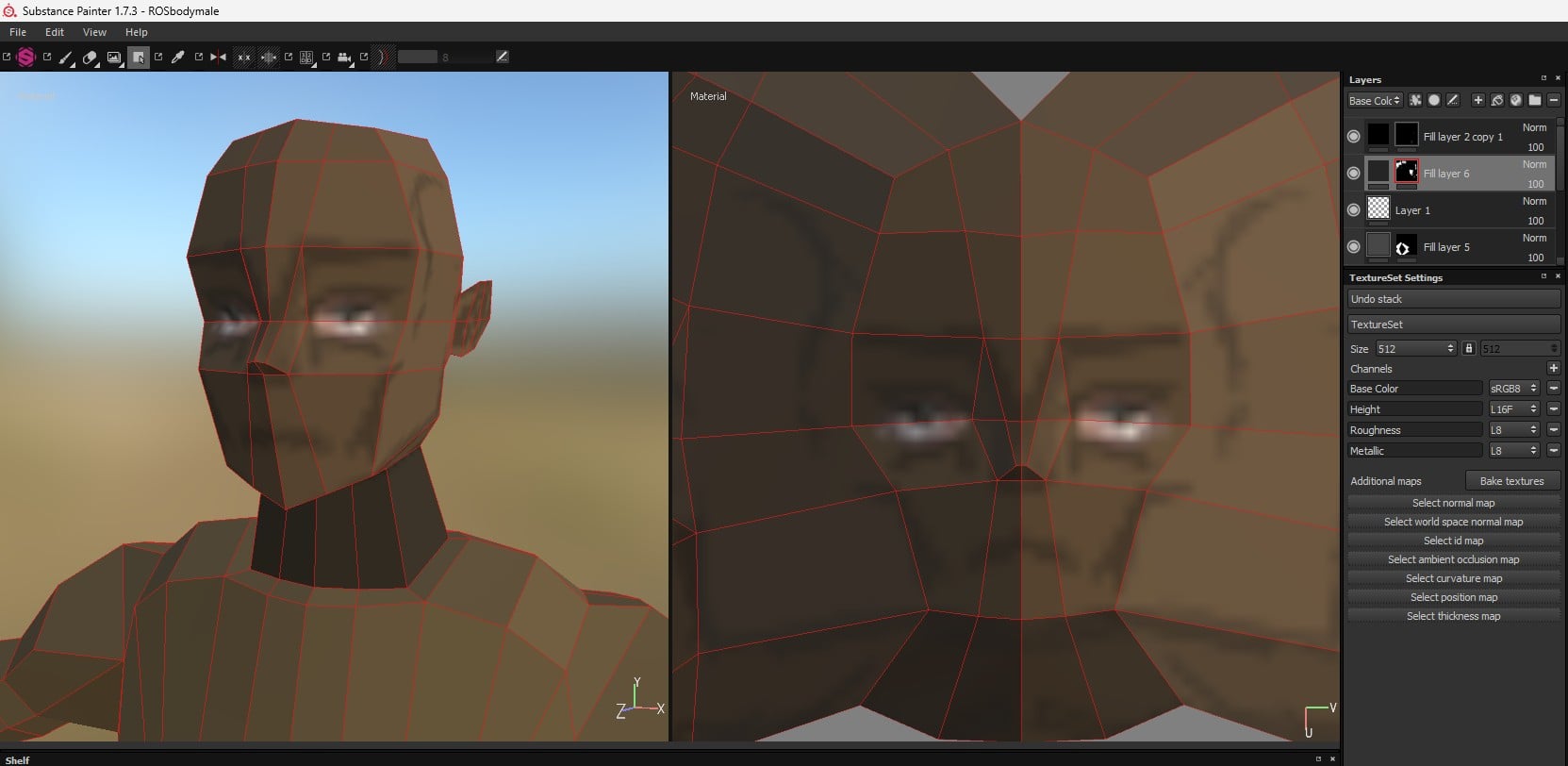
How do people get so much resolution in their textures on low poly models? I get really low resolution on my faces for 512x512 textures but I see people get really good faces when they have low poly.
Mine:

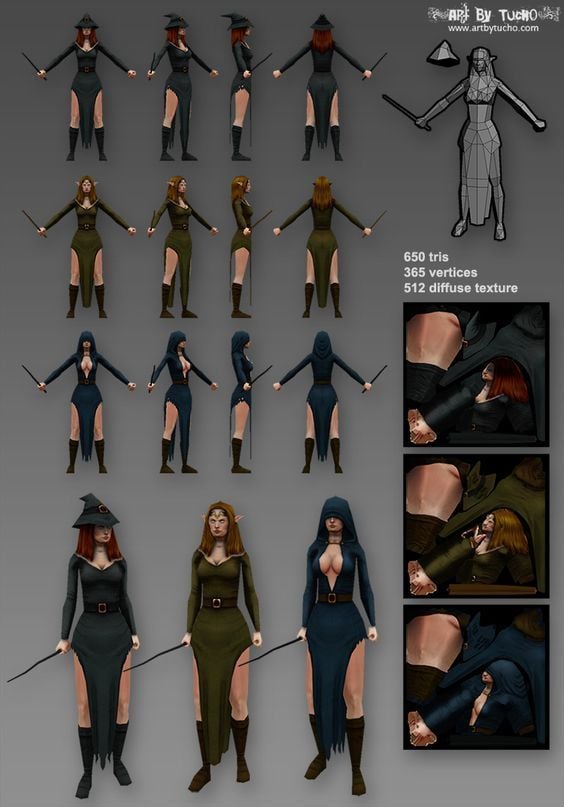
What I'm trying to achieve:
this is a 512x512
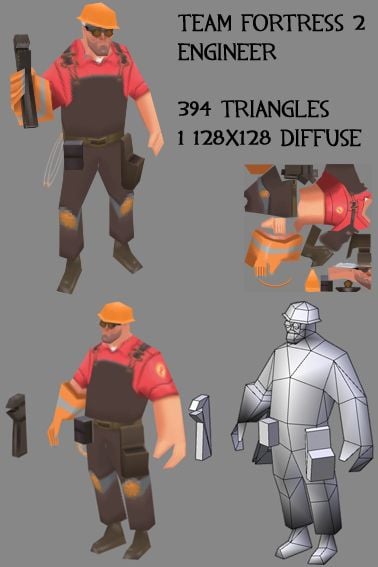
this is a 128x128
Replies

  • Eric Chadwick
    They reuse UVs a lot.

    Only 1/2 the face is textured, the other 1/2 is mirrored in UV space to use the same 1/2 texture. Same with any symmetrical body parts... only one arm is mapped, only one leg, etc.

    The helmet UVs are even more optimized... only a small section of the helmet is textured, and all the rest of the helmet is stacked in the same UV space.
  • Eric Chadwick
    We used to have a bunch of SDKs (skin development kits), UV'd lowpoly meshes that artists shared for fun on this forum, that anyone could try re-texturing themselves. Great learning material about how people organize optimized UVs!

    We have several threads for these, like https://polycount.com/discussion/70908/sdk-master-thread/p1
    Unfortunately though, bitrot has set in, and most of the links are now dead. :(
  • SeanWink
    Offline / Send Message
    SeanWink polycounter lvl 8
    I don't understand what you mean by "re-use UVs"?
  • Eric Chadwick
    The artist will create only one section of the helmet. Then make UVs for it. Then duplicate those UV'd triangles to make the whole helmet. The duplicated sections of the helmet all use the same initial UV space. So then when you paint the single helmet-section of texture, it shows across the whole helmet. 

    You can try this with a lowpoly sphere. Delete all but one section. UV it. Then duplicate and rotate that section, welding all those edge vertices together, to complete the sphere.
  • Eric Chadwick
    Here's an example, I highlighted the reused UVs in red, and the UV seams are pink.


    The reused UVs are offset in UV space 1 whole unit, which is purely optional. This way they reused bits are easier to see in a UV editor, but because the texture is tiled, they end up getting the same texture anyway!

    https://ericchadwick.com/3d.html#cowgirl
  • Eric Chadwick
    Here, I recorded a step-by-step of how to reuse UVs, and how it looks when you use a 3D paint system to paint textures with reused UVs. 
    https://www.youtube.com/watch?v=NR29yIW4iPc

  • Eric Chadwick
    So, did that help at all? Curious if you have any questions.

    It's a really cool technique, and there are some additional tricks I've seen people use that are really nice, like what I call 3/4 mirroring. Where you mirror the UVs of a face, but not down the midline. This lets you have different eyes or a diagonal scar, but the sides of the face are still reusing UVs. This shows how reused UVs don't have to be perfect midline mirrors.

    A couple neat examples from @BoBo_the_seal


  • pior
    Offline / Send Message
    pior grand marshal polycounter
    Hello,

    Adding to the great info above : in its current state your head texture is already higher res than the one seen in the lowpoly TF2 Engineer demake. Therefore besides technical tricks like miroring or reusing UVs, you also need to practice painting textures at the pixel level, handling them in a impressionist manner. And this comes from practising actual painting (either traditionally or digitally).


  • Noren
    Offline / Send Message
    Noren interpolator
    I don't have Substance installed right now and don't remember, but can you turn off texture filtering in the viewport?

    SeanWink: In addition to the great info you already got, turning off texture filtering can help you see what you are doing a bit better at lower resolutions and provides a crisper render as well. It's not 100% clear what's going on because of compression artifacts, but compare your engineer example with the presentation by Bobo. Obviously there's a huge difference in resolution, but filtering can make a big difference as well.

    If Substance Painter can't do that, then 3d-Coat or its slimmed down Textura variant is a pretty good option for texture painting these days.

  • gnoop
    Offline / Send Message
    gnoop sublime tool
    There are few more thing  that matter . Substance Painter  as any of modern  3d mesh painting soft does  slightly more blurry textures because they don't  work in integer  texture space math.  Even if you work in twice of target resolution initially .    People  used special  one pixel brushes and pixel art  style to do textures ones.    I recall a user here who showed amazing  pixel-art styled tiny normal maps for mobile project sized like 32x32 pix .  So using 2d software could sometimes let you make same detailing  impression  with twice smaller texture space. 

    Also as  I recall we used a lot of  texel size varying  , priority  . Higher res faces  and  outside palm surface . smaller space for inner palm and inner pants space. A blade  that just 3-4   pixels stretched  .   Modern texture soft is  restricting you to do so mostly.    
      We also used  limited pallet in textures  and many things often needed just 16  shades of color.    Those were tiny on vram memory but now completely replaced by dx compression and not supported by video cards.    That  sometimes  surprises  me nowadays  since modern diffuse/albwdo and roughnes  textures often looks like needing just a tiny number of colors .     Our software guys say  compression is still more efficient  but I am still surprised of that. 
       
  • Eric Chadwick
    gnoop said:
    I recall a user here who showed amazing  pixel-art styled tiny normal maps for mobile project sized like 32x32 pix.

    https://polycount.com/discussion/231437/handpainting-normal-maps-pixel-by-pixel-100-photoshop-0-highpoly


Sign In or Register to comment.