Search
-
Seams are showing up between modular pieces using an atlas texture I made in substance painter

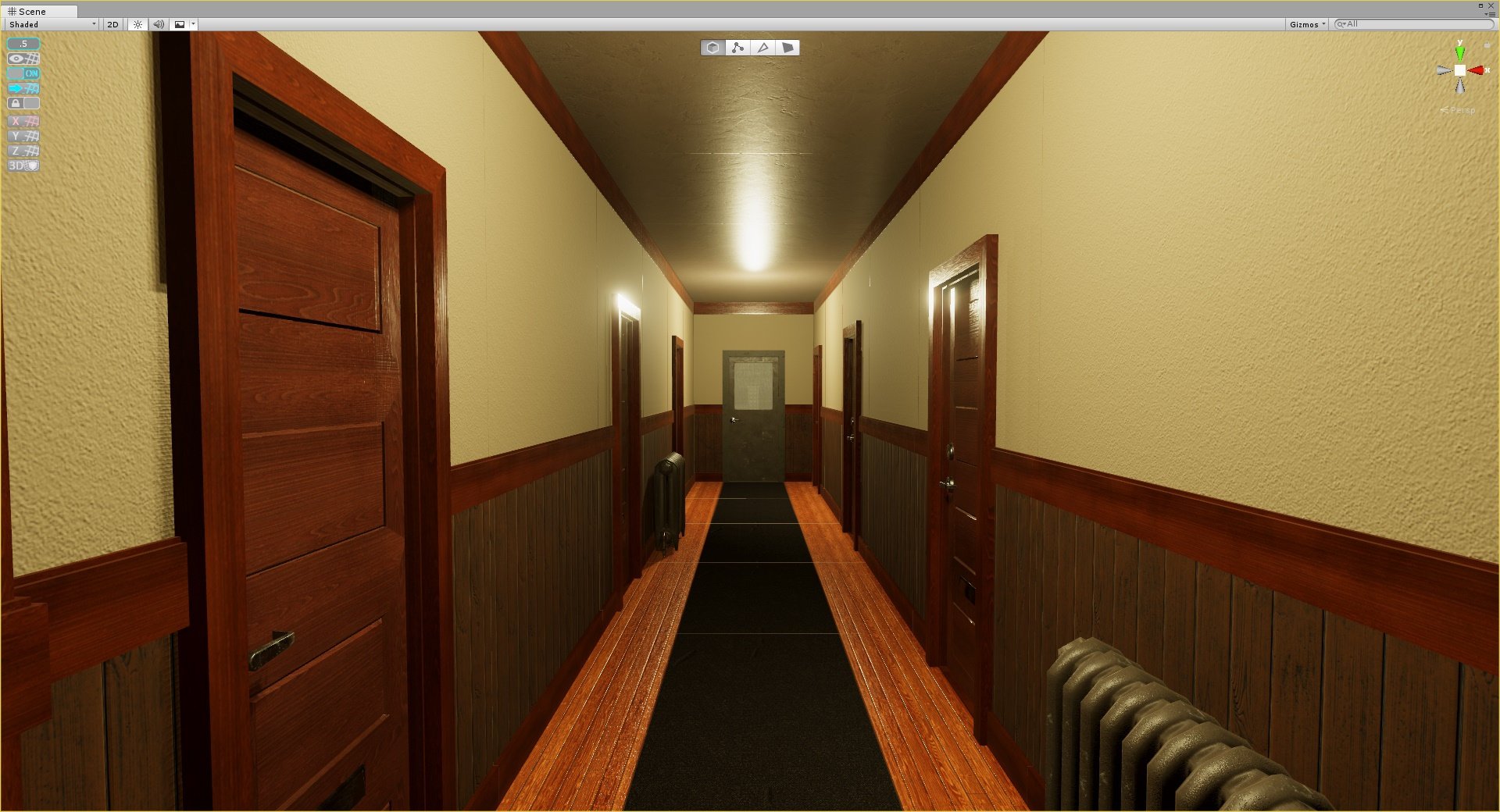 Hi, I've been trying out substances new plugin for unity 2018.1 with livelink and I've been having a small issue with the textures to a modular apartment hall set I've been working on where these seams would appear between the pieces as you can see below. I was using a plane mesh for the atlas and mapped the uvs for the…
 -
Re: Seams are showing up between modular pieces using an atlas texture I made in substance painter
Yea I have already tried using designer following this method with the atlast maker node from Wes McDermott. That just led me to the same issue with seams even with the uvs snapped to the exact pixel of each atlas element even with edge padding.I've concluded for myself that using an atlas for connected repeating modular… -
Re: Seams are showing up between modular pieces using an atlas texture I made in substance painter
 This is one of the reasons I hate using atlases and prefer to use tiling textures and trim sheets. you have way more control over individual materials and can quickly push material definition a lot easier, and you can make a larger variety of modular pices and kits with only a few tiling materials. Atlases really limit how…
 -
Re: Seams are showing up between modular pieces using an atlas texture I made in substance painter
Could you help me understand how trim sheets are different from atlases? I've been doing some searching but they seem like pretty much the same thing.. -
Re: Seams are showing up between modular pieces using an atlas texture I made in substance painter
 I've spent this much time trying to figure out what's going wrong, I'd like to just know what's going wrong at this point. It doesn't seem to be an issue with the mip mapping, as the textures appear to be mipping just fine. I even improved the padding between elements instead of blank space between with no change.
 -
Re: Seams are showing up between modular pieces using an atlas texture I made in substance painter
 That big black cross is the problem - google up how mip-mapping works and you'll see why. I'd be inclined to look into alternative ways to split your materials up, atlasing like this doesn't make a lot of sense to me unless you're severely limited on draw calls (which i assume you're not because its 2018 and that's a…
 -
Re: Seams are showing up between modular pieces using an atlas texture I made in substance painter
 Yeah you really need some padding between the different elements, butting them up right next to each other is going to cause bleed problems when mipping or simply at lower texture quality settings.
 -
Re: Seams are showing up between modular pieces using an atlas texture I made in substance painter
It looks like mipping to me. There's not a lot you can do except pull your UVs in a bit or try not to put wildly different colours next to each other on the atlas -
Re: Seams are showing up between modular pieces using an atlas texture I made in substance painter
 Okay so I've added some space between atlas elements but those seams in the distance unfortunately won't fade no matter what I do :disappointed: and it's definitely something with the atlas as they don't appear if the meshes don't have the textures applied.
 -
Re: Seams are showing up between modular pieces using an atlas texture I made in substance painter
Exactly. Engines Mip in powers of 2, so try tI have your atlas divided more evenly. Ie, have every side of every atlas element a power of 2, so 64, 128, 256, 512, etc. I wouldn't reccomend atlasing in thirds like you seem to be doing.
16 results